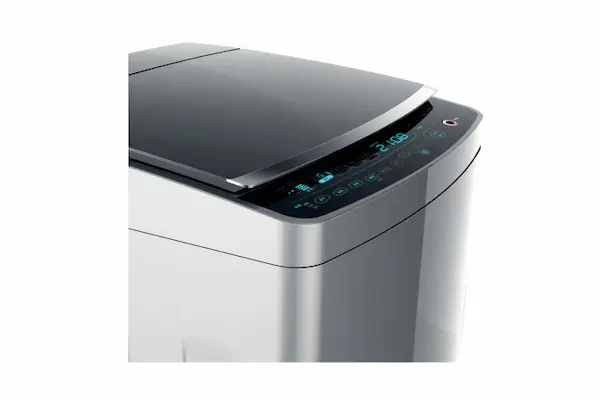
A dead front capacitive touch panel needs two separate acceptance targets: how well its icons blend into the background when unlit, and how clearly they can be read when illuminated. Approve both on the same assembled sample under defined viewing conditions—not from differently exposed photographs. Verify touch behavior separately from appearance.
Dead-front printing is intended to conceal selected graphics until illuminated, as The referenced supplier’s printing overview explains. “Hidden” should describe an agreed observation condition, not a promise of invisibility everywhere.
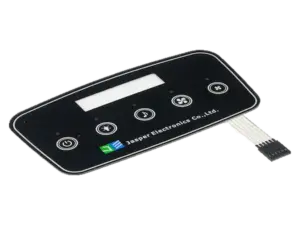
Also distinguish the sourcing scope: custom capacitive touch panels involve more than graphic overlays. A printed cover alone is not a functioning touch assembly; The referenced supplier’s construction guide illustrates distinct overlay and sensing-circuit layers.
Define the Off-State and On-State Appearance
Specify concealment and readability independently, then require the same construction to satisfy both. “Black when off” leaves unanswered whether a faint outline, color difference, or change in gloss is acceptable.
Here, off-state means the icon’s illumination is off. The host, touch controller, neighboring LEDs, or display may still be running. Test that condition separately from a completely unpowered product.
Agree whether an unlit legend must be unrecognizable or may remain faintly detectable within an approved limit sample. Define observation distance, angles, and inspection duration alongside that decision. For the on-state, assess complete symbol recognition rather than brightness alone.
Use this illustrative acceptance worksheet after assigning condition IDs. Fill the criteria with project-specific limits or approved reference samples; blank results are for actual inspection, not implied passes.
| State and feature | Controlled comparison | Acceptance criterion to agree | Actual result |
|---|---|---|---|
| Off: residual icon visibility | All icon lights off; specified ambient and viewing position | Maximum recognizable outline, color, or gloss difference against a limit sample | |
| Off: unintended illumination | Adjacent icons or display operating | Permitted light leakage into an inactive symbol | |
| On: readability | Intended brightness preset under its operating ambient | Complete recognition of specified strokes and symbols | |
| On: uniformity and color | Same source, drive, and stabilization procedure | Accepted hotspots, dark strokes, and color variation against references | |
| On: edge definition | Individual and permitted simultaneous icons lit | Permitted halos, pinholes, and illumination outside boundaries | |
| On: low-light comfort | Intended dim-room configuration | Accepted glare and readability from the user position |
Keep approved and rejected limit samples identifiable. A visually attractive prototype is not an acceptance boundary unless reviewers agree what makes another sample unacceptable.
Coordinate Ink Stack and Optical Transmission
Approve the complete optical stack, not an isolated ink color or transmission number. the referenced supplier identifies ink density, color, substrate, and lighting as interacting variables and describes diffusion for reducing hotspots in its dead-front printing guidance.
On the construction drawing, identify the cover tint and finish, transmissive icon region, surrounding light-blocking print, and any diffuser or light-isolation features. These are functional descriptions, not a prescribed layer sequence.
Specify whether the illuminated color comes from the LED, translucent printing, or their combination. The referenced supplier describes both colored-light and translucent-color approaches; compare the chosen combination in its unlit state too.
For deadfront touch panel graphics, draw the intended light path to each symbol and identify where light must be blocked from neighboring regions. Compare individual-on and adjacent-off conditions: an all-on view alone cannot establish whether optical isolation works. Evaluate diffusion and source spacing against both stroke uniformity and edge spill.
At unchanged illumination, reducing transmission through the icon region leaves less light available for the on-state. Therefore, do not accept “make it darker” as a complete correction: compare concealment and readability together. Ask whether the visible off-state defect is an icon outline, a color mismatch, a gloss difference, or a view of components behind the print. Investigate that specific symptom rather than changing every variable at once.
Request transmission information for the finished printed construction at the relevant light-source wavelengths, not only the bare film. Record substrate grade, tint, finish, ink sequence and deposit specification, adhesive, diffuser, backing, source identification, and drive configuration.
For prototype comparisons, change one documented variable where practical and keep the enclosure, source, and drive identical. Include the actual internal backing; do not approve a loose overlay against black paper and assume the installed assembly will match.
The optical solution must also remain compatible with sensing. Review the nonconductive overlay materials and unwanted air gaps as part of the sensing stack. Identify specialty inks and stack changes for electrical review instead of treating optical approval as touch approval.
Align Hidden Icons with Touch Targets
Map the graphic, the validated touch area, and the permitted host action as separate items. A hidden capacitive button’s decorative icon need not share the electrode geometry; validate the actual sensing area separately.
Use a shared drawing datum to locate icon boundaries, illumination openings, and sensing electrodes. Add assembly registration limits and the tested active region; an electrode outline alone is not evidence of the final touch boundary.
The following is an illustrative fixed-key interaction map, not a safety-control design. Position labels refer to locations that must be dimensioned on the project drawing.
| Graphic and position reference | Touch target | Host state | Visible state | Required behavior |
|---|---|---|---|---|
| Menu icon at P-MENU | K-MENU | Sleep | Hidden | Ignore menu commands |
| Menu icon at P-MENU | K-MENU | Ready | Illuminated | One menu event after a valid press-and-release sequence |
| Adjustment icon at P-ADJ | K-ADJ | Function unavailable | Hidden | Ignore adjustment commands |
| Permanent wake mark at P-WAKE | K-WAKE | Sleep | Identifiable under specified conditions | Wake only; require release before a subsequent command |
| Status symbol at P-STATUS | None | Status active | Illuminated | Indication only; no touch action |
Define startup and transitions too: holding a finger during wake must not silently become a second command. Test centers, boundaries, neighboring keys, and spaces between targets. Log controller press/release reports, host-accepted events, and commanded and observed illumination states against the same timeline.
Repeat illumination transitions with no finger present. Nearby LED circuits and changes in LED pin state can disturb sensing; investigate any events rather than assuming a lighting change is electrically irrelevant.
Assign approvals explicitly: the cover/print supplier owns the agreed optical construction; the sensor designer owns geometry; controller and firmware owners verify detection and event handling; the LED/display owner verifies illumination; the host owner defines permitted actions. Confirm the contracted boundaries rather than assuming one supplier provides everything.
For broader assembly planning, use the custom capacitive touch panel design guide. A PCAP coordinate interface additionally needs coordinate, edge, and multitouch validation; this fixed-key map does not replace those tests.
Specify Viewing and Lighting Conditions
Define the environment in which each appearance claim must hold. Use conditions drawn from the installation: the normal task position, relevant oblique views, bright directional reflections, and dim operation where applicable.
For every condition ID, record ambient illuminance at the panel, light-source identification and direction, viewing distance, horizontal and vertical angles measured from the panel normal, installed tilt, and neighboring display or indicator states. Include the sample’s operating temperature and stabilization procedure where relevant.
Do not reduce the setup to an illuminance reading alone. Preserve the source arrangement and observation geometry so reviewers can recreate the comparison. Keep ambient lighting unchanged between an off/on pair; use separate labeled pairs for different environments.
Record the observer, recognition task, and result. Where numerical contrast, luminance, or color limits are required, agree the instrument, measurement geometry, calculation, and acceptance threshold before testing. Use calibrated measurements for those claims rather than assigning a luminance value from ordinary image pixels.
Approve Samples without Camera-Exposure Bias
Lock capture and processing settings across each off/on comparison. Treat photographs as reproducible evidence alongside physical-sample inspection, not as independent proof of absolute visibility or brightness.
Use this capture checklist:
- Identify the assembly. Record sample ID, artwork and stack revisions, enclosure, source, drive/dimming state, and condition ID. Photograph the same physical sample in both states without repositioning it.
- Fix the geometry. Use a stable camera mount. Keep lens, focal length, focus, distance, angle, and framing unchanged. Include a setup photograph that shows the lighting arrangement.
- Lock actual exposure. Fix aperture, shutter speed and ISO; disable Auto ISO. In the Z 7/Z 6 example, manual mode can retain automatic sensitivity adjustment, so confirm that ISO is actually fixed.
- Lock rendering. Use the same white balance and processing profile. Disable HDR and automatic scene-dependent shadow or contrast adjustments. HDR can combine frames with different exposures, changing the comparison. Retain original files and process comparison images identically.
- Check usable detail. Avoid clipped illuminated strokes and crushed off-state detail. If one exposure cannot document both, capture the same predefined exposure bracket for both states and compare matching exposures. Do not select a darker off-state image and a brighter on-state image as one pair.
- Capture the state matrix. Include all-off, individual-on, adjacent-on, and permitted combinations at their specified drive settings. Preserve original metadata and label each pair with its settings and condition ID. Repeat the complete pair whenever the viewing setup changes.
Check unexpected bands before blaming the print. An electronic shutter can produce banding under intermittent lighting. Investigate capture timing as well as the actual light source; do not change the production drive simply to improve the photograph. After changing camera settings, retake both states with the same settings.
Finally, sign off the assembled reference sample, limit samples, completed acceptance matrix, and configuration record together. Keep the actual touch-event review attached. Optical acceptance does not demonstrate correct commands, and a touch log does not demonstrate concealed graphics.
Frequently Asked Questions
Agree the following purchasing and interaction details before freezing the artwork and sample plan.
Can a black color reference define dead-front acceptance?
Not by itself. Use it to identify the intended background color, then approve the actual printed stack in both illumination states. Include surface finish, observation conditions, and an agreed limit sample for residual icon visibility.
What transmission percentage should an RFQ specify?
Do not choose a percentage without the light source and stack definition. Request transmission data for the proposed printed construction and relevant wavelengths, then establish an acceptable range through application-specific off-state and on-state samples.
Should every icon be checked at every brightness setting?
Include each intended brightness preset and permitted icon combination in the review matrix. Pair them with the ambient conditions in which they will actually operate, including dimmed operation where the product allows it.
Can a hidden key wake the product?
Only with a clear way for users to discover the wake action and an explicitly defined interaction. A proposed approach is a permanently marked wake area that remains identifiable under the specified conditions and wakes the interface without executing a command, followed by release before another action.
Can phone photographs be used for remote approval?
Use them as comparison evidence only when exposure, white balance, processing, and geometry can be held consistent and documented. Do not replace the agreed physical-sample review with photographs whose automatic adjustments cannot be controlled.
Which changes should trigger another sample review?
Review changes to the cover, tint, finish, ink deposit, adhesive, diffuser, backing, light source, drive configuration, or mechanical spacing. Identify the affected optical and touch checks rather than assuming that unchanged artwork means unchanged appearance.
What should happen if illumination fails but touch detection continues?
Define this in the host-state specification. Do not allow an unexpectedly invisible command area to operate without a clear interaction policy. Decide how availability is communicated, whether commands are inhibited, and how recovery is verified; do not assume illumination-failure detection is already provided.
Submit Your Hidden-Icon Artwork for Review
Start with an artwork-and-configuration package that makes both appearance states reviewable. Use Review My Hidden-Icon Artwork to submit the layered graphics, cover/enclosure drawing, proposed optical stack, light-source and drive details, touch/controller responsibilities, icon-to-host-state map, observation conditions, and prototype and production quantities. Include existing sample photographs with their capture settings and identify the unresolved concealment or readability issue.
Ready to Start Your Project?
Tell us about your membrane switch, keypad, or graphic overlay requirements. Our engineering team will review your specifications and provide a detailed quote.