
PRODUCT KNOWLEDGE
What Is a Silicone Rubber Keypad?
A silicone rubber keypad is a molded elastomer component that gives an electronic product its physical buttons. Its flexible key webs allow the buttons to move and return; conductive contacts or separate switches underneath convert each press into an electrical input. The rubber provides the interface, not the control logic.
Read the guide ↓
In this guide
- A molded interface between the user and the circuit
- What parts make up a silicone keypad?
- How does pressing a key create a signal?
- Four product routes and when to use them
- What determines key feel?
- Legends, coatings, and backlighting
- How does it compare with other interfaces?
- Where are silicone rubber keypads used?
- How are silicone rubber keypads manufactured?
- Which checks and standards matter?
- What should be specified before requesting a quote?
- Choose the construction before finalizing the artwork
- Frequently asked questions
A molded interface between the user and the circuit
A silicone rubber keypad is a molded elastomer component that gives an electronic product its physical buttons. Its flexible key webs allow the buttons to move and return; conductive contacts or separate switches underneath convert each press into an electrical input. The rubber provides the interface, not the control logic.
The material, shape, and switching circuit perform different jobs. Ordinary silicone rubber forms the insulating, flexible body. A conductive insert can close a circuit, while a nonconductive actuator can press a metal dome or another switch. A soft rubber button is therefore not necessarily the electrical switch itself.
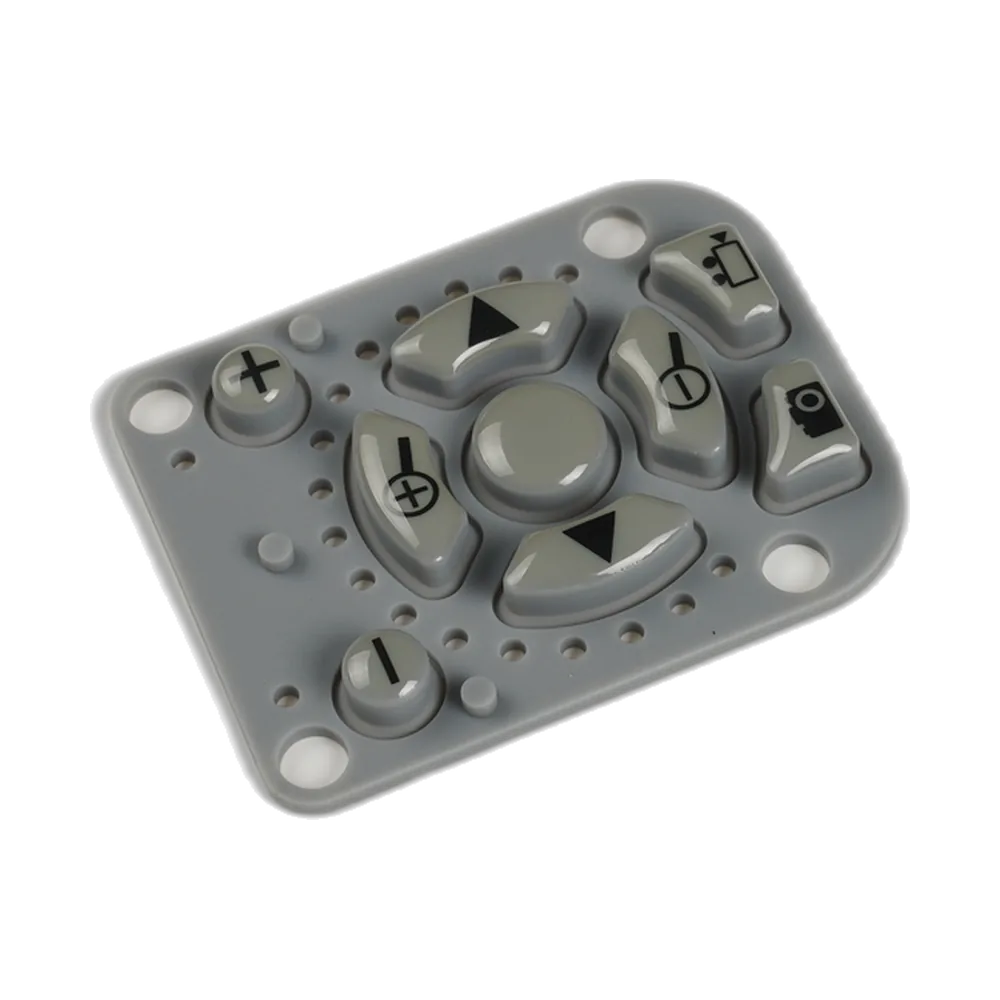
This distinction matters when ordering parts. A molded keymat, a set of individual keycaps, and a complete keypad assembly are different deliverables. A keymat may include the buttons, connecting base, locating features, and conductive pills but no printed circuit board (PCB). An assembly may also include that PCB, illumination, a support plate, and an interconnect.
Use this guide to understand the technology and choose the appropriate product route. The silicone rubber keypad family includes conductive, backlit, laser-etched, and assembled options. These descriptions can overlap: one keypad can use conductive contacts, illuminated legends, and a supplied circuit board at the same time.
What parts make up a silicone keypad?
A silicone keypad combines a molded mechanical part with a compatible switching surface. The enclosure and circuit support complete the working stack, even when they are purchased separately.
| Part | Main function | What to establish |
|---|---|---|
| Key top | Receives the finger or gloved press | Shape, area, spacing, symbols, and access |
| Flexible web | Controls movement, tactile response, and return | Geometry, material, force curve, and available travel |
| Silicone base | Joins keys and provides locating or sealing features | Thickness, mounting position, and enclosure fit |
| Contact or actuator | Transfers the press to an electrical switching point | Conductive pill, metal-dome actuator, or separate switch interface |
| Circuit | Routes the electrical input | PCB, flexible printed circuit (FPC), or printed membrane circuit |
| Support and enclosure | Maintain spacing and constrain movement | Backing stiffness, clearance, retention, and hard stops |
The web is the thin, flexible region surrounding a moving key. It is not interchangeable with the thicker base or key top. Changing the web can alter feel without changing the visible button shape, while changing the enclosure clearance can make an otherwise acceptable key rub or stick.
A carbon pill is a small conductive contact on the underside of a key. It bridges separated circuit contacts when pressed. The surrounding silicone normally remains insulating. Treating the whole rubber body as conductive leads to the wrong electrical assumptions and the wrong drawing requirements.
How does pressing a key create a signal?
A conductive silicone key creates a signal by moving its contact onto two separated circuit electrodes. The circuit detects the resulting change from an open path to a conductive path.
First, the operator applies force to the key top. The web deforms, and a snap-action web may pass through a force peak before continuing toward the contact surface. Next, the pill touches the circuit pads. Additional controlled movement establishes contact pressure without crushing the web or forcing the circuit board to bend excessively.
On release, the elastic web returns the key toward its resting position and separates the contact from the pads. The electronics must recognize both the press and the release. A button that feels normal but remains electrically closed is not an acceptable switch.
The mechanical click and electrical closure are separate events. Check both. Their positions should be checked together, especially where a light touch, a gloved hand, or an off-center press is expected. A very clear tactile snap does not by itself prove reliable contact.
In a different construction, a nonconductive rubber plunger presses a metal dome or a discrete tactile switch. That underlying component performs the electrical switching, and sometimes most of the tactile action. Software debounce then handles short transitions in the input signal; it cannot repair poor alignment, a contaminated contact, or a key that fails to return.
Four product routes and when to use them
Silicone keypads can be selected by contact method, lighting requirement, legend process, or integration level. The four routes below answer different purchasing questions rather than forming four mutually exclusive materials.
| Route | Defining feature | Useful when | Main coordination task |
|---|---|---|---|
| Conductive | Conductive contacts bridge circuit pads | The rubber key is part of the electrical switch | Contact geometry, pad finish, resistance, and circuit support |
| Backlit | Light reaches legends or selected key areas | Controls must remain identifiable in low light | LED position, diffusion, light blocking, and viewing conditions |
| Laser-etched | A coating is selectively removed to form legends | Detailed illuminated symbols are required | Coating stack, exposed area, contrast, and registration |
| Keypad assembly | Rubber, circuit, and related parts are supplied together | Mechanical and electrical integration should be coordinated | Scope of supply, connections, mounting, and functional acceptance |
Conductive rubber keypads require a defined contact system, not just black circles on the drawing. The pill and its mating pads must remain aligned throughout the allowed key movement.
Backlit silicone rubber keypads use a light-transmitting path and a light source. Translucent rubber alone does not ensure even brightness or prevent adjacent keys from glowing.
Laser-etched silicone keypads provide a way to make the legend. Laser etching does not specify the contact architecture or include the LED automatically.
Silicone keypad assemblies bring agreed components into one deliverable. Confirm whether the assembly includes the PCB, LEDs, cable, connector, bezel, backing plate, and testing, rather than assuming every item is included.
What determines key feel?
Silicone keypad feel comes from the interaction of web geometry, material hardness, travel, and the installed stack. No single durometer value or actuation-force number describes the complete experience.
Shore A hardness measures indentation response of the rubber under specified conditions. It does not measure the force required to operate a finished key. A harder compound with one web geometry can behave differently from a softer compound with another geometry; the force-displacement curve is the more useful comparison.
| Parameter | What it describes | What to compare on samples |
|---|---|---|
| Peak force | Maximum force before the main tactile drop | Center and off-center presses using the same fixture |
| Contact force | Force at the defined electrical closure point | Closure with the intended circuit and support |
| Travel | Movement from rest to a defined position | Contact travel, total travel, and clearance |
| Return force | Recovery during release | Release behavior after a held press and repeated cycling |
| Snap ratio | Relative drop between defined force points | The same measurement convention on every curve |
| Overtravel | Movement available after contact closes | Contact stability without damaging or bottoming the stack |
For an initial tactile comparison, a 50% snap ratio is a useful reference target within the commonly cited 40–60% design band. Using the convention (F1 − F2) / F1 × 100%, a 2.0 N peak and a 1.0 N contact force give 50%. This arithmetic example is a discussion benchmark, not a required force specification or a durability guarantee.
Snap ratio is continuous, not a catalog of mandatory percentage steps. Force, travel, and Shore A hardness likewise must be selected for the actual geometry and use. A higher snap ratio is not automatically better: prioritize repeatable operation, comfortable force, reliable return, and the required service life.
Legends, coatings, and backlighting
Silicone keypad graphics combine molded color, printed markings, selective coatings, and sometimes laser processing. Choose the surface system around legibility and exposure, not appearance alone.
Screen printing applies symbols or text to the key surface. Curved and recessed keys create different printing constraints from flat key tops. Fine strokes, small counters inside letters, and closely spaced symbols need to remain readable after the actual printing and curing process, not merely in the artwork file.
A protective silicone or polyurethane (PU) coating may improve resistance to the intended rubbing or handling. The coating must also remain compatible with the rubber, ink, and cleaning chemicals. Avoid treating a coating name as a promise of unlimited abrasion life. If coating reaches a flexible web, it can change the key’s mechanical behavior.
For illuminated legends, light travels from an LED through the selected translucent material and exposed symbol area. Opaque layers suppress unwanted light. Laser processing commonly removes selected coating areas to reveal a light-transmitting legend; it does not cut a working switch out of the rubber.
Inspect lit and unlit samples. A symbol can look crisp with the LED off but show a bright spot, a dark corner, or light leakage when illuminated. Approval should use the intended drive setting, enclosure, viewing angle, and surrounding light. Where several language versions share a tool, confirm that every translated legend fits the usable key area without shrinking it below a readable size.
How does it compare with other interfaces?
Silicone rubber keypads provide raised, shaped controls with adjustable mechanical feedback. Flat membrane switches, discrete switches, and capacitive interfaces solve different packaging and interaction problems.
| Interface | User interaction | Typical strength | Design trade-off |
|---|---|---|---|
| Silicone keypad | Presses a molded raised key | Shape, tactile identification, and flexible grouping | Requires movement clearance and a coordinated underlying switch |
| Membrane switch | Presses a thin layered interface | Low-profile integration and a continuous graphic surface | Travel and three-dimensional key shape are more constrained |
| Discrete switch with keycap | Presses a separate mechanical component | Individually specified switch behavior | More individual parts and enclosure interfaces |
| Capacitive touch interface | Changes an electrical sensing field | A continuous surface without mechanical key travel | Requires sensor tuning and an appropriate feedback strategy |
A silicone keymat can also operate a membrane circuit, so these categories are not always alternatives. In a hybrid construction the rubber provides the visible shape and force transfer while the membrane supplies the switching layer. The membrane switch explanation describes that layered electrical construction.
Choose by the complete interface requirement. A wearable controller may prioritize easy key identification without looking; a wipe-clean instrument may prioritize surface geometry and sealing; a compact handheld may prioritize the available thickness. The outer appearance alone does not identify the internal switching technology.
Where are silicone rubber keypads used?
Silicone rubber keypads suit products that benefit from physical buttons, differentiated shapes, and grouped controls. The application sets the approval conditions; a familiar keypad format does not establish suitability by itself.
Industrial handsets need controls that operators can identify and press consistently, sometimes while wearing gloves. Key spacing, recesses, force, and the direction of an off-center press matter together. Accidental activation should be considered in the enclosure and control logic as well as the rubber shape.
Medical equipment controls require attention to repeated cleaning, readable legends, and reliable operation. The cleaning agent, concentration, contact time, and wiping method belong in the test plan. A silicone compound or an attractive surface does not establish complete-device regulatory compliance.
Remote controls and handheld instruments often use a single keymat to locate many buttons. Different heights and shapes help distinguish frequently used keys. The underlying matrix, debounce behavior, and support must still handle the intended input sequences.
Outdoor access controls need legends that remain readable and an assembly designed for the actual exposure. Water can enter through the perimeter, fasteners, connectors, or other enclosure openings even when the rubber itself is continuous.
Vehicle and equipment control modules need an interface matched to vibration, temperature, lighting, and operator use. Backlighting and contrast should be reviewed in the installed position, not only on a bench. These are engineering use cases, not a claim that every keypad construction meets every industry requirement.
How are silicone rubber keypads manufactured?
Silicone keypad production converts the approved geometry and material into molded parts, then adds the specified contact and surface features. The exact sequence depends on the compound, tooling, and finishing route.
In a compression-molded process, prepared silicone is placed in a heated tool and cured into the cavity shape. Key tops, webs, locating features, and the connecting base are formed together where the design requires them. Conductive inserts can be incorporated according to the selected process; their location and bonding must be controlled.
After molding, parts are trimmed and inspected. Flash near a moving key or sealing edge can affect operation even when it is visually small. The finishing sequence may add printed legends, coatings, and laser-formed symbols, followed by the required curing and inspection steps.
Assembly positions the keymat against its circuit and support. Alignment pins and enclosure features should locate the parts without distorting the base or preloading the keys. A loose rubber sample cannot reproduce every constraint imposed by the finished housing.
Prototype approval should therefore include production-intent material and representative finishing. Shape approval is only one checkpoint. A prototype made to check the outline and mounting position is useful, but its force, surface durability, or light transmission should not be assumed identical to a production part made with a different compound, tool, cure, or finishing process.
Which checks and standards matter?
Silicone keypad acceptance combines mechanical, electrical, visual, and environmental checks. A material test is not a substitute for an installed keypad test.
| Check | Useful evidence | Boundary |
|---|---|---|
| Hardness | Shore A result using an agreed method such as ASTM D2240 | Does not specify finished-key actuation force |
| Force and travel | Press and release curves with the switching point recorded | Fixture and installed support affect results |
| Contact behavior | Closure resistance, bounce, release, and repeated inputs | Test with the intended sensing circuit and loads |
| Legend durability | Agreed abrasion and cleaning exposures followed by inspection | A coating name alone is not an acceptance criterion |
| Ingress protection | Enclosure testing against the required IEC 60529 classification | An IP rating belongs to the tested enclosure configuration |
| Repeated operation | Cycling with defined force, stroke, rate, and environment | Cycle count alone does not describe remaining performance |
Set pass criteria before the sample test. For repeated operation, record changes in force, return, resistance, and legibility rather than counting presses alone. Test conditions should reflect the intended use without introducing an unrealistic load that measures a different failure mode.
For sealing, define the assembled enclosure, compression, fasteners, cable exits, and allowable vent paths. A keypad can contribute to an IP-rated assembly, but the word silicone does not assign an IP rating. Keep material declarations, process controls, and device-level compliance responsibilities separate.
What should be specified before requesting a quote?
A useful silicone keypad inquiry defines the product’s operating needs and the boundary of the supply. Begin with a drawing or clear layout, then explain what the operator must do and what components are already fixed.
Provide the key count, overall size, key shapes, spacing, colors, legends, and available depth. Identify the mating PCB or circuit, contact arrangement, support, enclosure opening, and connector requirements. State whether the request is for a molded keymat or a tested assembly.
Describe glove use, actuation frequency, cleaning, temperature exposure, lighting, and the required sealing configuration. For feel, provide a reference sample or a force-travel target with its test method; do not substitute Shore A hardness for a complete feel requirement. Include production quantities and sample-approval expectations so tooling and inspection can be discussed on the same basis.
The silicone rubber keypad design guide develops those inputs into detailed stack, drawing, and validation decisions. This definition guide identifies the technology and product route; the design guide addresses how to release a specific OEM design.
Choose the construction before finalizing the artwork
Start with the switching method and the scope of supply. Then coordinate key feel, visible symbols, lighting, and enclosure integration around that construction. This sequence prevents a finished-looking button layout from concealing an unresolved electrical or mechanical interface.
For a new product, request a silicone keypad review with the layout, circuit interface, installation space, environment, and expected quantities. These inputs make it possible to discuss the correct conductive, backlit, laser-etched, or assembled route before committing to tooling.
Frequently asked questions
Is a silicone rubber keypad an electrical switch?
A silicone rubber keypad may include the moving electrical contact, but the molded rubber alone is not necessarily a complete switch. A conductive pill needs mating circuit pads; a nonconductive key may instead operate a metal dome or a separate tactile switch beneath it.
Is all silicone rubber electrically conductive?
No. The keypad body usually uses insulating silicone rubber. Electrical conduction is provided by selected conductive inserts or other contact structures. A carbon pill on the underside of a key does not make the surrounding base or every surface of the keypad conductive.
What is the difference between a keymat and a keypad assembly?
A keymat is the molded rubber component, which may include conductive contacts and legends. A keypad assembly includes additional agreed parts, such as a circuit, LEDs, connector, support, or bezel. The purchase specification should list those parts and the required functional testing explicitly.
Does harder silicone always produce a heavier key press?
No. Material hardness influences the response, but web geometry, travel, coatings, and enclosure constraints also affect actuation. Compare finished keys using force-displacement curves in the intended stack. Shore A hardness is a material measurement, not a direct replacement for the operating-force specification.
What snap ratio should a tactile keypad use?
A 50% snap ratio is a useful initial comparison target within a commonly cited 40–60% design band. It is not a universal acceptance limit. Confirm the force-point definition, electrical closure, return behavior, operator comfort, and durability on the actual keypad construction.
Can a silicone keypad be backlit and conductive?
Yes. Conductive contacts determine how the key closes a circuit, while backlighting determines how its symbols are illuminated. Both can be used together. Coordinate the LED position, contact layout, translucent regions, opaque coatings, and circuit support so one function does not obstruct the other.
Are silicone rubber keypads waterproof?
Silicone keypads can form part of a sealed interface, but waterproof performance depends on the complete enclosure. Perimeter compression, openings, fasteners, cables, and assembly tolerances all matter. Specify and test the required ingress classification on the actual assembly rather than assigning it from the material name.
How long does a silicone rubber keypad last?
Service life depends on the web, compound, contact, coating, enclosure, and use conditions. Specify a project cycle target together with force, stroke, rate, environment, and acceptable performance change. A cycle figure without those conditions does not establish how long the installed keypad will remain usable.