
OEM label specification resource
Polycarbonate Label Material Guide for OEM Equipment
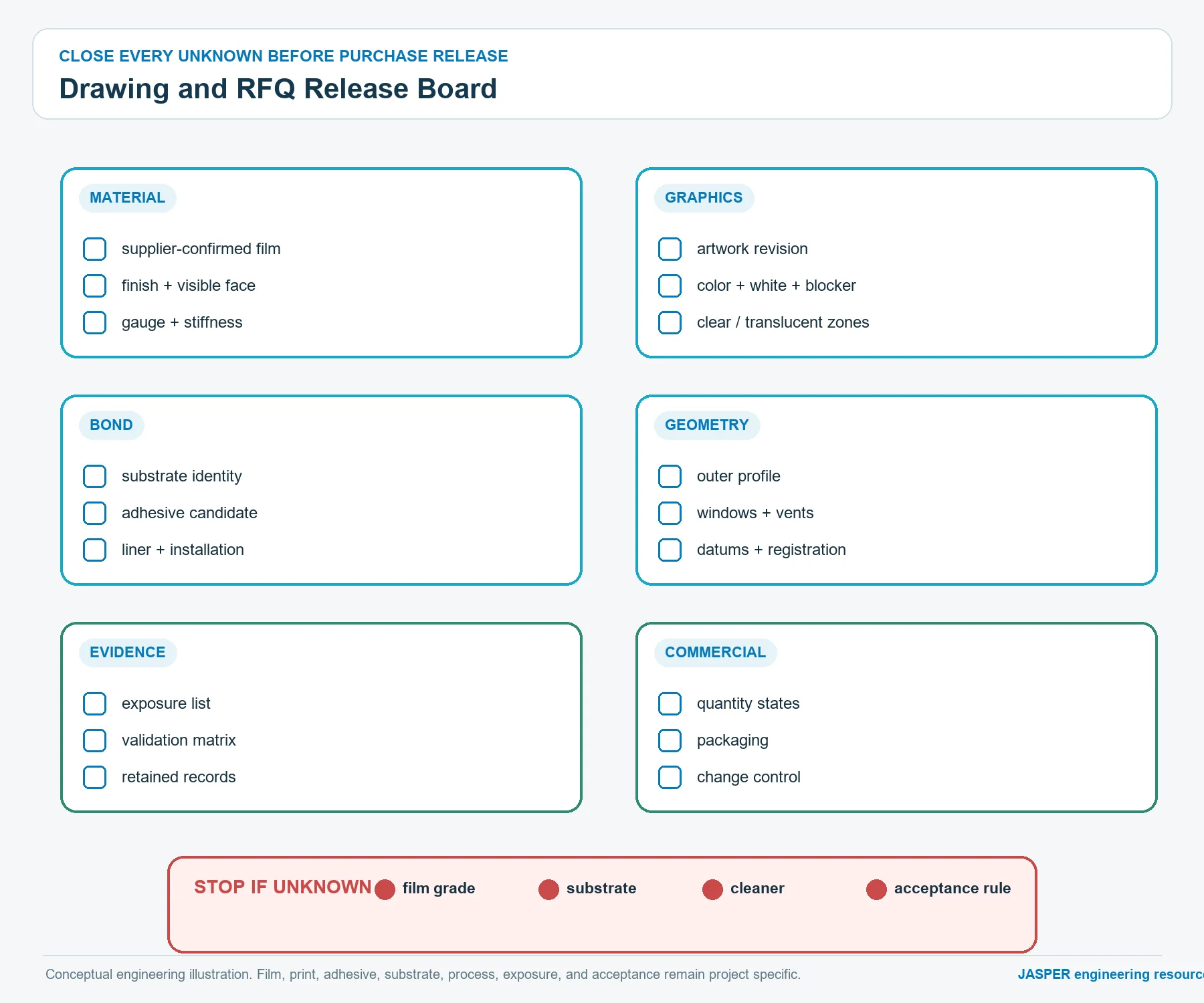
Specify the purchasable construction: supplier-confirmed film, finish, reverse graphics, optical zones, adhesive, enclosure substrate, converted geometry, installation, validation evidence, and change control.
Polycarbonate label material is a printable PC film used for equipment identification, warnings, ratings, branding, and non-operating panel graphics. A purchasable specification must define the approved film family, nominal gauge, visible finish, print side, color and window construction, pressure-sensitive adhesive, mounting substrate, converted geometry, installation state, exposures, and validation evidence. Do not release the label from a resin name alone. The finished construction has to be reviewed as one system because film, ink, clear areas, adhesive, enclosure surface, edge geometry, and application practice can fail at different interfaces.
For an OEM quotation route, JASPER’s custom label nameplates page is the primary commercial destination. Use this guide to prepare the material record and drawing before requesting a label quote; the product page remains the owner of available label formats and commercial review.
Open a material specification dossier before selecting a film
A useful label file begins with the job the part must perform. Record whether the label carries permanent product identity, regulatory information, operating legends, variable data, a viewing window, or several of those functions. Then identify the surface that receives it, the exposures it sees, and the evidence required for release. Those entries create the selection logic. “Use polycarbonate” is only one incomplete line inside that record.
The dossier should contain five controlled groups:
| Record group | Questions to close | Release evidence |
|---|---|---|
| Film identity | Which supplier family, grade, color, finish, gauge, masking, and treatment are approved? | Supplier data, converter confirmation, and drawing callout |
| Graphic construction | Which face is printed, what is the color order, where are whites, blockers, windows, and variable marks? | Layered artwork, print proof, and representative sample |
| Bonding construction | Which adhesive family is paired with which enclosure material and surface state? | Adhesive data, substrate record, and bonded-part evaluation |
| Converted geometry | Which outline, holes, radii, vents, splits, tabs, and adhesive-free areas are required? | Dimensioned drawing and cut-part inspection |
| Use and validation | How is the label installed, cleaned, handled, exposed, inspected, and accepted? | Application instruction, test plan, and approved report |
The controlled output is a finished label construction, not a shopping list of independent materials.
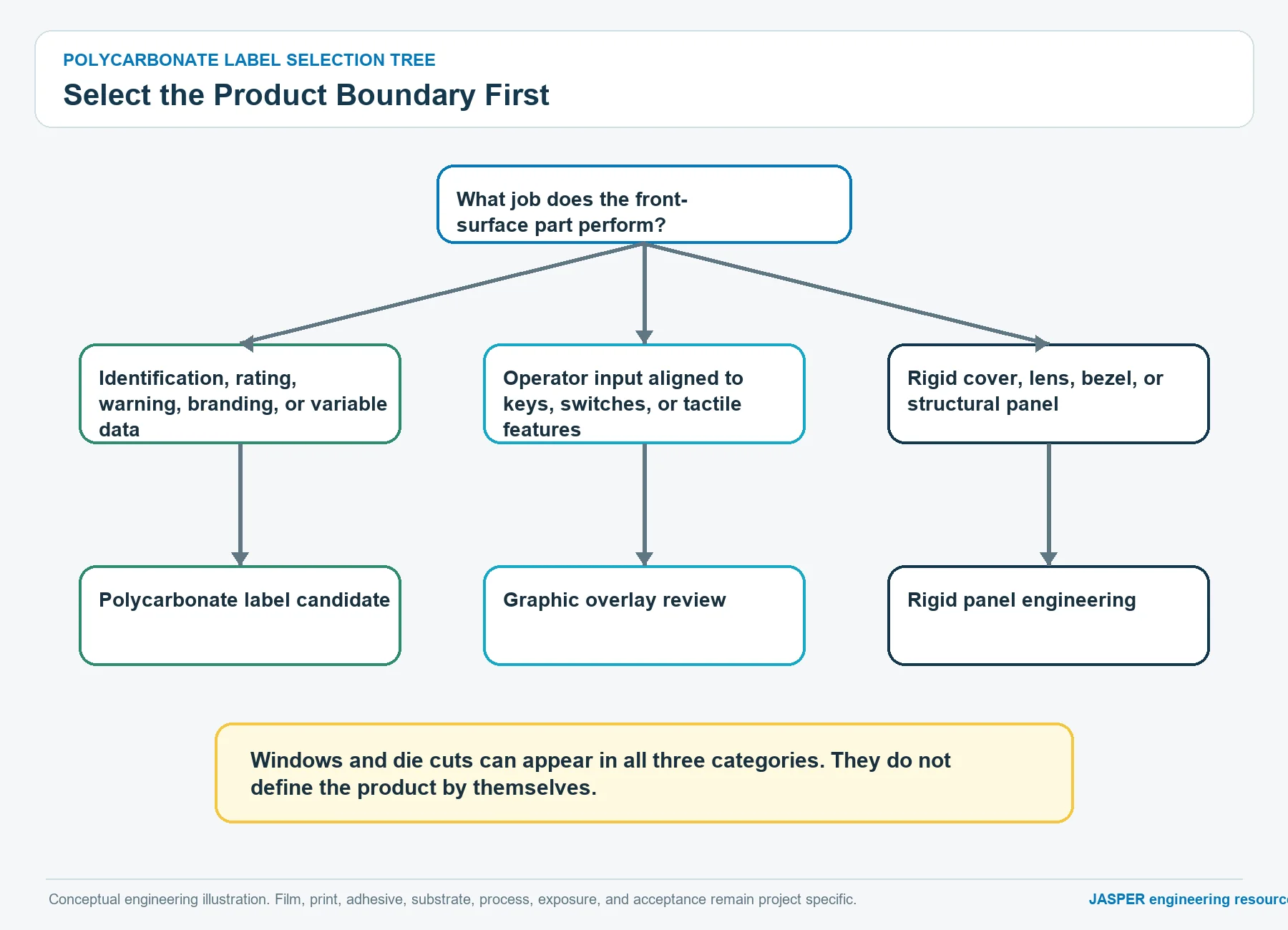
Use this polycarbonate label material selection tree
The decision tree below prevents a familiar purchasing error: choosing a recognizable PC trade family before defining the label duty.
START: What must the marked part do?
|
+-- It identifies, warns, rates, brands, or carries variable data
|   |
|   +-- It remains a separate adhesive-backed film part
|   |   |
|   |   +-- No operator actuation or switch-stack function
|   |       |
|   |       +-- PC is still a candidate
|   |           |
|   |           +-- Indoor or controlled exposure?
|   |           |   +-- Review standard PC film families
|   |           |
|   |           +-- Outdoor, strong cleaner, or demanding abrasion?
|   |               +-- Require a documented coated or weatherable candidate
|   |               +-- Validate the complete printed and bonded construction
|   |
|   +-- It becomes the operating face over keys, domes, or a switch circuit
|       +-- Reclassify as a graphic overlay and review flexing and actuation
|
+-- It is a rigid lens, structural plate, bezel, or protective cover
    +-- Stop the label specification and select the correct rigid-panel route
This tree does not declare that PC wins every label application. It decides whether a PC label is a technically coherent candidate and whether the part still belongs in the label category.
Define polycarbonate film by supplier-confirmed identity
“Polycarbonate” names the polymer family, not the complete commercial film. Official portfolios from SABIC and Covestro show PC films offered with different surface combinations, optical appearances, coatings, colors, weathering features, print surfaces, and converting characteristics. Those options are not interchangeable merely because the base polymer is the same.
The drawing or controlled bill of materials should identify the approved commercial film as specifically as the project requires. A release record may need:
- manufacturer and product family;
- supplier grade or converter-approved equivalent;
- clear, translucent, white, colored, or opaque state;
- first-side and second-side finish;
- coating or treatment state;
- nominal gauge and project tolerance;
- masking or liner requirement;
- print-side designation;
- orientation when the two faces differ;
- compliance documentation required by the end product;
- substitution and change-notification rules.
JASPER must confirm which brands, grades, coatings, and equivalents it can source or process. Until that confirmation exists, a supplier portfolio is evidence that options exist, not evidence that a specific JASPER construction is available.
Separate a label from a graphic overlay before artwork release
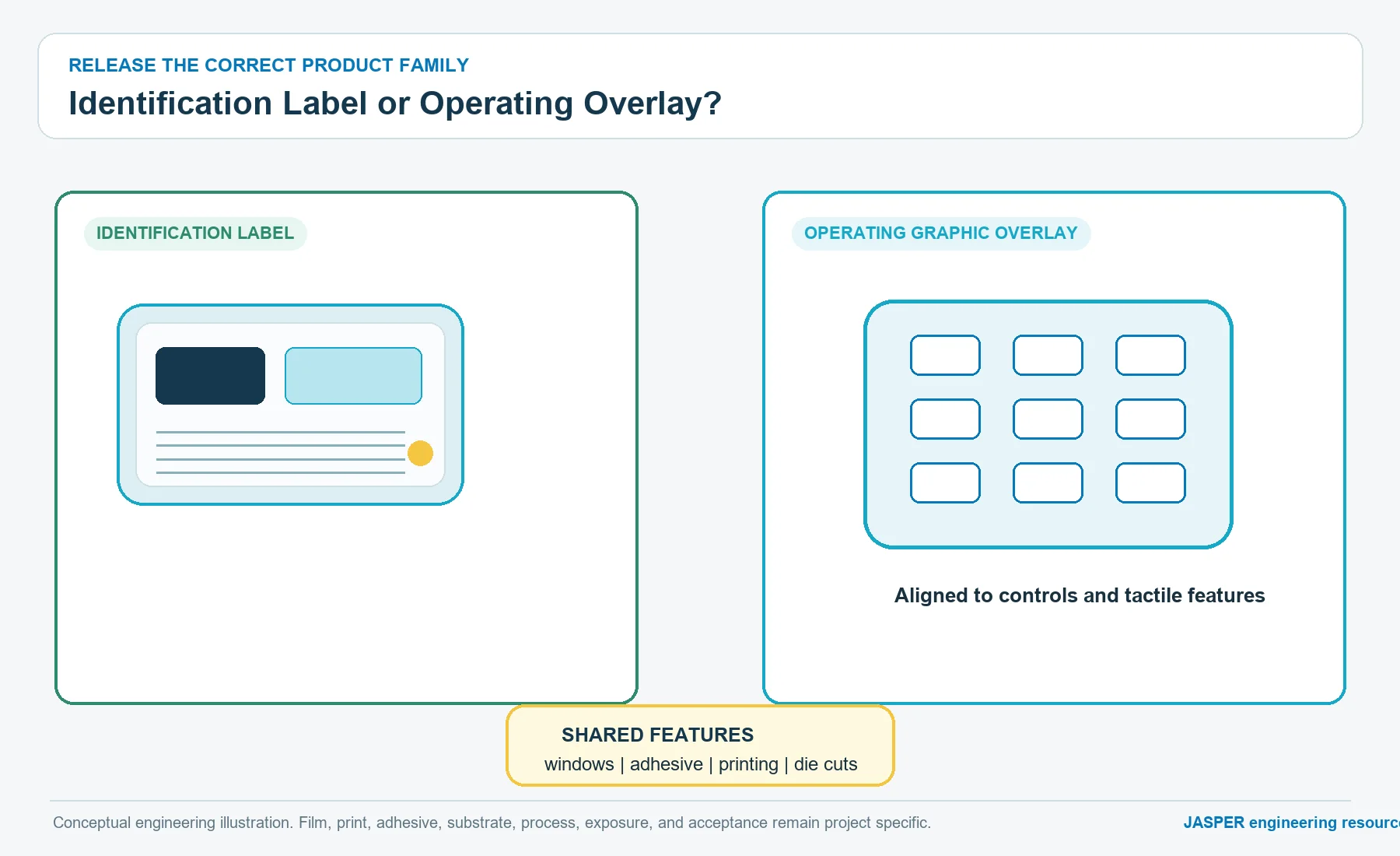
A label and a graphic overlay can share film, reverse printing, windows, adhesive, and die cutting. Their functional boundaries are different. The label identifies or marks equipment as a separate bonded part. The overlay is the operator-facing layer of a control interface and may flex, register to keys, support embossing, or participate in a membrane-switch stack.
| Boundary question | Label nameplate | Graphic overlay | Action if unclear |
|---|---|---|---|
| Is the part primarily identification, warning, rating, branding, or variable data? | Usually yes | May contain these, but not as its only duty | Keep label route if no control function exists |
| Does the operator press through the film to actuate a control? | No | Often yes | Reclassify as overlay |
| Must graphics register to keys, domes, switch contacts, or tactile zones? | Not normally | Common | Review overlay architecture |
| Is a window present only to reveal a display, indicator, or feature below? | Possible | Possible | Window alone does not decide the category |
| Does the film repeatedly flex as part of operation? | Not intended | May be required | Move flex and actuation into the material decision |
| Is the part a rigid lens or structural faceplate? | No | Not necessarily | Select glass, acrylic, metal, or another rigid route |
The graphic overlays and nameplates hub shows the current JASPER commercial families. Keep GO-01 narrow: it specifies PC labels. It does not redefine every front-surface product.
Specify nominal gauge through function, not a universal default
There is no responsible universal thickness for a polycarbonate equipment label. The nominal gauge affects handling, edge feel, ability to follow a surface, resistance to local denting, fit inside a recess, window behavior, cut quality, and the stresses transferred into the adhesive. Coatings, ink, and adhesive add to the finished construction, so film gauge alone is not finished label thickness.
Choose the gauge by answering:
- Must the label conform to a flat, gently curved, textured, or recessed surface?
- Does the edge need to sit below, level with, or above the enclosure?
- Will a user catch an exposed edge with a glove, cloth, tool, or fingernail?
- Does a transparent zone need to stay flat over an opening?
- Must the part bridge a gap, emboss, or remain deliberately flexible?
- Can the installer position a soft film without stretch or wrinkle?
- Does the converted shape include narrow arms, sharp internal features, or unsupported windows?
The flexible-to-semi-rigid boundary is construction specific. Ask the film supplier and converter to confirm available gauges, forming behavior, cutting limits, and the effect of any coating. Then evaluate the finished label on the actual enclosure instead of treating a catalog gauge as a universal stiffness class.
Lock visible texture and gloss as two-face properties
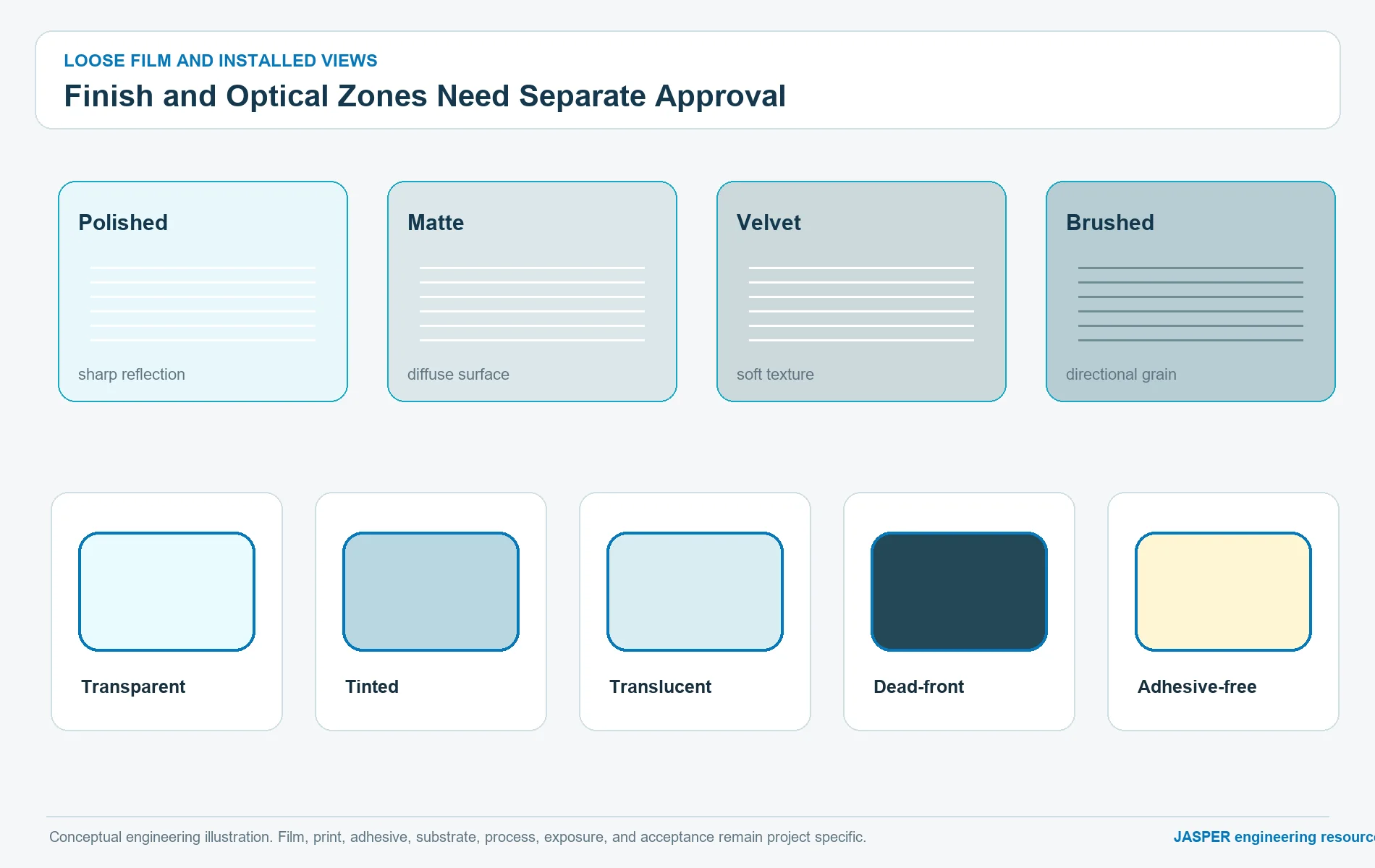
Finish is not a cosmetic note buried in an email. It changes glare, fingerprint visibility, perceived color, window clarity, cleanability, surface drag, scratch visibility, and how the label looks next to molded or painted equipment. PC film portfolios may pair different finishes on opposite faces, so the drawing must identify the operator side and print side.
A finish approval should state:
- visible surface: polished, matte, velvet, brushed, or another supplier term;
- reverse surface: suitable for the selected print and adhesive process;
- acceptable gloss or texture reference;
- whether a window keeps the same texture, uses a clear zone, or requires a separate construction;
- expected lighting and viewing direction;
- adjacent enclosure finish and color;
- whether appearance is judged before and after bonding;
- approved physical sample or controlled visual standard.
Do not translate one supplier’s texture code into another supplier’s code by name alone. Compare actual samples under the intended lighting, with the planned print stack and adhesive behind them.
Build the label as a reverse-printed and bonded cross-section
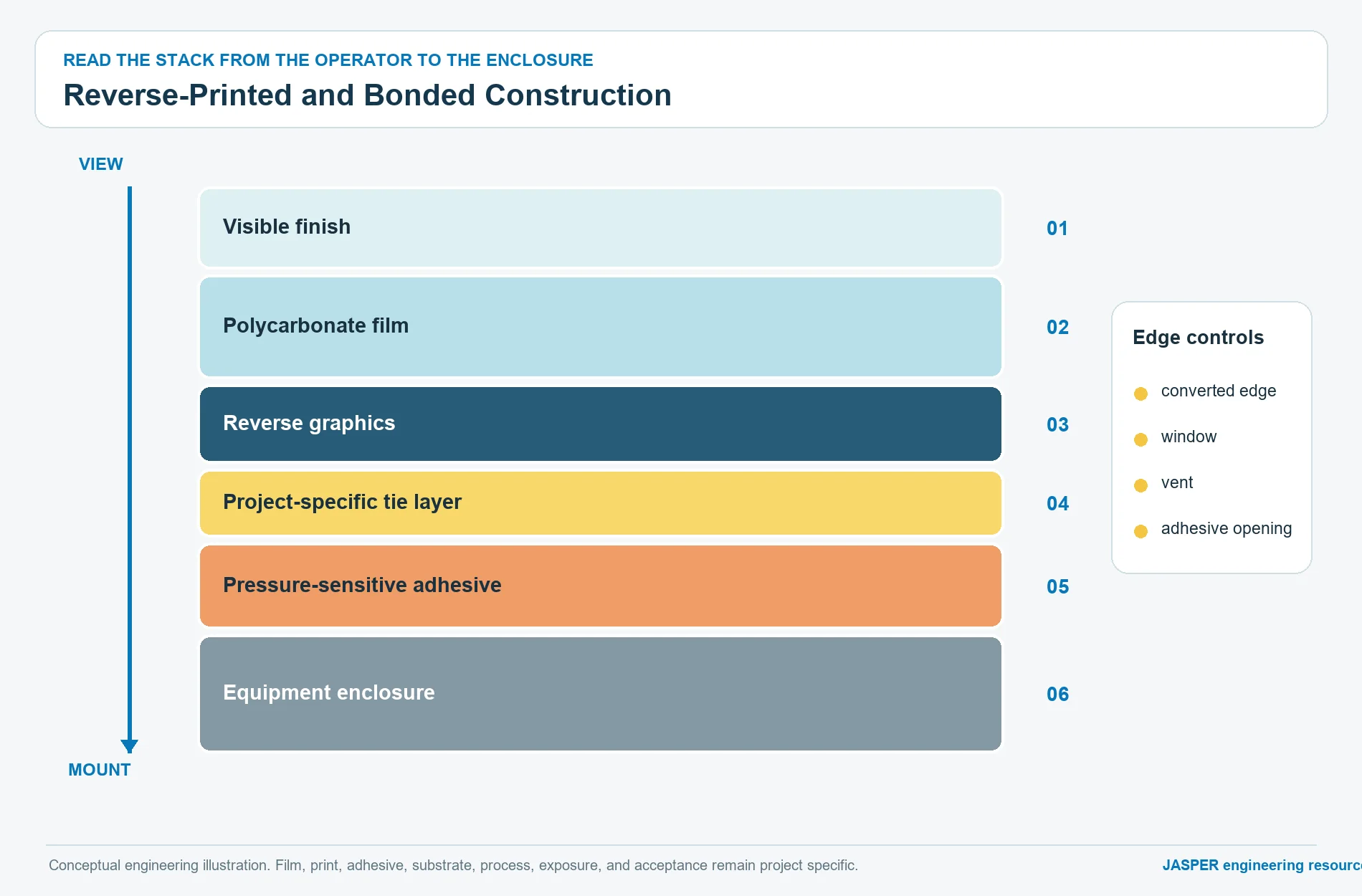
Subsurface, second-surface, or reverse printing places graphics behind the visible PC film. This can protect the ink from direct finger and wipe contact, but it does not make the entire label immune to wear, chemicals, or edge attack. The exposed film surface, converted edge, adhesive interface, window, and enclosure remain part of the durability system.
The section view below shows the interfaces that need separate ownership:
USER / CLEANING SIDE
        |
        v
+-----------------------------------------+
| Visible PC surface                      | finish or project-specific coating
+-----------------------------------------+
| Polycarbonate film                      | approved family, grade, gauge, faces
+-----------------------------------------+
| Reverse graphic layers                  | colors, white, blocker, clear zones
+-----------------------------------------+
| Optional print-compatible tie layer     | only when approved for the system
+-----------------------------------------+
| Pressure-sensitive adhesive             | selected for film and substrate
+-----------------------------------------+
| Enclosure surface                       | material, coating, texture, curvature
+-----------------------------------------+
        ^
        |
EDGE, WINDOW, VENT, AND CUTOUT DETAILS REMAIN EXPOSED DESIGN FEATURES
Every optional layer must be named as optional. Never add a primer, hardcoat, blocker, diffuser, or tie layer to a drawing because it appeared in another project or a supplier brochure.
Control print order, white layers, and color approval
Reverse printing requires the artwork to define how the operator sees colors through the film. A print order that looks correct on an opaque proof may change when viewed through a clear or textured PC surface. White support layers, opaque blockers, translucent colors, metallic effects, and adhesive color can all alter the final appearance.
Release artwork should separate:
- visible spot or process colors;
- white support areas;
- light-blocking areas;
- transparent areas;
- translucent or tinted areas;
- variable-data zones;
- cut and window geometry;
- adhesive-free geometry;
- inspection targets and critical registration features.
Color approval needs a named reference and viewing state. State whether the requirement applies to loose film, printed film, adhesive-laminated film, bonded assembly, illuminated assembly, or more than one state. A screen display is not a production color reference. The graphic overlay printing capability page is useful for discussing artwork, opacity, windows, finish, and registration, but JASPER still must confirm the actual process route and control method for this label.
Treat clear, translucent, and dead-front areas as optical zones
A window is not simply “no ink.” Its result depends on the PC film, visible finish, reverse-face texture, coating, adhesive opening, liner handling, print edge, underlying display or indicator, air gap, enclosure, and viewing angle. A label may use:
- a transparent window for a display or indicator;
- a tinted transparent area;
- a translucent diffuser-like zone;
- a dead-front zone intended to conceal an inactive feature;
- an adhesive-free opening around a switch, sensor, vent, or optical path.
For every zone, record whether the label must transmit an image, reveal a color, diffuse a point source, hide an inactive graphic, or merely provide clearance. Inspect the zone loose and installed because adhesive, trapped particles, enclosure color, and local stress can change the appearance.
Avoid calling a zone “optical grade” without a supplier definition and acceptance method. Avoid promising a dead-front effect from artwork alone. It is a stack behavior that needs a representative powered or backlit sample when illumination is involved.
Assign substrate and adhesive responsibilities explicitly
Adhesive selection belongs to the label and the enclosure together. Official 3M guidance distinguishes bonding behavior by substrate surface energy and discusses plastics as a varied class rather than one uniform surface. The chosen adhesive also has to wet the reverse label construction without damaging or lifting the print stack.
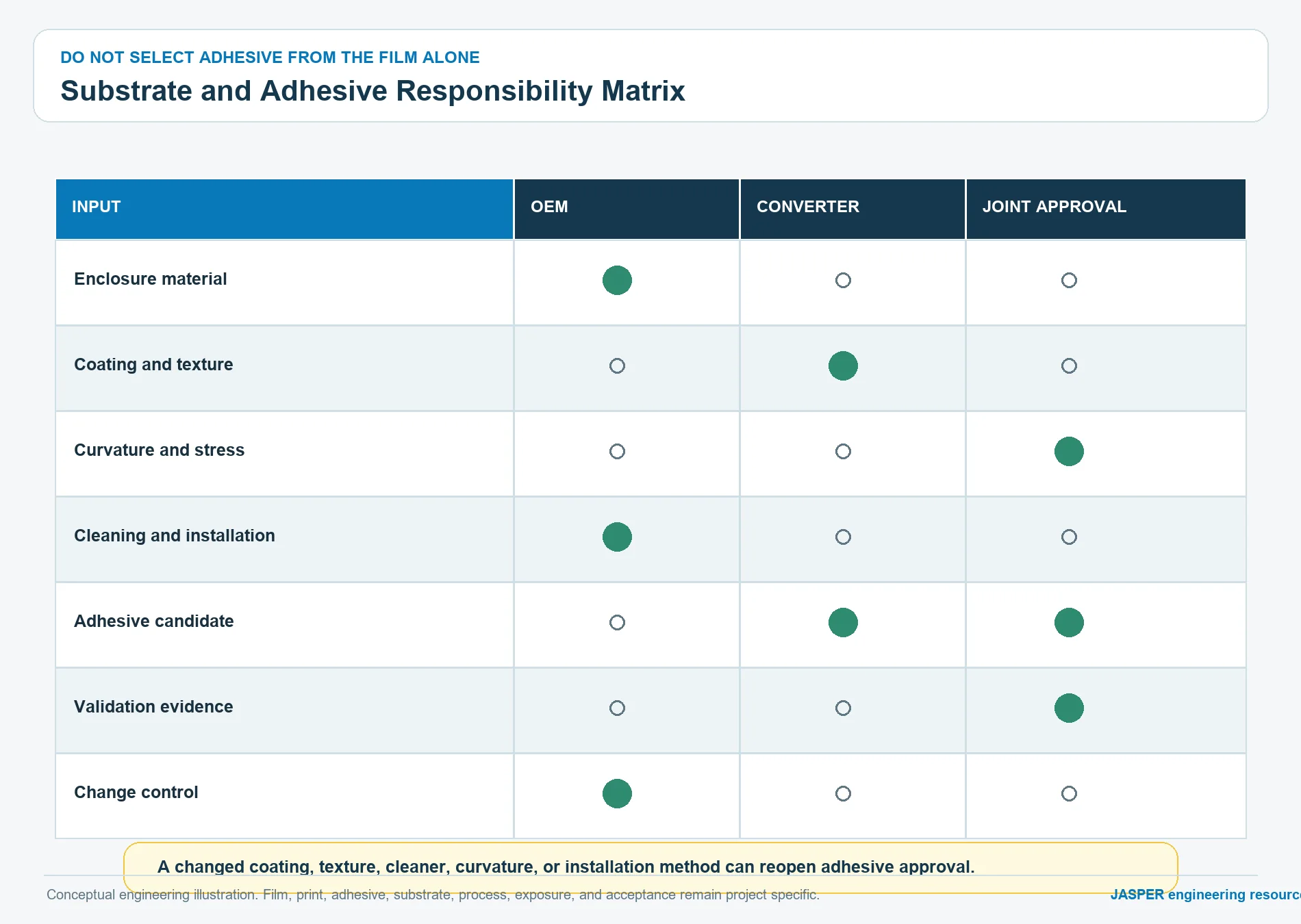
This original responsibility matrix keeps the decision from being pushed entirely onto the converter or the OEM:
| Decision | OEM owns | Label supplier or converter owns | Joint approval |
|---|---|---|---|
| Enclosure identity | Resin, alloy, paint, powder coat, coating, release additive, and supplier | Review whether the declared surface matches the proposed adhesive route | Confirm actual production surface |
| Surface geometry | Flatness, curvature, recess, texture, seams, fasteners, nearby edges | Assess label conformability and converted geometry | Fit check on representative parts |
| Surface condition | Cleaning process, contamination risks, storage, and handling | Label-side cleanliness, liner, lamination, and packaging | Installation work instruction |
| Adhesive candidate | Service exposures and removability needs | Candidate family, compatibility evidence, converting limits | Bonded sample and acceptance |
| Stress state | Enclosure movement, thermal cycling, vibration, edge picking, cable or gasket loads | Label stiffness, adhesive flow, edge design, and liner behavior | Assembly-level validation |
| Change control | Notify enclosure material, coating, supplier, or process changes | Notify film, ink, adhesive, liner, or converting changes | Revalidation decision |
The materials and adhesives capability page frames the enclosure, surface energy, texture, environment, and compliance inputs. It does not by itself prove compatibility with an unnamed production substrate.
Describe the mounting substrate beyond its resin abbreviation
“ABS,” “PC,” “aluminum,” or “powder coat” is not enough for adhesive selection. Surface energy can change with resin blend, additives, mold release, texture, paint chemistry, cure, contamination, aging, or supplier change. Metals can carry oils, conversion coatings, anodizing, paint, or powder coat. A nominally identical enclosure can therefore present a different bonding surface.
The substrate record should include:
- material and supplier designation where controlled;
- molded, cast, machined, painted, anodized, plated, or coated state;
- texture and flatness;
- curvature and recess details;
- known mold-release, lubricant, cleaner, plasticizer, or migration risks;
- storage age and handling before label application;
- cleaning and drying method;
- application environment;
- any post-application process;
- production changes that trigger review.
Use representative production parts for bond evaluation. A laboratory plaque can isolate an adhesive question, but it cannot prove fit, edge stress, recess behavior, or installer access on the actual equipment.
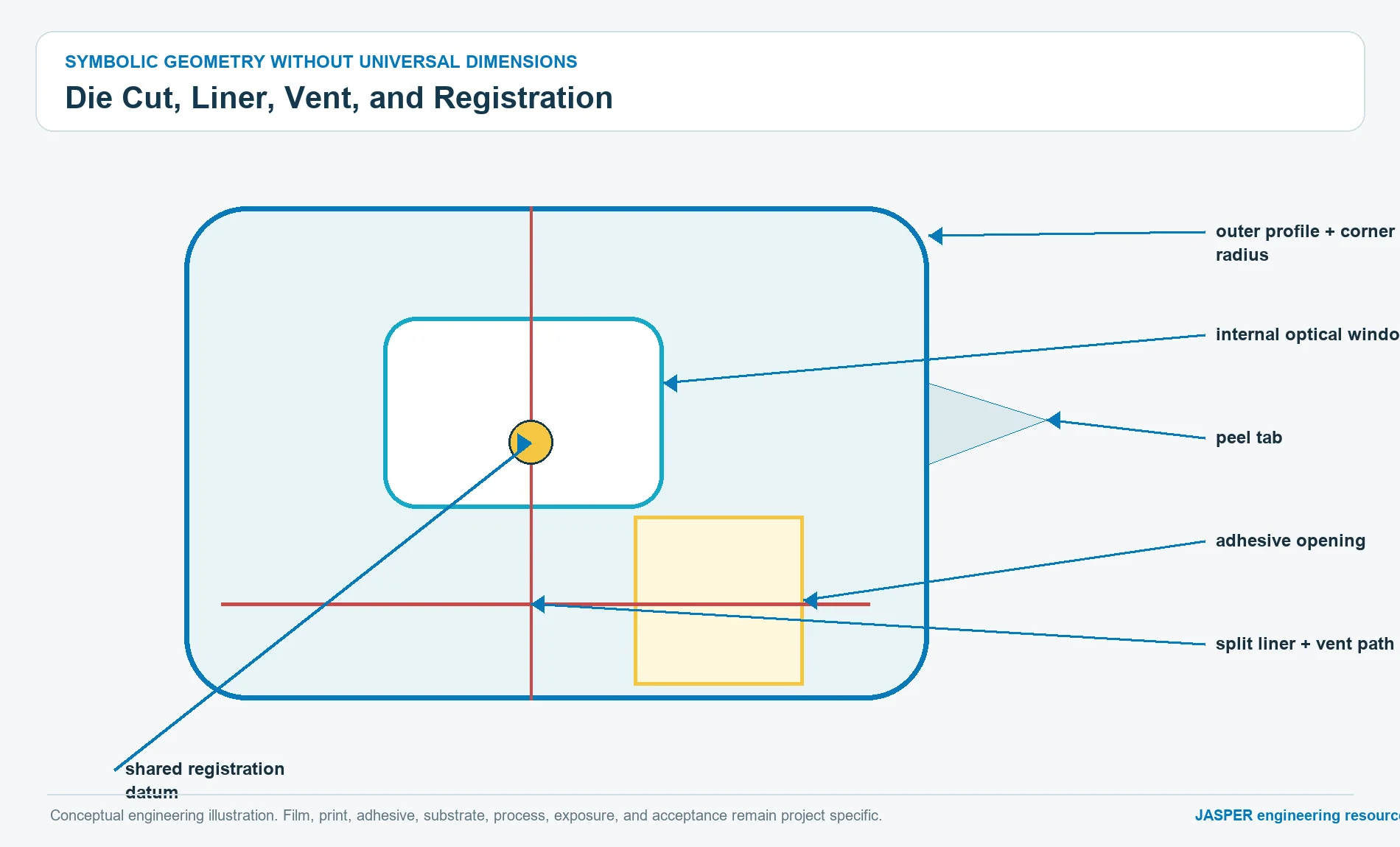
Design the die cut, corners, vents, and adhesive openings together
Converted geometry determines where stress and contamination concentrate. Sharp internal corners, narrow webs, unsupported clear zones, exposed edges, and cuts near printed features can create failure starts even when the base film and adhesive are suitable.
The dimensioned cut drawing should show:
- outer profile and datum scheme;
- corner radii and critical internal radii;
- holes, slots, switch clearances, and display windows;
- adhesive openings and adhesive-free zones;
- vents or air-release paths where the assembly requires them;
- split liners, peel tabs, or handling tabs;
- print-to-cut and window-to-cut registration;
- critical edge distances;
- recess and enclosure relationship;
- orientation and part marking.
Venting is a design response to trapped air or pressure, not a decorative cut. Decide whether the label needs an air path, whether that path creates an ingress route, and whether a window or recess traps a visible bubble. Confirm that a vent does not intersect graphics, adhesive sealing land, or a contamination-sensitive area.
Make installation part of the released specification
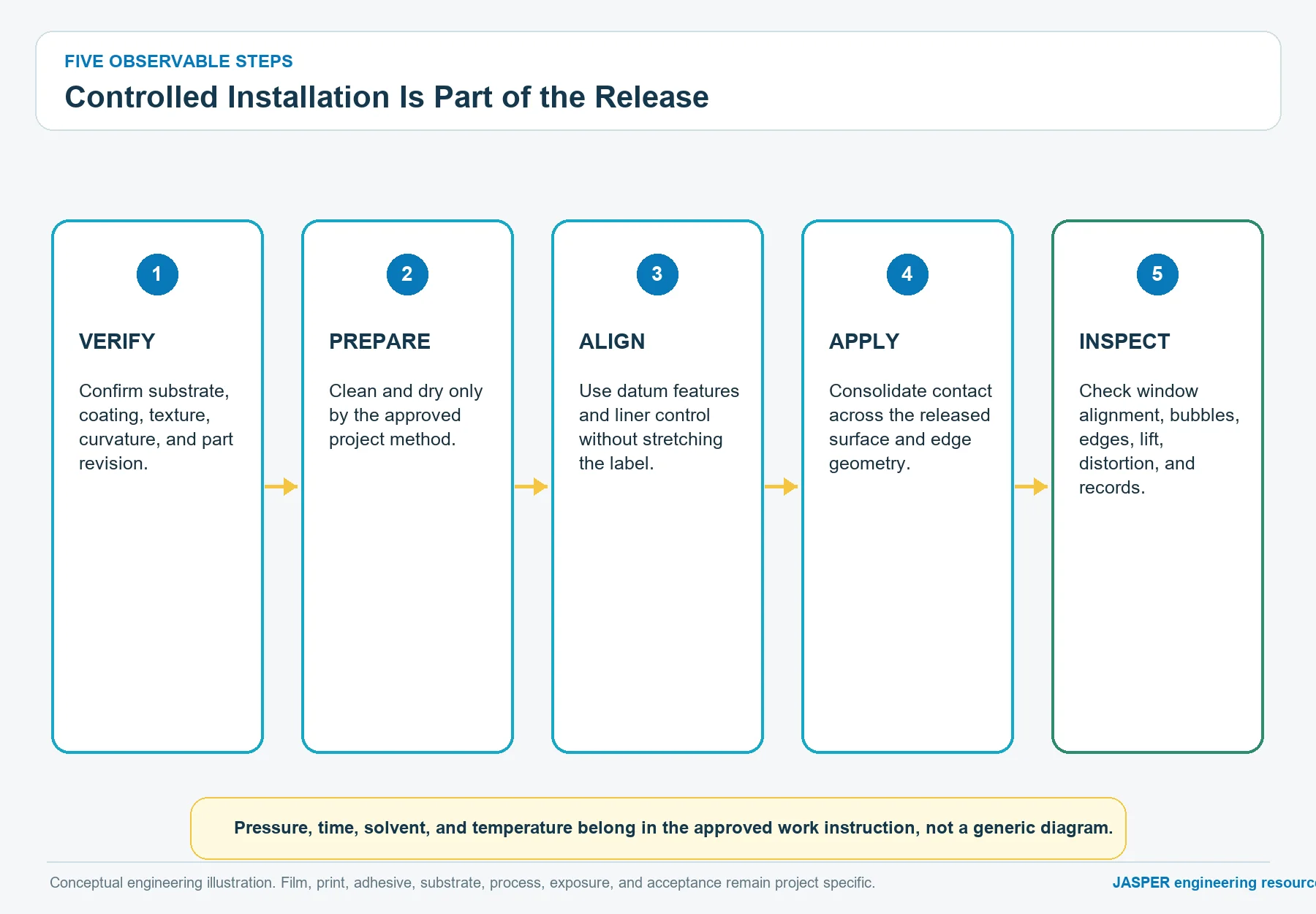
A correct label can fail through uncontrolled application. Installation should specify the condition of the enclosure and label, the approved cleaning and drying process, handling of the adhesive, alignment method, application sequence, pressure method, and the point at which inspection occurs. Those details must come from the selected adhesive supplier, converter, and assembly process, not from a generic label instruction.
Common installation risks include touching the adhesive, applying over dust or oil, stretching thin film during alignment, trapping air at a recess or window, bridging a texture without full contact, repositioning beyond the adhesive’s intended behavior, and loading an exposed edge immediately after application.
Approve the process with the actual liner design and operator access. A split liner or peel tab can be a functional assembly feature. It may reduce misalignment or contact contamination, but it also changes the die-cut and packaging plan.
Convert the chemical environment into a controlled exposure list
“Chemical resistant” is not a usable requirement. Record the actual commercial cleaner, disinfectant, oil, coolant, detergent, solvent, skin product, or process fluid. Include concentration or dilution state when relevant, application method, contact pattern, wipe material, rinse, drying, recovery, and the label condition to inspect.
Polycarbonate can be sensitive to particular chemical families and to stress-assisted attack. Reverse printing protects graphics from direct face contact, yet cleaners can still reach cut edges, windows, damaged coatings, or the adhesive bond line. The label may show haze, whitening, cracking, tack change, edge lift, color change, print attack, or no visible damage but reduced bond strength.
ASTM D543 provides an official framework for evaluating plastics exposed to chemical reagents. It does not supply the OEM’s real cleaner list or a universal label pass rule. Build the project method around actual exposures, the finished label, representative substrate, and agreed observations.
Set outdoor and UV limits without inventing service life
Standard PC film should not be assumed suitable for outdoor use merely because polycarbonate is associated with durable equipment. Supplier portfolios identify weatherable, coated, or capped constructions for particular applications. Those constructions may differ in printability, surface finish, available gauge, converting behavior, optical appearance, chemical response, and cost.
For any outdoor or UV-exposed label, define:
- direct sun, filtered light, or intermittent exposure;
- equipment orientation and shelter;
- climate and moisture state;
- heat buildup behind dark graphics;
- cleaner and pollutant exposure;
- required color, gloss, clarity, crack, and adhesion observations;
- whether a supplier weatherable grade is mandatory;
- accelerated and natural exposure evidence expected;
- change-control rules for film, coating, ink, and adhesive.
ISO 4892-3 describes exposure methods using fluorescent UV lamps for plastics. It is a method framework, not a field-life conversion. Do not publish a universal UV life or convert laboratory exposure into years without a validated correlation for the complete label construction and use environment.
Evaluate abrasion at the surface, edge, and installed assembly
Subsurface graphics can remain visually protected while the visible PC face becomes polished, hazed, scratched, or chemically softened. A textured surface may hide handling marks but change visibly under repeated wiping. A coating may improve one wear mode while creating new print, forming, or edge considerations.
An abrasion plan should identify the field mechanism:
- fingers or gloves moving across the label;
- cleaning cloth and cleaner;
- trapped dust or hard particles;
- tool, cable, carton, or fixture contact;
- repeated edge catching;
- contact concentrated on a raised enclosure feature;
- rubbing over a transparent zone.
ASTM D1044 covers abrasion resistance of transparent plastics using a defined apparatus. Use it only when that specimen and mechanism answer a project question. A flat coupon result is not automatically an installed-label claim. Pair controlled material comparisons with a representative bonded-part evaluation when edge, texture, window, curvature, or cleaning is important.
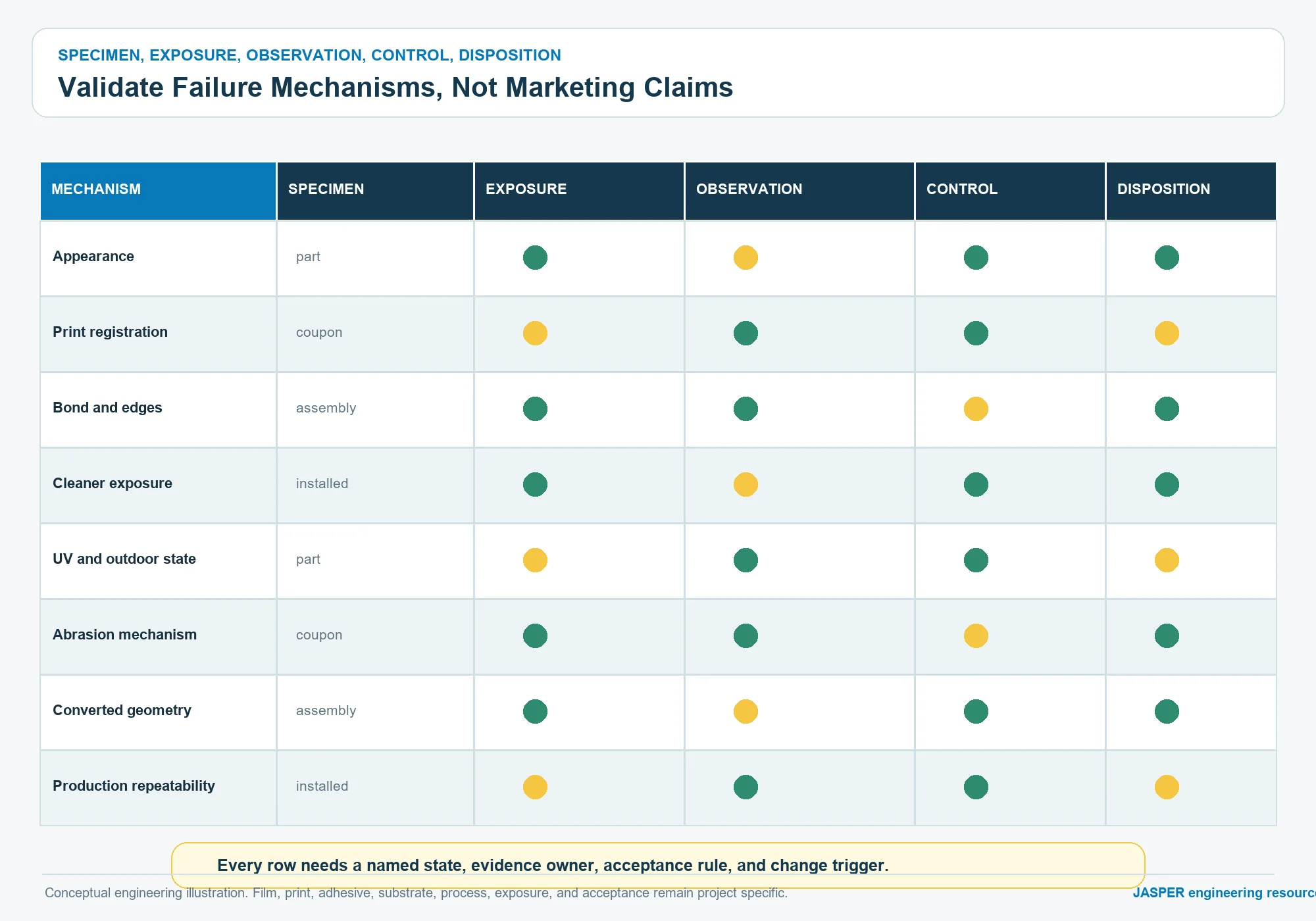
Build a validation matrix around failure mechanisms
Do not ask one test to certify the entire label. The matrix below separates material screening from construction and assembly evidence.
| Question | Representative specimen | Exposure or check | Observe after recovery |
|---|---|---|---|
| Is the film and finish visually suitable? | Unprinted and printed film samples | Intended lighting, viewing, handling | glare, texture, color, clarity, fingerprints |
| Does the graphic stack print and register correctly? | Production-representative printed label | Artwork and conversion inspection | color, opacity, edge, window, print-to-cut alignment |
| Does the adhesive match the enclosure? | Finished label on production substrate | Application and project-specific conditioning | wet-out, bubbles, edge lift, movement, residue if removal matters |
| Does cleaner exposure damage the construction? | Printed and bonded assembly | Controlled commercial-product exposure | haze, crack, whitening, tack, print, bond line, edge |
| Does outdoor exposure alter appearance or bond? | Finished construction and controls | Approved weathering program | color, gloss, clarity, crack, shrinkage, edge, adhesion |
| Does field rubbing create a relevant wear mode? | Flat control plus installed assembly | Mechanism-matched abrasion | polish, scratch, haze, coating damage, edge initiation |
| Does the converted geometry install correctly? | Final die-cut part and enclosure | Assembly trial | alignment, trapped air, wrinkles, window fit, recess fit |
| Can production repeat the approved state? | Representative production lot | Inspection and record review | material identity, revision, appearance, dimensions, traceability |
Acceptance criteria must be written before testing. “No failure” is ambiguous unless the team defines visual conditions, functional checks, measurement method, specimen state, comparison control, and disposition rules.
Release the drawing as a construction record
The drawing should connect geometry to the material and print notes without relying on tribal knowledge. Keep supplier-controlled properties in the approved material record and project-controlled requirements on the drawing or referenced specification.
Minimum drawing content:
- part number, revision, title, and label orientation;
- finished outline, datums, holes, windows, vents, and radii;
- nominal film callout and approved equivalent policy;
- visible and reverse surface designation;
- artwork revision and color reference;
- print-side and layer-order note;
- transparent, translucent, opaque, and adhesive-free regions;
- adhesive callout tied to the mounting substrate;
- liner, split, tab, or handling requirement;
- dimensional and registration characteristics;
- cosmetic zones and viewing conditions;
- variable-data format and verification if used;
- compliance and documentation requirements;
- installation reference;
- validation and approved-sample references;
- change-notification requirements.
Do not place an unsupported supplier grade on the drawing just to make it look complete. Mark it as pending supplier confirmation and prevent release until the actual material route is approved.
Use stop conditions before purchase release
Stop the label release when any of these conditions remains unresolved:
- the part is actually an operating graphic overlay or a rigid panel;
- the film is named only as generic PC with no approved grade path;
- nominal gauge is copied from another product without fit evidence;
- visible and print faces are not identified;
- a window has no optical-state definition;
- the adhesive is selected before the enclosure surface is known;
- the production enclosure differs from the bond-test substrate;
- the cleaner list says only “common chemicals”;
- outdoor use is assumed without a weatherable construction review;
- abrasion is specified without a field mechanism;
- the die line omits adhesive openings, vents, radii, or liner details;
- acceptance criteria are written after samples arrive;
- film, ink, adhesive, enclosure, or process substitutions lack change control.
Stopping at these points is less expensive than approving a visually attractive sample that does not represent the installed product.
Keep the PET versus PC comparison on its existing page
The existing PET versus polycarbonate harsh-environment guide owns broad material comparison for graphic overlays. GO-01 does not repeat its general debate over chemical, flex, UV, impact, flame, or overlay use.
This page starts after the project has identified PC as a candidate for an equipment label. It then asks which PC film construction, finish, print stack, window, adhesive, converted geometry, installation process, and validation evidence should be released. If the application evidence shows that PC is unsuitable, return to the existing comparison and material-selection process rather than forcing PC into the purchase specification.
Prepare the RFQ packet as a release-ready file set
Procurement should send more than a logo and overall dimensions. A strong RFQ packet includes:
- dimensioned label and enclosure drawings;
- layered vector artwork with revision;
- label duty: identification, warning, rating, branding, variable data, or window;
- PC film preference, supplier restriction, or request for supplier confirmation;
- visible finish and adjacent enclosure appearance;
- target nominal gauge or functional stiffness and fit requirement;
- print-side, color references, white, blocker, transparent, and translucent zones;
- enclosure material, coating, texture, curvature, recess, and surface condition;
- adhesive, removability, liner, peel-tab, and installation requirements;
- die-cut outline, holes, windows, radii, vents, and adhesive openings;
- cleaner and fluid list;
- indoor, outdoor, UV, moisture, abrasion, and handling exposures;
- compliance and material-document needs;
- validation methods and acceptance criteria;
- prototype, production, and annual quantity context;
- packaging, traceability, approved sample, and change-control expectations.
For industrial machinery, the industrial control application page provides related enclosure and exposure context. It does not replace a label-specific drawing or validation plan.
Frequently asked questions
What is polycarbonate label material?
Polycarbonate label material is a PC film converted into a printed, usually adhesive-backed equipment label. The finished part may carry identification, warnings, ratings, branding, variable data, or non-operating panel graphics. Its specification includes film grade, gauge, finish, print stack, windows, adhesive, geometry, substrate, installation, exposures, and validation.
Is Lexan the same as every polycarbonate label film?
No. LEXAN is a SABIC brand family. Other suppliers, including Covestro, offer polycarbonate film families with different grades, surfaces, coatings, colors, optical properties, and converting characteristics. Approve a supplier-confirmed film construction rather than using a brand name as a generic complete specification.
Should a polycarbonate equipment label be printed on the front or back?
Reverse or second-surface printing is common because the PC film places graphics behind the visible surface. The correct route still depends on the film faces, coating, print system, color effect, window design, and use environment. First-surface printing should be treated as a separate construction requiring its own durability review.
How do I choose thickness for a PC label?
Choose nominal gauge from fit, conformability, edge exposure, recess depth, handling, window flatness, die-cut geometry, and installation needs. Ask the supplier and converter to confirm available gauges and tolerances. Validate finished thickness and stiffness because ink, coating, and adhesive also affect the construction.
What adhesive works on a polycarbonate label?
The adhesive must bond both the reverse label construction and the actual enclosure surface. Selection depends on substrate chemistry, surface energy, coating, texture, curvature, cleanliness, stress, exposure, installation, and removability needs. Test a production-representative label on the production substrate.
Can polycarbonate labels be used outdoors?
They can be candidates when the selected film and coating are documented for the intended weathering exposure and the full printed, adhesive-backed construction is validated. Generic PC should not be assigned an outdoor lifetime. Define the climate, orientation, appearance requirements, test method, and acceptance before release.
When does a label become a graphic overlay?
Treat the part as a graphic overlay when it becomes the operating face over keys, domes, or switch circuitry, repeatedly flexes during actuation, or must register to tactile control features. A window or die-cut hole alone does not turn an identification label into an overlay.
Sources
- SABIC LEXAN Film Portfolio: official PC film portfolio covering graphic-film surfaces, coatings, printability, optical options, and converting features.
- Covestro Makrofol polycarbonate films: official brand page for PC film families and application routes.
- Covestro film selector guide for PC films: official selector showing that grades vary by finish, color, coating, print, converting, weather, optical, and application requirements.
- 3M surface-energy guidance: official explanation of why substrate surface energy affects adhesive wet-out and selection.
- 3M engineered-plastics bonding guidance: official material-bonding context for plastics.
- 3M Adhesive Transfer Tape 467MPF technical data: official example of a nameplate and overlay adhesive document; it is not a universal selection for GO-01.
- ASTM D543: official standard page for evaluating plastics exposed to chemical reagents.
- ASTM D1003: official standard page for haze and luminous transmittance of transparent plastics.
- ASTM D1044: official standard page for surface abrasion of transparent plastics.
- ISO 4892-3: official method page for fluorescent UV lamp exposure of plastics.
- UL Marking and Labeling Systems Program: official overview of UL marking and labeling system evaluation.
Send the finished specification for RFQ review
Send the controlled drawing, layered artwork, PC film requirements, visible finish, enclosure material and surface state, adhesive needs, windows and cut geometry, installation plan, exposure list, validation criteria, quantity context, and required records through JASPER’s request-a-quote page. Ask JASPER to confirm the available film grade, print route, adhesive construction, converting scope, sample evidence, inspection plan, documentation, and change-control boundary before purchase release.