
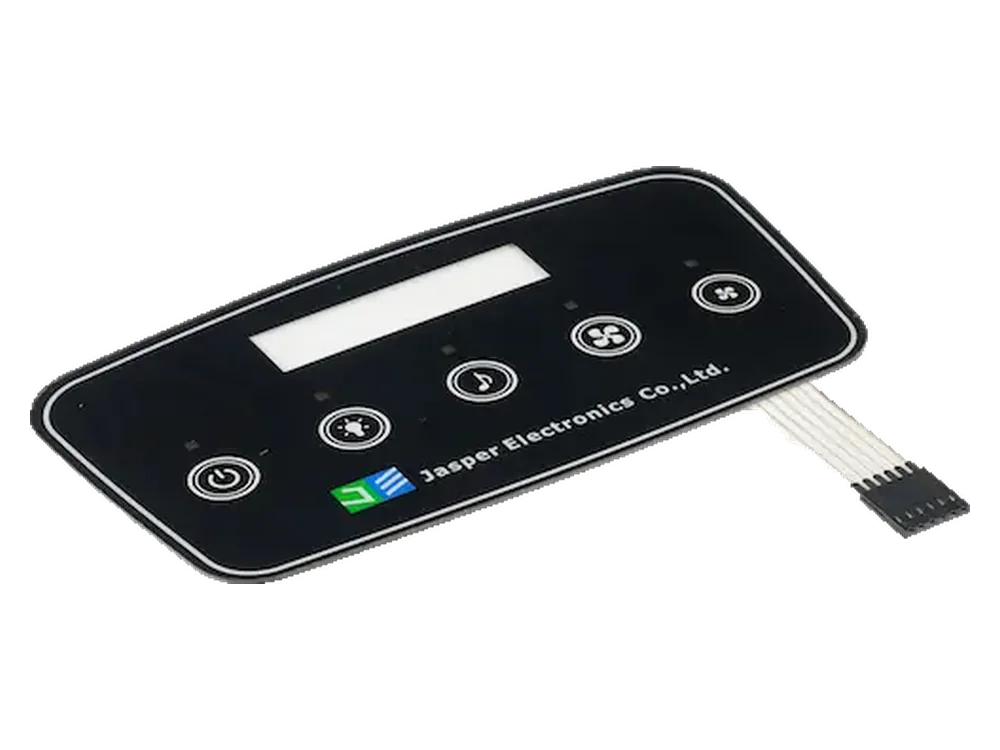
Capacitive Touch Control Panel for a Sealed Interface
Capacitive touch control panels are useful when the product needs a flat, sealed, cleanable interface. The design must review overlay thickness, sensor layout, touch sensitivity, grounding, LED indicators, environment, and electronics integration.
JASPER can support overlay printing, sensor layout coordination, structure review, assembly, and inspection while the buyer engineering team confirms controller behavior in the final product.
What the project needed to solve
The snapshot keeps the case practical: application, part type, design risks, and review scope.
| Item | Project direction |
|---|---|
| Application | Appliance, access control, medical-adjacent device, instrument, or sealed equipment interface |
| Product type | Capacitive touch panel with printed overlay and sensor structure |
| Key concerns | Touch sensitivity, overlay thickness, sealing, LED indicators, electronics fit |
| JASPER review scope | Structure review, overlay printing, sensor layout coordination, assembly, inspection |
| Project reference | JASPER project example |
A flat touch surface still depends on structure, grounding, and electronics
Capacitive touch interfaces look simple from the outside, but sensitivity can be affected by overlay thickness, material, grounding, nearby metal, moisture, gloves, electronics design, and housing structure.
The front surface also needs controlled printing, clean appearance, and clear icon visibility. If LEDs are used, light management and opacity must be reviewed.
Buyer note: Bring mechanical and electronics teams into the review early so overlay, sensor, enclosure, grounding, and controller behavior are not designed separately.

Related engineering guide: add glass optical-state and inspection-fixture evidence.
Design decisions JASPER would review before sampling
The response focuses on structure and production controls, not unsupported performance promises.
Overlay and thickness
Review material, thickness, print stack, surface finish, icon areas, windows, and whether the overlay affects sensing distance.
Sensor geometry
Coordinate key size, spacing, routing, shielding, ground reference, LED location, and nearby metal or display components.
Sealed assembly
Review adhesive, edge design, tail exit, enclosure fit, and whether moisture or cleaning exposure changes touch behavior.
Lighting integration
Plan LED positions, dead-front effects, light blocking, and icon readability without compromising sensor layout.
Functional review
Define how touch response will be checked with the buyer electronics and final enclosure instead of judging only the printed front surface.
Inspection points that should be defined before approval
The sample should be judged against agreed visual, functional, dimensional, and documentation criteria.
| Area | Review point | Why it matters |
|---|---|---|
| Overlay | Material, thickness, printing, finish, window or icon areas | Affects appearance and sensor performance |
| Sensor | Key size, spacing, sensitivity, routing, shielding or grounding needs | Controls touch reliability in the assembly |
| Lighting | LED position, icon readability, dead-front effect, light blocking | Balances visual design and sensing layout |
| Assembly | Adhesive bonding, alignment, tail exit, enclosure fit | Connects panel structure to final product |
| Testing | Visual inspection, electrical review, touch function according to project plan | Confirms the design with buyer electronics |
Engineering resource: Use the turn the capacitive panel concept into controlled drawings.
Information JASPER needs for a similar project
Better RFQ inputs reduce quotation back-and-forth and prevent late structural changes.
| Input needed | Useful detail | Why it matters |
|---|---|---|
| Overlay details | Material, thickness, finish, artwork, icon size, windows | Defines sensing distance and visual surface |
| Sensor requirement | Touch zones, spacing, controller information, grounding or shielding expectations | Guides sensor layout coordination |
| Environment | Moisture, cleaning, gloves, outdoor use, nearby metal or display | Identifies false-trigger or sensitivity risks |
| Lighting needs | LED positions, colors, lit/unlit states, dead-front areas | Prevents conflict between lighting and sensing |
| Electronics and enclosure | Controller behavior, PCB/FPC interface, mounting surface, tail route | Confirms the complete assembly context |
Touch technology resource: Read selecting a touch technology before the cover and controller are frozen.
Buyer takeaway
Capacitive touch panel projects should involve both mechanical and electronics teams early. The best result comes from reviewing overlay, sensor, enclosure, and controller behavior together.
Continue planning this type of project
Related resources connect the case example with product options, resource guides, quality planning, and quotation preparation.
Questions buyers ask before sharing a similar project
Can JASPER make capacitive touch panels?
Yes. JASPER can support capacitive touch switch and control panel projects with overlay printing, structure review, assembly, and inspection.
Can capacitive touch panels be sealed?
Yes. A flat sealed surface can be designed, but adhesive, housing, tail exit, and electronics requirements must be reviewed together.
Can LEDs be included?
LED indicators and backlit icons can be reviewed as part of the panel structure.
Can glove use or wet-finger use be guaranteed from this case?
No. Glove, moisture, and false-trigger behavior depends on the controller, overlay, enclosure, grounding, environment, and testing plan.
Who should join the design review?
Mechanical, electronics, purchasing, and quality teams should review the overlay, sensor, enclosure, connector, and approval criteria together.
Need a sealed capacitive touch control panel?
Send your artwork, enclosure information, touch-zone layout, electronics requirements, and operating environment for capacitive panel review.
Request Project Review