
Custom OEM control panels
Custom Membrane Switches for Beauty & Aesthetic Equipment
A control panel shaped around your equipment—not the other way around.
JASPER manufactures custom beauty device membrane switches with your key layout, printed graphics, display opening and electrical connection. Bring the enclosure drawing, artwork or an existing sample, and we can review the panel as one complete assembly.
- Custom graphics and key layouts
- Display windows and indicator positions
- Tail, connector and mounting review
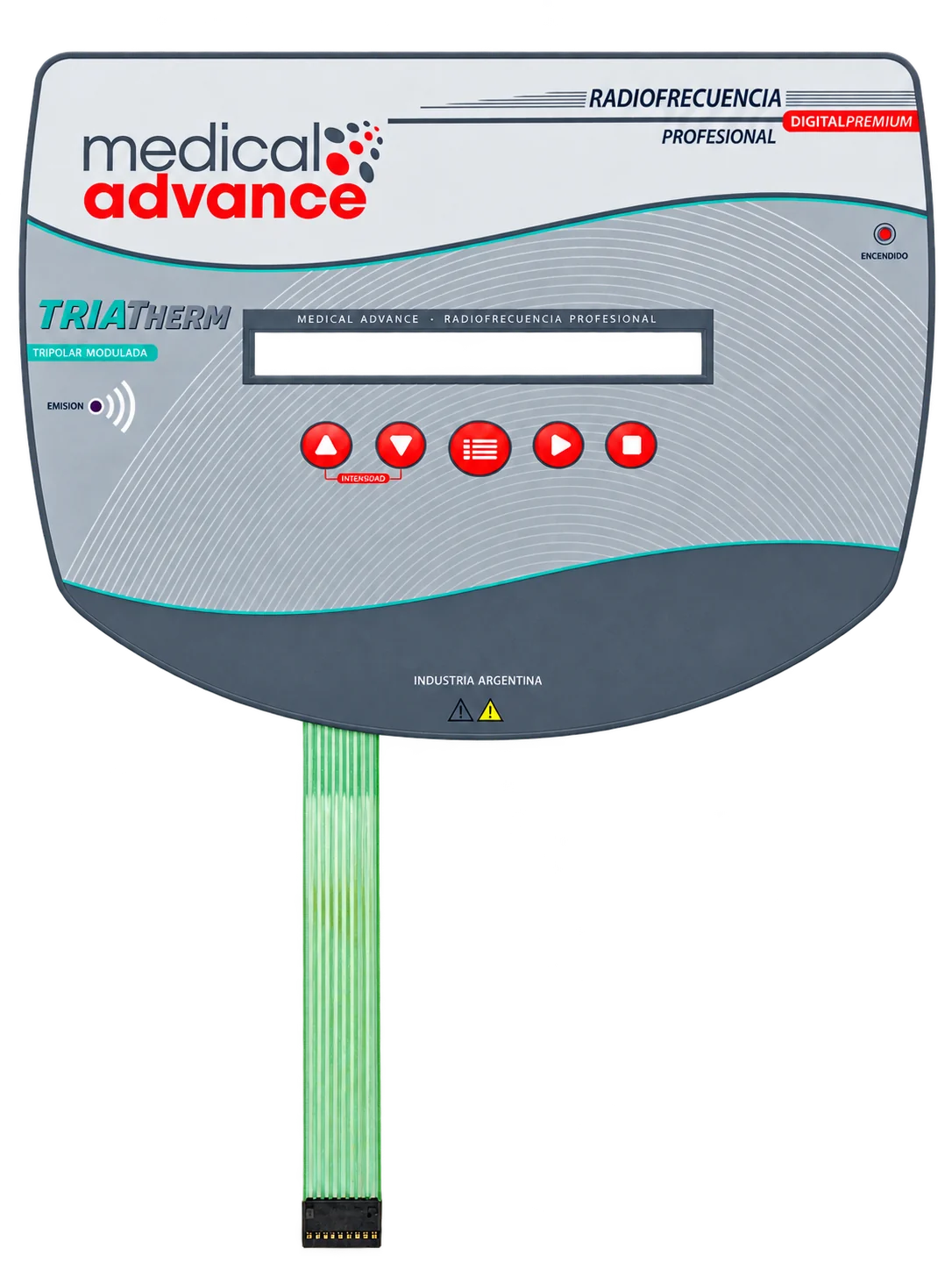
A real customer panel
An OEM membrane keypad for radiofrequency beauty equipment.
The product shown above is a JASPER customer project for radiofrequency beauty equipment. Its shaped face, five red control keys, long display opening and flexible connection tail show how the keypad is built around a particular machine.
Controls below the display
Intensity adjustment, a menu symbol and start/stop symbols sit together below the viewing area. For a new design, confirm the key functions and printed legends against the controller’s commands.
A defined viewing area
The long horizontal opening leaves space for the equipment display. Its position, visible area and clearance need to match the display behind it; the opening alone does not specify a sealed window.
Outline and tail considered together
The curved perimeter and extended tail are part of the panel geometry. Share the housing recess and internal connector position so outline, bonding area and cable route can be reviewed together.
Built to your front panel
Keep the controls, display and connection in one design.
A change to the window, a new button or a different connector can affect several layers of a membrane switch. Define those details together before the artwork and tooling are released.
Define the supply scope
Specify the part you need us to supply.
A printed front panel and a working membrane keypad are different deliverables. Identify what is already in your equipment and which parts belong in the quotation.
| Supply option | What to specify | When to consider it |
|---|---|---|
| Graphic overlay only | Printed face, outline, display and indicator openings, embossing and rear adhesive as required. | Your equipment already has the input switches or touch-sensing layer, and needs a matching graphic face. |
| Complete membrane keypad | Overlay, switching circuit, tactile or non-tactile keys, adhesive stack and tail or termination. | You need a functional keypad that connects to your controller, with the pin map and key response agreed before sampling. |
| Supported or integrated panel | Keypad plus the requested backplate, indicators or other assembly features. Confirm which components are supplied by each party. | Mounting and component alignment need to be reviewed together. Display, electronics and assembly responsibilities are defined in the project quotation. |
Within a complete keypad, printed PET, FPC and PCB-supported constructions are reviewed against the circuit, mounting and connection requirements—not selected from appearance alone.
Beauty equipment applications
Different machines. A project-specific keypad.
Radiofrequency aesthetic equipment, ultrasonic beauty devices and salon control units can require very different key maps, windows and connections. The membrane switch should follow the machine’s controls and enclosure, rather than reuse an unsuitable standard layout.
Explore beauty equipment interface applications →Radiofrequency equipment
Review intensity, mode and start/stop controls alongside the display opening and controller interface.
Ultrasonic & multifunction units
Organize program selection, timing and confirmation keys so the printed layout stays clear as functions are added.
Permanent makeup & salon equipment
Plan compact key groups, brand graphics and connection details around the available panel space.
Before production release
Check the sample in the equipment.
A loose keypad cannot show every fit or usability issue. Use the production-intent enclosure, display and mating connector when reviewing a sample, and agree the acceptance checks before moving into repeat orders.
Keep the approved drawing, artwork, circuit and reference sample under the same revision. If a window, connector or housing changes later, review the affected layers before reordering.
See our membrane switch manufacturing process →Sample review checklist
- Fit: outline, window alignment, bond area and enclosure clearances.
- Operation: key feel, spacing, readable legends and use with the intended gloves.
- Connection: pin map, connector engagement and an unobstructed tail route.
- Cleaning: appearance and bond condition after the agreed exposure routine.
- Release: documented electrical and visual acceptance criteria for the approved design.
Drawing, sample and repeat order
From your first drawing to an approved production sample.
Use the quotation and sample review to settle both the product details and the handover requirements. Agree any inspection records, material documents or special testing needed for your project before ordering.
Review the inputs
Send the available artwork, dimensions, key functions and connector details. Review open questions and the supply scope before confirming the quotation.
Confirm the sample definition
Agree the drawing and artwork revision, window dimensions, key layout, pin assignment and proposed construction. Confirm sample quantity and timing with the quotation.
Evaluate the assembled fit
Check the sample in the intended enclosure and controller setup. Record fit, key operation, connection and the agreed cleaning checks; resolve changes before production approval.
Release the approved revision
Use the agreed drawing, artwork and reference sample for repeat production. Define visual and electrical acceptance checks, packaging and any required inspection records in the order specification.
Start your custom project
Send what you have. We’ll help identify what is missing.
You do not need a complete membrane-switch specification to start a discussion. A panel drawing, clear sample photographs and an explanation of the controls give the engineering review a useful starting point.
The quotation depends on the construction, materials, artwork, quantities and assembly requirements. Sample timing and production terms are confirmed with the project quotation.
Useful information for your RFQ
- Panel outline, display dimensions and enclosure drawing.
- Artwork, key functions and required language versions.
- Tail length, direction, pin map and mating connector.
- Glove use, gels and the intended cleaning routine.
- Prototype quantity, expected order volume and target schedule.
Use the inquiry form for your contact and project details. Drawings can also be sent to [email protected].
Open the membrane switch RFQ checklist →Product questions
Beauty device membrane switch FAQ
Can you make a panel from our drawing or existing sample?
Yes. Send the panel outline, artwork or sample photographs, key functions and connection details. JASPER can review the structure and identify the information needed for a custom quotation and sample.
Can the panel include a display window and tactile buttons?
Yes. Display cutouts or covered windows can be combined with tactile keys and indicator positions. Window alignment, key spacing, stack thickness and the display or LED arrangement should be reviewed together.
Will it withstand our disinfectant or cleaning gel?
Compatibility depends on the specific substances and exposure. Provide the product names, concentrations, contact time, cleaning method and required test criteria so the proposed materials and assembled sample can be evaluated. A generic chemical-resistance claim is not a substitute for that review.
Can you match our existing connector and pin assignment?
Provide the connector part number or drawing, pin map, tail length and routing space. These details are reviewed with the circuit design; final compatibility is checked against the approved specification and sample.
Do you supply complete beauty machines or replacement keypads for any brand?
JASPER supplies custom interface components for OEM projects, not complete treatment machines. A replacement keypad requires a confirmed design and compatibility review; the product photograph does not establish compatibility with other models.
Have a beauty equipment panel in development?
Let’s review the graphics, keys, display and connection together.
Request a Project Review