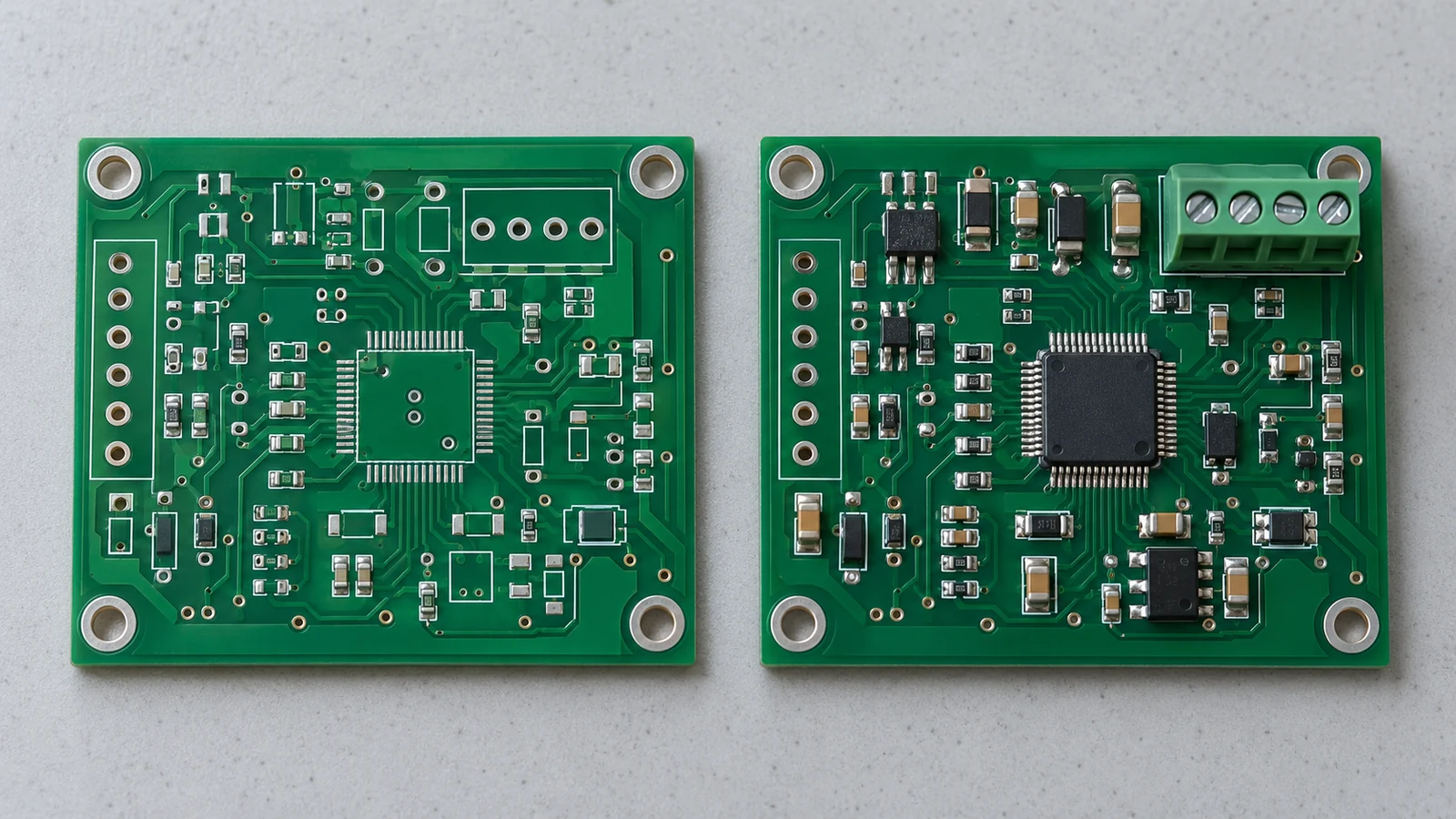
PCB assembly BOM variants let an OEM build different assemblies on a common bare-board design by controlling which components are fitted. A producible product variant also needs an approved connection between its populated BOM, firmware, configuration, label and test requirements. Manage that connection through one released variant record, not separate files selected from memory. Release a combination only when its hardware and software compatibility is approved, and verify the physical unit against that same record before shipment. 1
- Separate the Base Board from Each Assembly Variant
- A base-board-to-product configuration matrix
- Map Optional Components and DNP Rules by Variant
- Bind Firmware and Configuration to the Correct BOM
- Approve complete combinations, not independent menus
- Assign Product Labels and Orderable Part Numbers
- Keep Placement, Inspection and Test Programs Variant-Aware
- Release and Verify a Variant Without Mixing Configurations
- Resolve and review the release
- Challenge the production route
- Preserve the as-built configuration
- Specify Interfaces and Acceptance Documents
- Apply the Variant Model to Common OEM Tasks
- Industrial control with optional communications
- HMI with optional illumination
- Instrument with selectable sensing hardware
- Shared electronics with localized operation
- Service replacement and retrofit
- Prepare a Variant Package for JASPER
Separate the Base Board from Each Assembly Variant
The base board identifies the fabricated PCB; an assembly variant identifies its component population. Keep both separate from the finished-product configuration, which may include software and labeling. Assembly variants can share one bare board, whereas fabrication variants change the board-manufacturing outputs. Even changing the fabricated legend can invalidate the assumption of identical bare boards.
For release control, use a variant record that resolves the orderable item, base-board revision, populated BOM revision, firmware release, configuration revision, label artwork and test revision. Give the record an owner and an approved effectivity: the orders, lots or serial numbers to which it applies. A board revision alone is not a complete purchasing instruction.
Use a stable variant key, with document revisions stored in separate fields. Keep readable option descriptions alongside that key, and prohibit uncontrolled renaming or reuse. A descriptive alias helps people navigate the matrix; the approved identifier and revision fields must drive purchasing and production selection.
A base-board-to-product configuration matrix
The following documentation example uses LOCAL, LINK and LINK-LANG as configuration aliases, not manufacturer product numbers. It assumes a board designed for an optional communications circuit. LINK-LANG shares LINK hardware but uses a different language configuration and label. Actual circuit compatibility must be qualified before these relationships authorize a build.
| Configuration Element | Variant Identifier | Shared or Different | Controlling Record | Verification Step |
|---|---|---|---|---|
| Base-board revision | LOCAL, LINK, LINK-LANG | All use the same approved bare-board revision | Fabrication drawing and board item record | Match incoming board identity to the variant record |
| Populated BOM | LOCAL uses local BOM; LINK and LINK-LANG use communications BOM | LOCAL differs; the other two share hardware | Released BOM revision resolved by each variant record | Compare fitted reference designators, quantities and exact approved parts |
| Optional components | LOCAL omits communications group; LINK and LINK-LANG fit it | Group population differs by hardware configuration | Variant population rules covering transceiver, connector and supporting parts | Verify the complete group and its dependencies, not just the connector |
| Firmware image | LOCAL uses local application; LINK and LINK-LANG use communications application | Shared within the communications pair only | Approved image manifest and compatibility record | Verify image identity, programming result and reported application identity |
| Runtime configuration | LOCAL and LINK use primary language; LINK-LANG uses alternate language | LINK-LANG differs from LINK | Released configuration dataset | Read back the configuration identity and exercise the selected language |
| Product label | LOCAL, LINK and LINK-LANG each resolve to their own label identity | Different commercial configurations | Item master and controlled label artwork | Compare applied label with unit record and order line |
| Test configuration | LOCAL uses local test; LINK uses communications test; LINK-LANG adds language checks | Common tests plus explicit variant-specific coverage | Test procedure, fixture requirements and approved limits | Record the actual test revision, selected variant and results |
Treat each row as a controlled relationship, not an independently selectable option. A shared firmware image does not make two configured products interchangeable, and a shared label layout does not authorize identical label data.
Map Optional Components and DNP Rules by Variant
Optional components need explicit population rules for every released BOM variant. Define fitted parts, not-fitted parts and authorized substitutions; do not ask the assembler to infer omissions from a feature name. The following table distinguishes four component-variation cases.
| Component variation | Meaning in the variant | Production control |
|---|---|---|
| Fitted | Use the base component without a variant change | Resolve the approved part and required quantity |
| Not fitted | Leave the designated component unpopulated | Carry the DNP state into assembly and inspection instructions |
| Fitted with varied parameters | Keep the component fitted but vary an identified parameter | Resolve any purchasing-relevant change to an unambiguous part specification |
| Alternate part | Use a specifically selected replacement component | Approve electrical, package, manufacturing and test compatibility |
Keep the master design’s complete reference-designator set available, then export an unambiguous production BOM for the selected variant. A populated BOM can omit DNP rows when a companion assembly record identifies every intentional omission. Alternatively, an agreed BOM format can retain explicit population fields. Do not mix conventions without documenting how the receiving system interprets them.
Define optional circuits as dependency groups. In the example, the communications option includes its transceiver, connector and required supporting components. Approve the exact group against the schematic; do not assume every interface uses the same termination, bias or protection network. Separately identify mutually exclusive components and required default states when a circuit is absent.
Distinguish an approved sourcing alternative from a product option. A second approved manufacturer part may remain inside the same BOM identity when the OEM’s interchangeability rules permit it. A component that changes the delivered function needs configuration review, even when its footprint appears compatible. Preserve the actual consumed part in the build record either way.
For the receiving assembler, reconcile the BOM with placement data by reference designator. The referenced supplier describes the BOM as the part-identification record and the component placement list, or CPL, as the position, rotation and board-side record. Neither file alone defines the complete product variant. 3
Bind Firmware and Configuration to the Correct BOM
Firmware must be released against an approved hardware configuration, not merely a board name or the newest available software version. Specify the application image, relevant bootloader dependency, hardware target and configuration dataset. Keep unit-specific calibration and identity data separate from shared configuration so programming does not overwrite information that belongs to an individual assembly.
A build target can encode board revisions and qualifiers, making hardware distinctions explicit. Selecting that target does not itself qualify the OEM’s optional circuits; the released configuration still needs the applicable evidence.
Approve complete combinations, not independent menus
Use this compatibility matrix with the preceding documentation example. “Eligible” means the combination may enter the release process after project validation; it does not claim that a physical design has already passed testing.
| Hardware population | Firmware | Configuration | Label identity | Decision |
|---|---|---|---|---|
| Local BOM | Local application | Primary language | LOCAL | Eligible for the local release |
| Communications BOM | Communications application | Primary language | LINK | Eligible for the communications release |
| Communications BOM | Communications application | Alternate language | LINK-LANG | Eligible after language and interface verification |
| Local BOM | Communications application | Either language | LINK or LINK-LANG | Block: required communications hardware is absent |
| Communications BOM | Communications application | Alternate language | LINK | Block: label does not match the defined configured product |
The table is a whitelist model. Block every unlisted combination until the OEM adds an approved relationship. A universal image is possible only when the project explicitly supports every intended population and validates how hardware identity selects safe behavior.
Record an immutable image identifier and a cryptographic digest in the release manifest. Verify the programming input against that manifest, then perform the approved programming verification and functional checks. A displayed version string is useful traceability information, but do not make it the only check of which binary was loaded. Where memory protection prevents readback, use the approved programming verification method and application identity checks; do not disable protection simply to obtain a comparison.
Verify hardware identity against independent population evidence. Writing a configuration code and reading it back proves the code was stored, not that the optional circuit is present. Treat a file digest as an identity check; authenticate the release manifest through the approved release process.
Keep image identity, authenticity and compatibility separate. Version, image-dependency and signing controls address different release questions. A valid signature does not prove that an optional circuit is fitted or electrically compatible. Make a separate hardware-compatibility decision and run the applicable production tests.
Assign Product Labels and Orderable Part Numbers
Product labels and orderable identifiers must resolve to the delivered configuration, including software-controlled differences that the buyer needs to distinguish. Keep the OEM’s item master authoritative: the configuration aliases above explain relationships and must not replace actual approved purchasing identifiers.
Separate the bare-board identifier, assembled hardware identifier and finished product identifier. Depending on the OEM’s numbering policy, LINK and LINK-LANG could share an intermediate PCBA item while becoming different configured items later. Record exactly where that distinction is introduced and which operation owns it.
Create a distinct orderable identity when the customer must select the configuration separately or when the alternatives are not interchangeable under the approved supply agreement. A compatible maintenance firmware release may instead stay within an existing item and move through revision or effectivity control. Do not encode every software patch in a new commercial number by default.
Specify label artwork revision, approved content, location and the source of variable data. Generate the label from the unit’s released configuration record after required programming and testing. At pack-out, compare the physical unit identity, test record, applied label and order line; scanning a label without checking its association with the unit is insufficient.
Control reprints and relabeling as exceptions. Record why the label changed, who authorized it and how the old label was removed or invalidated. A label correction must never silently convert an incorrectly configured unit into the ordered product.
Keep Placement, Inspection and Test Programs Variant-Aware
Placement, inspection and test instructions must resolve to the same released variant as the BOM. Shared geometry is a reason to reuse validated program elements, not a reason to select one unchecked program for every assembly.
Check export settings as well as filenames. Placement-data exports may include variant and filtering controls alongside coordinates, rotation and side. Inspect the generated file instead of assuming that the active design view determines every export correctly.
Compare the actual placement set with the selected BOM, accounting for documented hand-fitted parts and non-component items. Review feeder assignments, substitutions and connector-specific handling against the selected population. Confirm whether paste application can be shared or requires a different stencil or dispensing program; a common bare board does not decide that process question.
For automated optical inspection, or AOI, use variant-specific expected presence and absence. An approved DNP position should not trigger a missing-component defect, but the same position may need an unexpected-component check. Do not suppress an entire inspection region to eliminate a nuisance alarm when adjacent joints still require coverage.
Define functional testing as common coverage plus variant-specific checks. LOCAL needs its intended local functions verified; LINK also needs communications checks; LINK-LANG adds the configured language and interface checks. Define expected behavior for absent features rather than silently removing every associated test.
Use the same discipline for in-circuit testing where applicable. Approve which tests are required, intentionally not applicable or prohibited for the selected hardware. Store the selected recipe and revision with results so a passing record identifies what was actually tested.
Release and Verify a Variant Without Mixing Configurations
Release a variant only when its orderable identity resolves to a consistent configuration and the production route verifies that configuration. For this workflow, use explicit hold points rather than relying on a final visual check to discover mismatched files.
The control path is: orderable item and effectivity → approved variant record → resolved BOM and manufacturing outputs → verified population → approved programming and configuration → variant-specific testing → verified label and shipment identity. Any disagreement returns the unit or release package to a controlled hold.
Resolve and review the release
The OEM configuration owner authorizes the permitted combination. Hardware engineering approves population dependencies, firmware engineering approves image and configuration compatibility, manufacturing engineering accepts usable process outputs, and quality approves verification coverage. One person may hold several roles, but each decision still needs an accountable owner.
Compare all files against the same release record before production. Resolve reference-designator differences, incompatible revisions, missing label rules and ambiguous software selection at this point. Record package identity and applicable effectivity so an approved change cannot unintentionally alter work already in progress. Freeze the approved exports together and compare the package manifest before each build. Check that the supposedly shared fabrication outputs remain identical; unexpected copper, drill or legend differences require resolution outside an assembly-only variant assumption.
Challenge the production route
Qualify each distinct assembly or configured-product route, reusing evidence only where engineering has justified commonality. Use controlled challenge records or safe test conditions to check rejection of the wrong firmware, wrong configuration, wrong inspection recipe and wrong label. Never energize an incompatible hardware combination merely to demonstrate that a control fails.
At changeover, remove the previous variant’s kits and label stock, resolve remaining work in progress, and confirm the new recipe selection. Where different variants share a panel or fixture, require positive unit-position identification and a qualified routing method before using mixed processing.
Preserve the as-built configuration
Keep the as-built record separate from the latest design record. Associate each tracked unit or lot with its consumed BOM, actual approved substitutions, programmed image, configuration, test results and label identity. Capture calibration references where applicable without exposing production secrets in ordinary shipment documents.
After repair, component substitution or reprogramming, repeat the affected verification and any required regression checks. Retain the previous identity in the history. Do not release the unit until its current physical condition and its record agree with the order.
Specify Interfaces and Acceptance Documents
Variant specifications should define how every receiving operation interprets the released configuration. Agree the identifier format, revision fields, BOM population convention, placement units and coordinate origin, board-side convention, programming access, fixture interface, label data source and test limits before the package is approved. These are project-specific interface requirements, not universal numerical thresholds.
Keep workmanship acceptance separate from configuration acceptance. IPC’s public J-STD-001 program description covers soldered connection acceptance and assembly requirements. The contract should name the applicable standard revision and any agreed additions; the variant record must separately determine which hardware and software the customer ordered. Do not use a generic workmanship pass as the release decision for the configured product. 7
Define precedence and discrepancy handling in the supplier agreement. When the BOM, drawing or software manifest disagrees, place the affected build on hold and obtain an approved resolution. Do not ask production personnel to choose whichever document looks newest.
Apply the Variant Model to Common OEM Tasks
A variant model is useful when a shared hardware platform supports different orderable functions. The following are application scenarios for planning configuration controls, not claims about completed customer projects.
Industrial control with optional communications
For a local controller and a network-enabled controller, bind the full communications population to the correct application and connector label. Test the enabled interface and verify defined behavior when the interface is absent. A connector fitted without its required supporting circuit is not an acceptable intermediate interpretation of the option.
HMI with optional illumination
For an illuminated and non-illuminated interface, review the LED population, current-control parts, firmware behavior and front-panel artwork together. Release the illuminated combination only after its electrical and optical requirements are verified. Keep the shared switch functions in the test scope for both configurations.
Instrument with selectable sensing hardware
For alternative sensor or measurement populations, link the approved component selection to input configuration, calibration procedure and test limits. Do not reuse calibration data merely because the bare-board identifier matches. Record which calibration dataset belongs to each physical unit.
Shared electronics with localized operation
For language-specific products, identify whether only artwork changes or whether firmware resources and runtime settings also change. LINK and LINK-LANG illustrate a shared-hardware case. Verify that displayed instructions and physical legends agree with the ordered language, including the behavior after a factory reset.
Service replacement and retrofit
For a replacement assembly, specify the installed equipment configurations it is allowed to support. Verify the approved connector, firmware and configuration relationship before dispatch. Treat any required conversion or reprogramming as a controlled operation rather than assuming that a later board revision replaces every earlier variant.
Frequently Asked Questions
Can one bare-board revision support several PCBA part numbers?
Yes, one bare-board revision can support several PCBA part numbers when the released design supports their different component populations. Each assembly identity must resolve to its approved BOM and associated manufacturing requirements. Keep firmware, configuration, testing and final product labeling linked separately wherever those elements distinguish the delivered product.
How should optional components be represented across variants?
Represent optional components with explicit population states for every affected reference designator. Group dependent parts and identify mutually exclusive choices. Export a production BOM and assembly instructions that agree for the selected variant, and document how the receiving system handles DNP positions instead of relying on omissions or informal notes.
Should different firmware images create separate assembly variants?
Different firmware images require controlled configuration identities, but they do not automatically require different hardware assembly part numbers. Create separate orderable identities when the customer must distinguish the products or interchangeability changes. Otherwise, manage compatible firmware updates through the approved revision and effectivity policy while preserving each unit’s programmed identity.
How can inspection avoid flagging a valid DNP configuration?
Inspection should select the expected population from the same released variant record as the BOM. Configure missing-component and unexpected-component checks accordingly, without disabling unrelated defect coverage. Verify recipe selection during setup and retain its identity with inspection results so a valid omission cannot become a blanket inspection exemption.
What prevents the correct board from shipping with the wrong variant label?
Bind label generation to the unit’s verified configuration and compare the applied label against its identity, test record and order line at pack-out. Control reprints and relabeling, and hold mismatches for resolution. Correct hardware alone is insufficient when firmware, configuration or commercial identity differs from what the customer ordered.
Can one firmware image support several BOM variants?
Yes, one image can support several BOM variants when the project explicitly validates that arrangement. Define how the software recognizes or receives the hardware configuration, how absent functions behave and which settings are allowed. Verify the selected configuration during production rather than assuming that successful programming proves hardware compatibility.
Can different variants share placement and test programs?
Different variants can share validated program elements, but each production route must select the correct population and test requirements. Approve variant-specific parameters or recipes and retain their revisions with the results. Shared geometry does not authorize identical placement, inspection, programming or functional coverage for every product configuration.
What should an OEM send when requesting a multi-variant assembly quote?
Send the common fabrication package, each populated BOM, the variant mapping, assembly and placement data, firmware and configuration requirements, label rules and test requirements. Include quantities by variant, approved sourcing alternatives and responsibility for fixtures and programming. Ask the supplier to identify configuration ambiguities before accepting the production release.
Prepare a Variant Package for JASPER
Prepare one configuration matrix that connects each orderable item to the common board, populated BOM, options, firmware, configuration, label and test requirements. Include the approved combinations, prohibited combinations, quantities by variant and the owner of every release decision.
For a JASPER PCB assembly services review, provide the fabrication package, variant-specific assembly outputs, programming requirements and acceptance criteria together. Identify whether configuration and labeling occur at PCBA assembly or during a later product integration stage.
Close the review by confirming one practical question: can the supplier select, build, test and identify the ordered variant without making an undocumented configuration choice? Authorize production only when the answer is yes.
Ready to Start Your Project?
Tell us about your membrane switch, keypad, or graphic overlay requirements. Our engineering team will review your specifications and provide a detailed quote.