
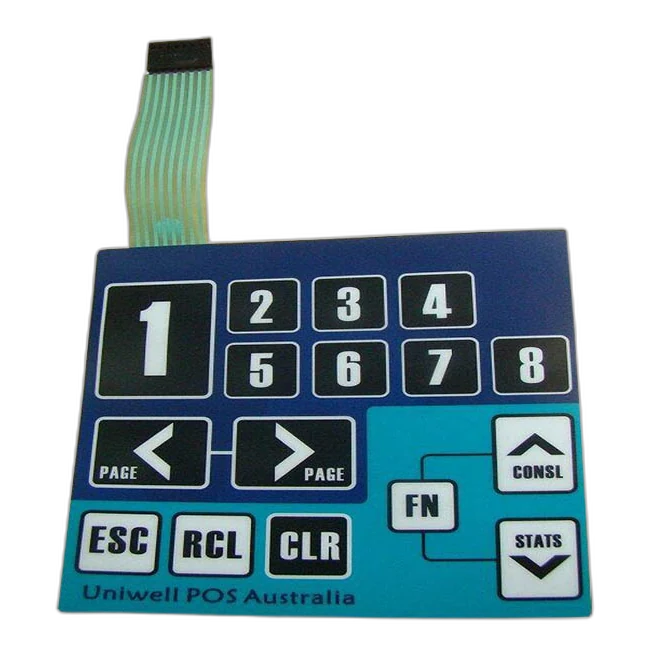
メンブレンスイッチはどのように機能しますか?
メンブレン スイッチは、印刷されたキー領域に圧力がかかるとコンタクト層またはメタル ドームがスペーサー開口部を通って移動し、電気回路を閉じることによって機能します。
テクニカル リファレンスでは、購入者にとって物理的な動作が簡単に説明されていますが、レイヤー スタック、触感、コネクタの配線、サンプルの承認要件を定義するのに役立つ十分なエンジニアリングの詳細が含まれています。
簡単な答え: 圧力により、制御された電気経路が閉じます。
メンブレン スイッチは、前面のオーバーレイに圧力がかかると、接触層またはメタル ドームを介して回路が閉じられます。スペーサーは作動するまで接点を分離したままにし、印刷されたトレース、テール、コネクターが製品の電子機器に信号を伝えます。
キーが押されると何が起こるでしょうか?
シーケンスは単純ですが、各層は同じ動き、電気経路、および戻り動作をサポートする必要があります。
ユーザーは、グラフィック オーバーレイ上の定義されたキー領域を押します。目に見えるオーバーレイは単なる装飾ではありません。プレスを導くのはタッチ面です。
オーバーレイと上部スイッチ層は、アクティブ キー ゾーン内で下に移動します。キーのサイズ、オーバーレイの厚さ、エンボス加工、エンクロージャーのサポートがこの動きに影響します。
スペーサーは、静止状態で接点を離した状態に保ちます。キー開口部では、回路接点に向かって制御された動きを可能にする構造になっています。
導電性接触領域または金属ドームが下部回路接触と接触します。これにより、そのキーまたはマトリクス位置の電気経路が閉じられます。
信号は、印刷されたトレース、フレキシブルテール、コネクタシステムを通って製品の電子機器に伝わります。
コントローラーは閉回路をオペレーター入力、LED コマンド、キーパッド信号、またはその他の定義された機能として読み取ります。
プレスが放された後、ドーム、フィルム、スペーサーによってキーが開いた静止位置に戻ります。
Which layers make the switch work?
A membrane switch is a stack. The circuit does not work correctly unless the overlay, spacer, contact, tail, adhesive, and enclosure support each other.
| Layer or area | Role in the working principle | Design details to confirm |
|---|---|---|
| Graphic overlay | Provides the visible press surface and protects the printed legends | Material, thickness, finish, embossing, window areas, cleaning exposure |
| オーバーレイ adhesive | Bonds the front layer to the switch stack without blocking key motion | Adhesive type, lamination quality, bubbles, edge condition, material compatibility |
| Spacer layer | Keeps contacts separated until the key area is pressed | Spacer thickness, opening size, registration, venting path, sealing path |
| Metal dome or upper contact | Moves downward to close the circuit and may create tactile click feedback | Dome force, dome diameter, contact stability, snap ratio, support surface |
| Lower circuit contact | Receives the moving contact and completes the electrical path | Conductive ink, PCB/FPC support, contact size, oxidation and contamination control |
| Printed traces and matrix | Carry the signal from each key area toward the tail | Trace width, matrix layout, common lines, LED routing, short/open test plan |
| Tail and connector | Transfer the signal to the product electronics | Tail length, exit direction, pitch, pinout, contact side, stiffener, bend radius |
| Rear adhesive and enclosure | Hold the assembly in place and support the pressing action | Housing material, surface texture, installation pressure, gasket or sealing needs |
Why some membrane switches click and others do not
The electrical idea is the same: close the circuit. The user feel changes depending on the contact structure and mechanical support.
| Type | 仕組み | When buyers choose it |
|---|---|---|
| 触覚メンブレンスイッチ | A metal dome or formed feature snaps down and closes the contact, giving a noticeable click | When operators need press confirmation by feel, such as control panels, keypads, and industrial equipment |
| Non-tactile membrane switch | The contact closes without a strong mechanical click, often creating a flatter and quieter press | When a low-profile surface, simple interface, or softer feel is preferred |
| Metal dome membrane switch | A stainless steel dome controls snap feel, actuation force, and contact closure | When consistent key feel and defined force are important in sample approval |
| PCB/FPC supported switch | The circuit or connector area uses PCB or FPC support for routing or stability | When the electronics interface, LED routing, or connector area needs more structure |
What changes the press feel and signal reliability?
A bench sample can close the circuit, but the real product depends on the complete stack and the enclosure behind it. These details should be checked before production approval.
- オーバーレイ thickness and material affect flexibility and operator feel.
- Dome force, dome size, and support surface affect tactile click and return.
- Spacer thickness and opening accuracy affect travel and contact timing.
- Tail exit direction and bend radius affect trace stress during assembly.
- Connector pitch, pinout, contact side, and stiffener affect installation reliability.
- Adhesive and enclosure flatness affect how the key area is supported.
- Backlighting, LED windows, and dead-front icons add opacity and alignment requirements.
- Waterproof or cleanable designs need sealing review beyond the switch circuit.
RFQ note: Send the drawing, artwork, circuit or pinout, connector requirement, tail route, key feel target, enclosure material, and application environment. A switch can work electrically but still fail assembly if the tail, adhesive, or enclosure support is wrong.

Common design variations that change how the switch is built
The working principle stays similar, but the stack changes when lighting, sealing, connector, or circuit support requirements are added.
LED and backlit versions
LED indicators, backlit icons, and light guide films require circuit routing, opacity control, and window alignment to be reviewed together.
Waterproof versions
Sealing depends on overlay continuity, adhesive bonding, edge design, tail exit, enclosure support, and project-specific exposure.
PCB/FPC versions
PCB or FPC support can help with dense circuits, LEDs, connector stability, or rigid areas behind the interface.
Embossed key versions
Rim embossing or key embossing can help users locate buttons, but it changes feel, forming limits, and stack behavior.
Dead-front graphics
Hidden icons appear only when lit, so printing opacity, LED position, and light blocking become part of the working design.
Custom connector versions
ZIF, crimp, pin header, solder pad, and custom tail options change assembly method, test plan, and serviceability.
When a membrane switch does not work as expected
Failure symptoms usually point to a layer, connector, assembly, or environment issue. Use these symptoms to describe the problem more clearly during troubleshooting.
| Symptom | Possible cause | What to review |
|---|---|---|
| No signal from a key | Open trace, wrong pinout, poor connector contact, contact contamination | Continuity test, pinout, connector insertion, contact side, short/open report |
| Wrong signal or swapped keys | Matrix or pinout mismatch between switch and electronics | Circuit drawing, controller mapping, tail orientation, connector numbering |
| Intermittent signal | Sharp tail bend, unstable ZIF insertion, weak contact, enclosure stress | Bend radius, stiffener thickness, strain relief, full assembly test |
| Weak or inconsistent click | Dome force, spacer height, overlay thickness, support surface, adhesive stack | Actuation force review, dome selection, enclosure backing, sample comparison |
| LED or icon not aligned | LED position, window tolerance, printing registration, light guide placement | Artwork revision, LED layout, window tolerance, opacity/light blocking |
| Water or cleaning failure | Edge path, tail exit, adhesive mismatch, enclosure sealing problem | Sealing path, adhesive choice, housing surface, exposure requirement |
Continue from the working principle
Related resources cover product selection, connector design, switch types, and RFQ preparation.
Detailed questions about how membrane switches work
Do all membrane switches click?
No. 触覚メンブレンスイッチes usually use metal domes or formed structures to create a click response. Non-tactile membrane switches close the circuit without the same mechanical feedback.
How does a membrane switch connect to electronics?
Most designs use a flexible tail with a ZIF connector, crimp connector, pin header, solder pad, PCB/FPC support, or a custom connector. Pitch, pinout, contact side, stiffener, and bend radius should be defined before sampling.
Can a membrane switch include LEDs or backlighting?
Yes. LED indicators, backlit icons, light guide films, and dead-front graphics can be integrated when the circuit, printing opacity, spacer, and window design are reviewed together.
What keeps the circuit open before the key is pressed?
The spacer layer and contact geometry keep the conductive areas separated. The circuit closes only when pressure moves the contact area through the spacer opening.
Why does key feel change between samples?
Key feel can change because of dome force, overlay thickness, spacer thickness, key size, embossing, adhesive stack, PCB/FPC support, and the enclosure behind the switch.
Is the working principle different for waterproof membrane switches?
The circuit closure principle is the same, but waterproof designs must also review edge sealing, adhesive bonding, tail exit, enclosure support, and exposure conditions.
Can JASPER review an existing switch and explain how it works?
Yes. A sample, photo, drawing, circuit note, connector information, and known failure symptoms can be reviewed to identify the likely stack and working path.
What should be confirmed before production?
Confirm the layer stack, key layout, tactile or non-tactile feel, circuit, pinout, connector, tail route, adhesive surface, environment, backlighting, inspection method, and sample approval criteria.
Planning a switch structure or troubleshooting a sample?
Send your drawing, sample photo, circuit notes, connector requirement, and application environment. JASPER can review the circuit path, stack-up, connector route, and sample risks before production.
Request a Technical Review