
DER GRUNDLAGENLEITFADEN
Was ist eine Folientastatur?
Aufbau verstehen. Optionen vergleichen.
Die passende Bedienschnittstelle für Ihr Gerät spezifizieren.
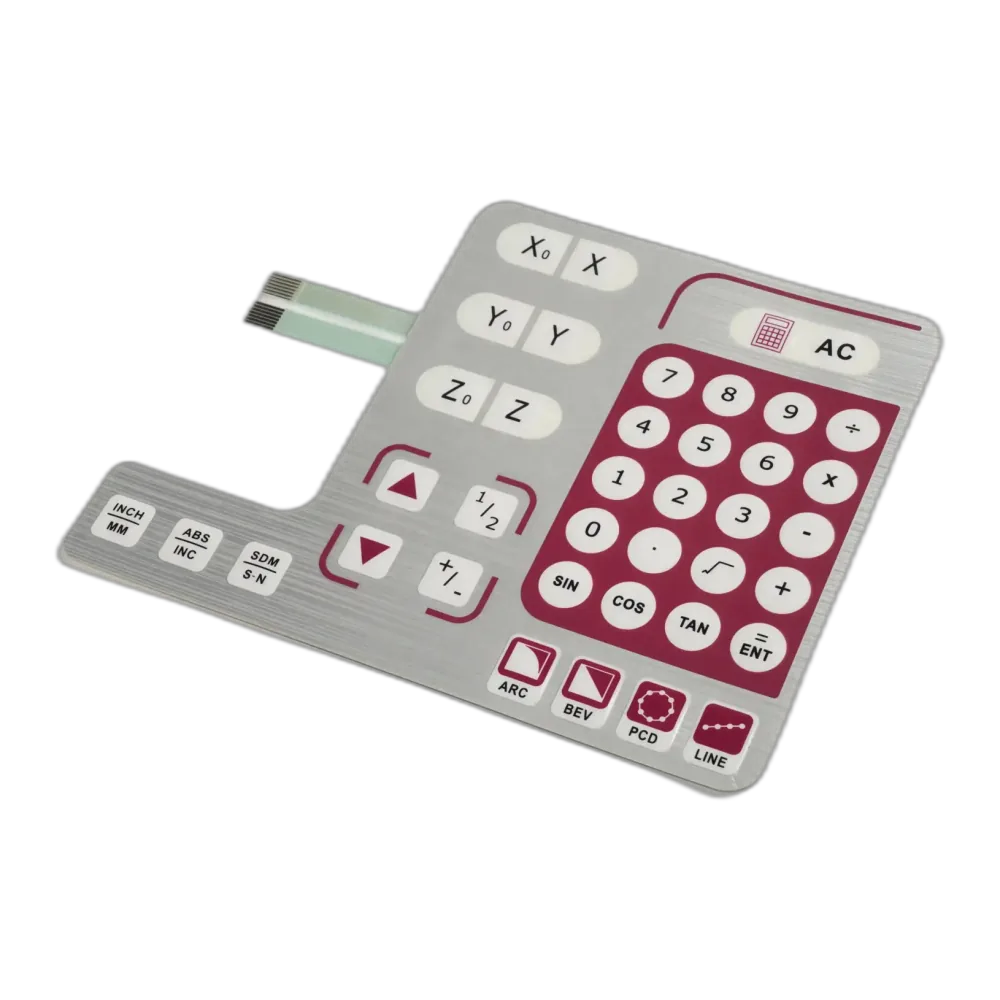
Folientastatur · bedruckte Front und flexibler Anschluss
Die 12 Kapitel entdecken
Eine Folientastatur ist eine flache elektrische Schaltbaugruppe, mit der Benutzer Geräte durch Drücken gekennzeichneter Tastenflächen bedienen. Sie verbindet Druckgrafik, elektrische Kontakte, Schaltungslagen und Klebstoffe zu einer flachen Schnittstelle. Beim Drücken schließt sich ein Stromkreis; beim Loslassen öffnet er sich normalerweise wieder. Die Gerätesteuerung erkennt diese Änderung und reagiert auf den Befehl.
Die sichtbare Oberfläche kennzeichnet Funktionen wie Ein/Aus, Einstellungen oder Navigation, während die darunterliegende Schaltung den Kontakt schaltet. Eine Folientastatur ist daher mehr als ein bedrucktes Etikett: Sie ist ein funktionales Eingabegerät.
Für Entwicklung und Einkauf hilft das Verständnis des Aufbaus, eine Frontplattenzeichnung in eine umsetzbare Spezifikation zu überführen. Dieser Leitfaden erklärt Funktionsweise, Werkstoff- und Schaltungsoptionen sowie wichtige Punkte vor der Anfrage eines kundenspezifischen Designs.
Wie funktioniert eine Folientastatur?
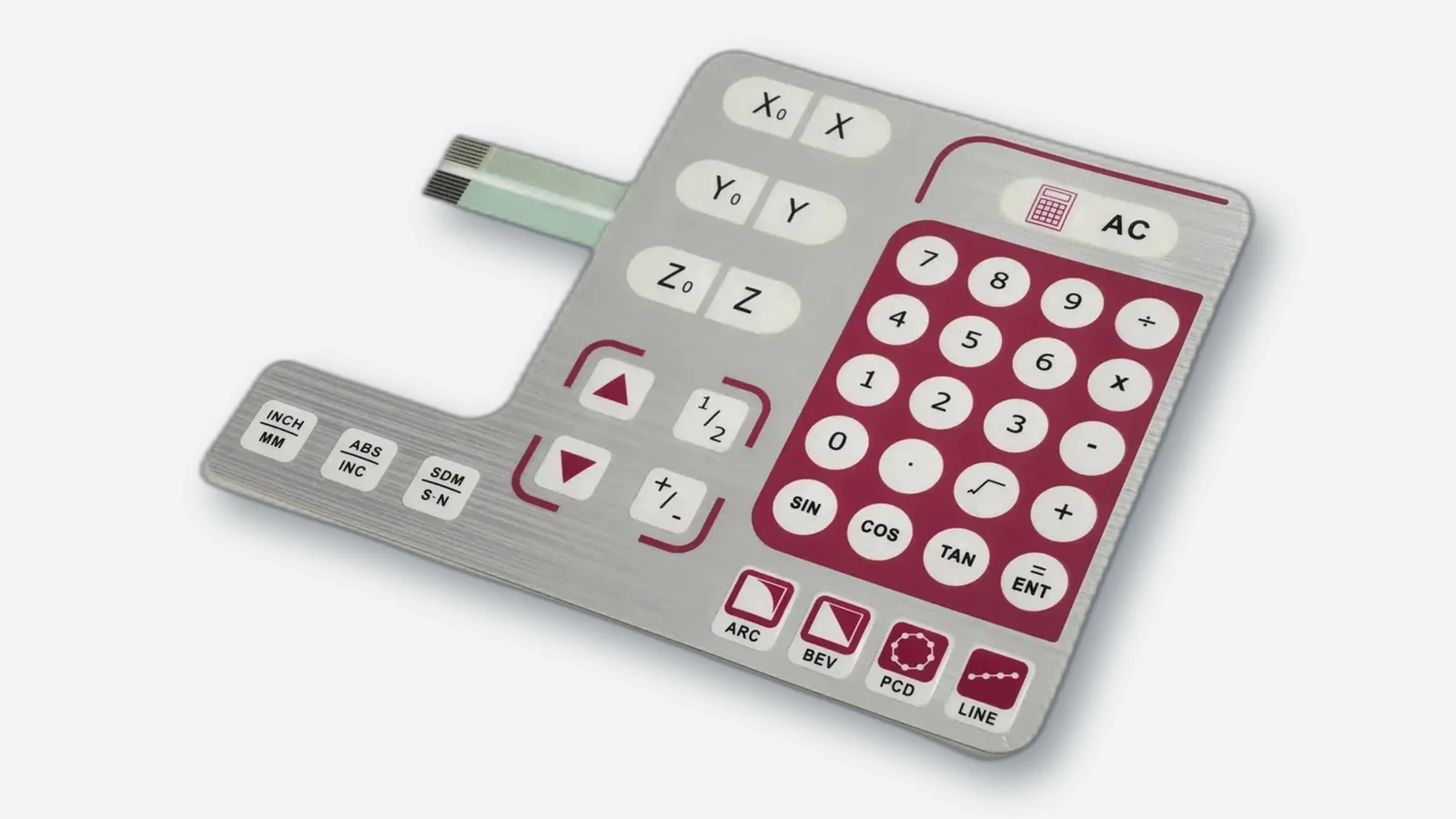
Die meisten konventionellen Folientastaturen arbeiten mit tastenden Schließerkontakten. Bei gedruckten Kontakten hält ein Abstandshalter leitfähige Flächen auseinander. Druck auf die flexible Tastenfläche bringt sie zusammen und stellt die elektrische Verbindung her. Nach Entlastung trennen sie sich wieder. Üblicherweise liefert die Tastatur ein Steuersignal bei niedriger Spannung und geringem Strom, statt die Leistungslast einer Maschine direkt zu schalten.
Taktile Folientastaturen
Eine taktile Folientastatur bietet einen spürbaren Schnappeffekt beim Drücken. Häufig erzeugt ihn ein Metalldom aus Edelstahl oder ein geformter Polyesterdom. Der Metalldom verformt sich, überbrückt Schaltungskontakte und kehrt nach dem Loslassen in seine Ausgangsform zurück. Der Bediener erhält dadurch eine mechanische Rückmeldung.
Nichttaktile Folientastaturen
Eine nichttaktile Folientastatur schließt ihre Kontakte ohne ausgeprägten Schnappeffekt. Das Gerät kann die Eingabe durch Licht, Ton oder eine Anzeige bestätigen. Beide Varianten können Steuereingaben liefern; der Unterschied betrifft das Bediengefühl, nicht das Vorhandensein einer elektrischen Funktion.
Elektrische Signale und Gerätesteuerung
Die Kontakte liefern ein Eingangssignal, keine Kommunikationsschnittstelle. Die Steuerung stellt die Erfassungsschaltung bereit, wertet den Kontaktschluss aus und bestimmt die Reaktion des Geräts. Eine gedruckte Tastatur gibt nicht von sich aus USB, CAN oder ein anderes Digitalprotokoll aus; dafür ist zusätzliche Elektronik nötig.
Spezifizieren Sie zulässige Erfassungsspannung und -strom, maximalen Widerstand im geschlossenen Zustand und die erforderliche Isolation bei geöffnetem Kontakt. Diese Grenzen müssen zum gesamten Pfad über Anschlussfahne, Leiterbahnen, Kontakte und Steckverbinder passen, nicht nur zum Dom. Versorgung und Ansteuerung der LEDs benötigen eine eigene Schaltungsdefinition.
Matrixverdrahtung und Ghosting
Eine Matrix verbindet Tasten zwischen Zeilen und Spalten, deren Schnittpunkte die Steuerung erkennt. Eine 4 × 4-Matrix stellt beispielsweise 16 Tastenpositionen mit acht Zeilen-/Spaltenleitungen bereit, ohne Beleuchtung und weitere Anschlüsse. Weniger Anschlussleitungen stehen zusätzlicher Abfragelogik und der Behandlung von Mehrfachtastendrücken gegenüber.
Mehrere gleichzeitige Tastendrücke können bei manchen Abfrageverfahren mehrdeutige Strompfade erzeugen. Die Steuerung meldet dann unter Umständen eine gar nicht gedrückte Taste: Ghosting. Definieren Sie erlaubte Tastenkombinationen vor der Auswahl von Matrix, Abfrageverfahren und möglichen Entkopplungsdioden. Eine Firmware, die mehrdeutige Kombinationen verwirft, ist nicht dasselbe wie eine Hardware, die sie korrekt unterstützt.
Kontaktprellen und Entprellung
Ein schließender Kontakt kann vor dem stabilen Zustand kurz mehrfach öffnen und schließen. Ohne Entprellung kann die Elektronik einen Tastendruck mehrfach zählen. Die Entprellung übernimmt die Steuerung oder Schnittstellenschaltung, nicht die Druckgrafik.
Messen Sie das Kontaktverhalten und legen Sie Erfassungszeiten fest, die Prellen unterdrücken und zugleich die geforderte Reaktion auf kurze, gehaltene und losgelassene Tasten bewahren. Eine unverändert von einem anderen Produkt übernommene Verzögerung ist keine Abnahmeprüfung.

Aus welchen Schichten besteht eine Folientastatur?
Es gibt keine für alle Designs gültige Schichtzahl. Gedruckte Kontakte, Metalldombaugruppen und PCB-basierte Schnittstellen können unterschiedlich aufgebaut sein. Die folgende Tabelle beschreibt übliche Komponenten, keinen zwingenden Aufbau für jedes Produkt.
| Schicht oder Bauteil | Hauptfunktion |
|---|---|
| Dekorfolie | Zeigt Beschriftungen, Symbole, Farben und Marken; kann geprägte Tasten und transparente Fenster enthalten. |
| Klebeschicht der Dekorfolie | Verbindet die bedruckte Front mit den darunterliegenden Lagen. |
| Domhalter oder obere Kontaktlage | Fixiert taktile Dome oder trägt bewegliche Kontakte, abhängig vom Design. |
| Abstandshalter | Hält Kontakte getrennt und schafft Raum für die Schaltbewegung. |
| Schaltungslage | Führt Leiterbahnen zwischen Tasten, Anzeigen und elektrischem Anschluss. |
| Rückseitige Klebeschicht | Befestigt die Baugruppe an der Montagefläche. |
| Optionale Träger- und Funktionslagen | Stellen bei Bedarf einen starren Träger, Beleuchtung oder elektrische Abschirmung bereit. |
Die genaue Anordnung hängt vom Schaltmechanismus und den spezifizierten Zusatzfunktionen ab.
Die Schichten müssen zusammenwirken. Dekorfolie, Abstandshalter und Auflagefläche beeinflussen das Tastengefühl; die Auswahl eines Doms allein bestimmt nicht die gesamte Betätigungskraft. Auch Anschlüsse benötigen Gehäuseraum, unabhängig davon, ob eine flexible Anschlussfahne oder ein Leiterplattenanschluss verwendet wird.
Die Zeichnung sollte zudem lokale Dickenänderungen an Domen, LEDs, Fenstern und Verstärkungen zeigen. Eine nominelle Gesamtdicke sagt nicht, ob das Gehäuse unbeabsichtigt auf eine Taste drückt oder deren Bewegung behindert. Halten Sie Dichtflächen, Bauteilräume und Steckerausgänge in der Konstruktion frei.
- Grafikfolie
- Klebstoff der Grafikfolie
- Domhalter und Metalldome
- Abstandshalter und Betätigungsraum
- Schaltung mit Kontakten
- Rückseitiger Klebstoff
Welche Werkstoffe werden in Folientastaturen verwendet?
Die Werkstoffe erfüllen unterschiedliche Aufgaben: Die Dekorfolie ist Benutzer und Umgebung ausgesetzt, die Schaltung führt Signale, und Klebstoffe verbinden Lagen und Gehäuse. Vergleichen Sie konkrete Werkstofftypen für ihre jeweilige Lage, nicht isoliert die Polymernamen.
Dekorfolien aus Polyester und Polycarbonat
Polyester, meist PET genannt, und Polycarbonat, kurz PC, werden häufig für Dekorfolien verwendet. Beide ermöglichen Druckgrafiken, Fenster und verschiedene Oberflächen. Berücksichtigen Sie wiederholte Biegung in Tastenbereichen, Optik, Reinigungsbelastung und gewünschtes Finish statt nur den Polymernamen.
Hartbeschichtete Folientypen können Abrieb- und Chemikalienbeständigkeit sowie unterschiedliche Texturen bieten. Diese Eigenschaften hängen jedoch vom konkreten Film und seiner Beschichtung ab. Eine Folie für Innenraum-Bedienfelder sollte nicht automatisch für langfristige Außenbewitterung spezifiziert werden.
| Werkstoff und Aufgabe | Sinnvolle Auswahlrichtung | Zu prüfen |
|---|---|---|
| PET-Dekorfolie | Wiederholt gebogene Tastenflächen; strukturierte oder klare Schutzoberflächen | Dicke, Prägegeometrie, Hartbeschichtung, Reinigungsverträglichkeit und spezifizierte UV-Belastung |
| PC-Dekorfolie | Klare Fenster und Grafiken bei geeignetem Folientyp und Finish | Tatsächliche Biegebeanspruchung, Chemikalienverträglichkeit, Kratzschutz und Außeneignung |
| Wärmestabilisierte PET-Schaltungsfolie | Gedruckte Leiterstrukturen in einer dünnen laminierten Tastatur | Tintenhaftung, Druck-/Aushärtungsverträglichkeit, Maßstabilität und Bauteilbefestigung |
| Polyimid-FPC-Substrat | Geätzte Kupferleiterbahnen und Lötverbindungen | Biegezonen, Deckfolie, Verstärkungen, Bauteilabstützung und Steckerschnittstelle |
PET und PC sind beide als hartbeschichtete Interfacefolien verfügbar; keiner der Namen garantiert eine bestimmte Außen- oder Reinigungsbeständigkeit. Wärmestabilisierte PET-Schaltungsfolien und Polyimid-FPC-Substrate sind nicht mit dem Material der sichtbaren Dekorfolie gleichzusetzen.
Oberflächen und Fenster
Bedienfläche und Anzeigefenster können unterschiedliche optische Eigenschaften benötigen. Ein strukturiertes Finish kann um die Tasten sinnvoll sein, während das Sichtfenster höhere Klarheit erfordert. Legen Sie für beleuchtete Bereiche fest, ob das Fenster Licht direkt durchlassen oder zur Verringerung sichtbarer Lichtpunkte streuen soll.
Prüfen Sie beleuchtete Muster unter repräsentativen Bedingungen. Fenstertransparenz, Druckbehandlung und LED-Anordnung beeinflussen die wahrgenommene Helligkeit und Gleichmäßigkeit.
Leitfähige Werkstoffe
Gedruckte Folienschaltungen verwenden häufig Silberleiter, teilweise mit Kohlenstoff in ausgewählten Kontaktbereichen. FPC und starre PCB verwenden Kupferleiter. Leiterführung, Bauteilanschlüsse und mechanische Bauform bestimmen mit, welche Schaltungstechnologie geeignet ist.
Klebstoffe
Haftklebstoffe verbinden die internen Lagen und befestigen die Tastatur am Gerät. Ihre Auswahl hängt von realer Fügefläche, Textur, Oberflächenenergie und Umgebungsbelastung ab. Eine auf glattem Metall funktionierende Verklebung verhält sich auf strukturiertem Kunststoff nicht zwangsläufig gleich.
Welche wesentlichen Folientastaturtypen gibt es?
Die Bauarten lassen sich am besten als unabhängige Designmerkmale verstehen. Wählen Sie Schaltung, Rückmeldung, Beleuchtung, Schutz und Integration getrennt und prüfen Sie anschließend, ob die Kombination im verfügbaren Raum gefertigt und eingebaut werden kann.
Folientastaturen lassen sich nach Schaltungsaufbau, taktiler Rückmeldung, Abdichtung oder Beleuchtung einteilen. Die Kategorien überschneiden sich: Eine Baugruppe kann FPC-Schaltung, taktile Tasten, Randabdichtung und LED-Hinterleuchtung kombinieren.
| Einteilungsmerkmal | Wesentliche Optionen | Auswahlfrage |
|---|---|---|
| Schaltungsaufbau | Silberdruck/PET, Kupfer-FPC, starre PCB | Welche Leiterführung, Bauteilbefestigung und mechanische Abstützung werden benötigt? |
| Taktile Rückmeldung | Metalldom, geformter Polyesterdom, nichttaktile Kontakte | Was soll der Bediener spüren, und wie wird die Eingabe bestätigt? |
| Beleuchtung | Direkte LED, LED mit LGF, EL, Lichtverteilung über Glasfasern | Welche Bereiche sollen leuchten, und welcher Raum sowie welche Versorgung stehen zur Verfügung? |
| Umgebungs- und elektrischer Schutz | Randabdichtung, Gehäusedichtungen, EMI-/RFI-/ESD-Maßnahmen | Welchen Belastungen und elektrischen Störungen muss die eingebaute Baugruppe standhalten? |
| Mechanische und elektronische Integration | Flache Dekorfolie, Silikonhybrid, Trägerplatte, Steckverbinder, integrierte Bauteile | Welche Teile gehören zur Tastaturbaugruppe und welche verbleiben im Gerät? |
Diese Bezeichnungen sind nicht austauschbar. Eine wasserdichte FPC-Tastatur kann zugleich taktil und LED-hinterleuchtet sein. „Kundenspezifisch“ beschreibt den Spezifikationsprozess, keinen weiteren elektrischen Schaltmechanismus.
Folientastaturen mit flexibler Silberdruckschaltung
Folientastaturen mit flexibler Silberdruckschaltung verwenden leitfähige Silbertinte auf flexiblem Polyester. Sie sind bei vergleichsweise einfachen Bedienfeldern üblich, wenn flacher Aufbau und wirtschaftliche Fertigung wichtig sind. Die Eignung hängt weiterhin von Schaltungskomplexität, Betriebsbedingungen und der Befestigung eventueller elektronischer Bauteile ab.
FPC-Folientastaturen
FPC-Folientastaturen nutzen flexible Leiterplatten mit Kupferleitern, meist auf Polyimidfolie. Sie ermöglichen feinere Leiterführung und gelötete Bauteilverbindungen und sind daher für kompakte Schnittstellen mit komplexerer Schaltung interessant. Flexibilität ersetzt nicht die Prüfung von Biegezonen, Steckerabstützung und Montagegrenzen.
PCB-Folientastaturen
PCB-Folientastaturen enthalten eine starre Leiterplatte als Teil der Schaltbaugruppe. Die Platte kann mechanischen Halt bieten sowie Bauteile und Steckverbinder tragen. Das ist bei einer gewünschten starren Schaltungsplattform hilfreich; verfügbare Dicke und Befestigung müssen jedoch geprüft werden.
Metalldom-, Polyesterdom- und nichttaktile Konstruktionen
Eine Metalldomkonstruktion verwendet ein separates Federmetallelement für taktile Rückmeldung und elektrischen Kontakt. Sie ist geeignet, wenn ein deutlicher Schnappeffekt die Befehlsbestätigung unterstützt. Domposition, Halterung, Kontaktgeometrie und tragender Schichtaufbau müssen kontrolliert bleiben.
Ein Polydom ist ein geformter Polyesterdom, nicht bloß eine erhaben bedruckte Taste. Bei einer leitfähigen Polydomkonstruktion schließt ein gedruckter Kontakt auf der geformten Folie den Stromkreis. Sie kann ein weicheres Tastengefühl bieten und separat platzierte Dome einsparen; Werkzeug, Formgeometrie und Veränderungen im Gebrauch müssen dennoch bewertet werden. Metalldome und Polydome sind beide taktile Optionen.
Nichttaktile gedruckte Kontaktkonstruktionen verzichten auf den Schnappmechanismus. Sie eignen sich, wenn Licht, Signalton oder Anzeige ausreichend bestätigen. Eine leise Schnittstelle ist möglich, aber der Benutzer muss weiterhin erkennen können, ob der Befehl registriert wurde. „Nichttaktil“ ist nicht mit „kapazitiv“ gleichzusetzen.
Wasserdichte und abgedichtete Folientastaturen
Wasserdichte Folientastaturen erfordern ein vollständiges Dichtungskonzept. Eine durchgehende Frontfolie schützt die Vorderseite, doch freiliegende Ränder, Öffnungen und Anschlüsse bleiben mögliche Eintrittsstellen. Randdichtungen, geeignete Klebstoffe und Gehäuse müssen gemeinsam betrachtet werden.
Eine IP-Schutzart beschreibt den Schutz einer Umhüllung gegen festgelegte Eindringbedingungen. Sie ergibt sich nicht automatisch aus einer Frontfolie. Definieren Sie die Belastung und prüfen Sie den Schutz der relevanten Baugruppe im vorgesehenen Einbau.
Abgeschirmte Folientastaturen
Abgeschirmte Konstruktionen ergänzen eine leitfähige Abschirmung und einen definierten Anschluss an das Masse- oder Chassiskonzept des Geräts. Je nach Design können sie elektromagnetische Störungen (EMI), Hochfrequenzstörungen (RFI) oder elektrostatische Entladungen (ESD) adressieren. Eine Abschirmung ohne festgelegten Anschluss ist eine unvollständige Anforderung.
Besprechen Sie Schirmabdeckung, Anzeigeöffnungen, Anschlussfahnenführung und Anschlusskontinuität zusammen mit der Steuerungselektronik. Validieren Sie die eingebaute Schnittstelle im Gerät; eine Abschirmlage allein belegt keine EMV-Konformität.
Silikon-Hybridtastaturen
Eine geformte Silikontaste oder Abdeckung kann über Folienschaltung und taktiler Lage liegen. Dadurch werden dreidimensionale Tasten oder eine abgedichtete Frontform mit der gewählten elektrischen Konstruktion kombiniert. Das kann bei Anforderungen an Griffigkeit, Tastentrennung oder eine umschließende Abdeckung helfen, bringt jedoch zusätzliche Formgeometrie, Werkzeuge und Kraftübertragungsdetails mit sich.
Nicht jede Silikontastatur ist eine Folientastatur. Ein separates Elastomertastenfeld kann stattdessen über leitfähige Kontaktpillen eine PCB kontaktieren. Klären Sie, ob das Angebot nur das Formteil, auch eine Schaltung oder eine vollständig laminierte und montierte Schnittstelle umfasst.
Hinterleuchtete Folientastaturen
Hinterleuchtete Folientastaturen beleuchten Tastenbeschriftungen oder andere ausgewählte Bereiche. Das unterscheidet sich von einer kleinen Statusanzeige neben einer Taste. LEDs können lokale Bereiche direkt beleuchten oder mit einer Lichtleiterfolie Licht über größere Flächen verteilen. LGF ist ein Element zur Lichtverteilung, keine eigenständige Lichtquelle.
Eine EL-hinterleuchtete Folientastatur verwendet dagegen eine elektrolumineszente Lampenlage. EL ermöglicht dünne, flächige Beleuchtung und benötigt einen passenden elektrischen Treiber. Vergleichen Sie das komplette System einschließlich Gleichmäßigkeit, Dicke, Versorgung und Betriebsbedingungen, statt allein nach dem Technologienamen zu entscheiden.
| Beleuchtungsaufbau | Geeigneter Einsatz | Wesentlicher Kompromiss oder Prüfpunkt |
|---|---|---|
| Direkte LEDs | Einzelne Anzeigen oder kleine beleuchtete Bereiche | Position, Streuung, Lichtpunkte, Treiberstrom und Bauteilabstützung |
| LEDs mit Lichtleiterfolie (LGF) | Lichtverteilung über ausgewählte Beschriftungen bei geringer Frontplattentiefe | Lichtauskopplung, Maskierung, optische Trennung und Platz für LED-Einkopplung |
| Elektrolumineszente Lampe (EL) | Dünne beleuchtete Fläche mit breiter Lichtverteilung | Passender Treiber, Versorgungsintegration, Helligkeitsänderung über die Zeit und elektrische Störungen |
| Faseroptisches Panel mit separater Lichtquelle | Speziallayouts oder Designs mit Vorteil durch entfernt eingekoppelte Beleuchtung | Quellenkopplung, Faserführung, Schichtaufbau, Gleichmäßigkeit und Lieferverfügbarkeit |
Die Beleuchtung verändert Schichtaufbau, Leistungsbedarf und sichtbares Ergebnis, nicht das zugrunde liegende Kontaktprinzip.
Faseroptische Hinterleuchtung verteilt Licht einer separaten Quelle über optische Fasern. Auch das ist Lichtverteilung, keine selbstversorgte Leuchtschicht. Vergleichen Sie bei bestehenden Designs einen lieferbaren Ersatz mit LED-/LGF-Alternativen; prüfen Sie bei neuen Designs vor der Spezifikation die gesamte Optik und Lieferunterstützung.
Integrierte Baugruppen und verwandte Touch-Technologien
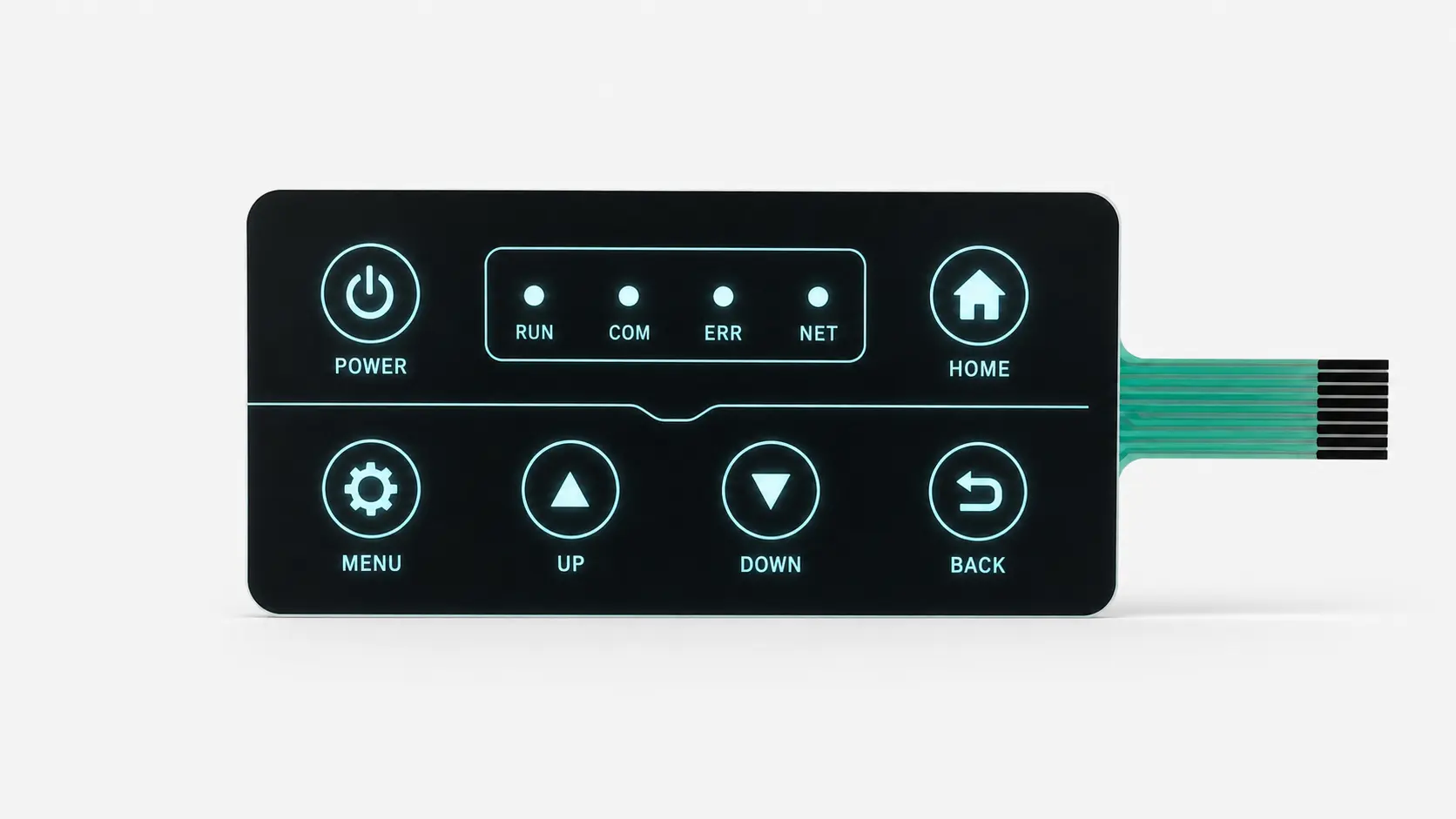
Eine Folientastatur kann mit starrer Trägerplatte, Anzeigefenster, Steckverbindern, Widerständen, LEDs oder weiterer Elektronik geliefert werden. Definieren Sie dies als Baugruppenmerkmale. Eine integrierte Steuerung verändert elektrische Schnittstelle und Prüfumfang; sie macht aus einer einfachen Kontaktfolie nicht automatisch ein digitales Kommunikationsgerät.
Kapazitive Bedienelemente erkennen Kapazitätsänderungen und benötigen eine passende Auswerteschaltung. Deckschichtdicke, Feuchte und Handschuhe müssen bei Sensordesign und Abstimmung berücksichtigt werden. Ein resistiver Touchscreen bestimmt die Berührungsposition über Widerstandsschichten, die unter Druck Kontakt bekommen.
Dies sind verwandte HMI-Technologien, keine Unterarten der hier beschriebenen mechanisch betätigten Folientastaturen. Sie können in einer Frontbaugruppe kombiniert werden, unterscheiden sich aber bei Erfassung, Rückmeldung, Elektronik und Validierung.
Welche Vorteile und Grenzen haben Folientastaturen?
Wesentliche Vorteile
Folientastaturen vereinen Grafik und elektrische Eingabe kompakt. Ihr flacher Aufbau eignet sich bei geringer Einbautiefe; anpassbare Formen, Farben und Beschriftungen stimmen die Schnittstelle auf ihre Funktionen ab. Eine durchgehende Front lässt sich zudem im Alltag einfacher abwischen als die Zwischenräume vieler einzelner Tastenkappen.
Je nach Design können taktile Tasten, Fenster, Anzeigen, Hinterleuchtung und Abschirmung integriert werden. Mehrere Frontplattenfunktionen werden so gemeinsam betrachtet, statt jede als unabhängiges Bauteil zu behandeln.
Konstruktive Grenzen
Der Tastenhub ist meist kurz und fühlt sich anders an als bei vielen Einzelpulsatoren. Ein fest bedrucktes Layout ist weniger anpassbar als softwaregesteuerte Bildschirmtasten. Zusätzliche Beleuchtung, Träger und Komponenten können Dicke und Komplexität erhöhen.
Betrachten Sie Abdichtung, Chemikalienbeständigkeit und Haltbarkeit als zu validierende Anforderungen, nicht als automatische Eigenschaften jeder Folientastatur. Werkstoffverträglichkeit und Prototypentests bleiben auch bei scheinbar einfachem Aufbau wichtig.
Wartbarkeit und Ausfallfolgen
Bei einem verklebten Mehrlagenaufbau kann die Reparatur einzelner Kontakte oder LEDs schwierig sein. Berücksichtigen Sie Austauscheinheit, Zugang zum Fahnenstecker und Verfügbarkeit von Ersatzgrafiken und -teilen. Ein günstiges Bauteil hilft wenig, wenn die Gehäusedemontage den Serviceaufwand bestimmt.
Trennen Sie außerdem normale Bedienereingaben von sicherheitsbezogenen Funktionen. Eine mit „STOP“ beschriftete Taste macht Tastatur, Steuerung oder Maschine allein noch nicht zu einem validierten Not-Halt-System.
Folientastatur oder mechanischer Taster: Was ist der Unterschied?
„Mechanischer Taster“ meint hier einen diskreten Druck- oder Tastenschalter; auch eine konventionelle Folientastatur arbeitet durch mechanische Bewegung. Sinnvoll ist daher der Vergleich vollständiger Bedienkonzepte, nicht „beweglicher“ und „bewegungsloser“ Technologien.
| Aspekt | Folientastatur-Schnittstelle | Schnittstelle mit Einzeltastern |
|---|---|---|
| Frontoberfläche | Häufig durchgehend bedruckte Dekorfolie | Separate Betätiger in einer Frontplatte |
| Tastenhub | Meist kurz | Unterschiedlich; längere Hübe verfügbar |
| Grafik | In die Dekorfolie integriert | Gegebenenfalls separate Beschriftungen oder Etiketten nötig |
| Abdichtung | Abhängig von Dekorfolie, Rändern und Einbau | Abhängig vom jeweiligen Taster und seiner Panelmontage |
Keine Lösung ist grundsätzlich überlegen. Vergleichen Sie benötigtes Tastengefühl, Bauraum, Reinigbarkeit und Montage.
Bei wechselnden Menüs oder komplexen Informationsanzeigen kann ein Touchscreen eine weitere Option sein. Er lässt sich auch mit physischen Bedienelementen kombinieren, statt als reine Entweder-oder-Lösung zu dienen.
Soll ein Laststromkreis direkt unterbrochen werden, wählen Sie ein entsprechend bemessenes Schaltgerät und Systemkonzept. Eine stromarme Folientastatureingabe kann dieses ansteuern; ihre ansprechende Front beweist jedoch kein Lastschaltvermögen.
Wo werden Folientastaturen eingesetzt?
Folientastaturen eignen sich für eine definierte Befehlsauswahl in einer kompakten, beschrifteten Schnittstelle. Die Anwendung bestimmt die Spezifikation: Reinigung, Handschuhe, Licht, Wasser, Vibration oder Publikumsverkehr können wichtiger sein als die Branchenbezeichnung.
Medizin- und Laborgeräte
Anwendungen umfassen Diagnoseinstrumente, Überwachungsgeräte und Laborsteuerungen. Bei häufig gereinigten Geräten reicht „leicht zu reinigen“ nicht als Vorgabe: Benennen Sie Mittel, Expositionsbedingungen und geforderte Lesbarkeit, damit die Werkstoffe passend bewertet werden können.
Medizingeräte
Unterscheiden Sie bei Monitoren und Diagnosegeräten normale Befehle von versehentlichen Eingaben mit schweren Folgen. Prüfen Sie Tastenabstand, Lesbarkeit, taktile Bestätigung und Geräterückmeldung. Reinigung und Gebrauchstauglichkeit sind am fertigen Panel mit den vorgesehenen Handschuhen und Reinigungsverfahren zu prüfen.
Wischdesinfektion ist nicht dieselbe Belastung wie Dampfsterilisation. Muss ein Teil autoklaviert werden, benötigen alle Folien, Klebstoffe, Steckverbinder und Bauteile einen dafür geeigneten Aufbau und Validierungsplan; eine abwischbare Frontfolie genügt nicht.
Laborgeräte
Ermitteln Sie bei Analysegeräten, Waagen und Tischinstrumenten die tatsächlichen Reagenzien, Verschüttungsstellen und Reiniger im Bedienbereich. Sinnvoll können taktile Tasten, ein klares Fenster und eine zur Anzeige passende Schaltung sein. Prüfen Sie Lesbarkeit, Tastenfunktion und Klebeverbund nach repräsentativer Chemikalienbelastung, nicht nur am unbenutzten Muster.
Industriesteuerungen und Messgeräte
Industriegeräte verwenden Folienbedienfelder zur Moduswahl, Parametereingabe und festgelegten Bedienung. Reviews sollten Verschmutzung, Temperatur, Bauraum und Bedienablauf berücksichtigen. Bei Handschuhbetrieb ist der fertige Prototyp mit repräsentativen Handschuhen zu prüfen, nicht nur die Grafik zu beurteilen.
Gewerbe- und Verbrauchergeräte
Haushalts- und Gewerbegeräte verwenden ebenfalls Folientastaturen. Feste Bedienelemente können bekannte Symbole und Markenauftritt in einer Front vereinen. Das Design muss trotzdem zum realen Einsatz passen; ein geschütztes Innengerät und ein Zugangspanel im Freien benötigen nicht allein wegen ähnlicher Tastenlayouts dieselbe Spezifikation.
Anwendungsbezogene Konfigurations- und Validierungsmatrix
Die folgenden Fälle sind technische Auswahlszenarien, keine festen Rezepte oder Zusagen, dass ein Hersteller alle Anwendungen beliefert. Jede vorgeschlagene Konfiguration muss gegen die tatsächlichen Geräteanforderungen geprüft werden.
| Geräteszenario | Zentrale Designanforderung | Zu bewertende Konfiguration | Validierungsschwerpunkt |
|---|---|---|---|
| Medizinische Monitore und Diagnosegeräte | Häufige Reinigung und eindeutige Befehle | Taktile Tasten, lesbare Fenster, verträgliche Frontfolie und Dichtungen | Vorgegebene Reinigungszyklen, Handschuhe, Eingabebestätigung und elektrisches Verhalten |
| Laboranalysegeräte und Waagen | Reagenzienspritzer und Anzeigesichtbarkeit | Chemikalienverträgliche Frontfolie, geschütztes Fenster, passende PET-/FPC-/PCB-Schaltung | Realer Reagenzienkontakt, Lesbarkeit, Tastenreaktion und Klebstoffzustand |
| Industrielle Maschinensteuerungen | Handschuhe, Öle, Schmutz und Vibration | Deutlich taktile Tasten, abgedichteter Rand, gestützte Fahne und Bauteile | Handschuhbedienung, Verunreinigung, Vibration und Tastengefühl im Einbau |
| Prüf- und Messinstrumente | Kompakte Bedienelemente neben Anzeigen und empfindlicher Elektronik | Feinleiter-FPC oder gestützte PCB, Anzeigen, bei Bedarf Abschirmung | Elektrische Schwellwerte, Signalstörungen, Fensterklarheit und Steckerpassung |
| Haushaltsgeräte | Dampf, Fett, wiederholtes Wischen und geringe Einbautiefe | Gedruckte PET-Schaltung oder andere geeignete Schaltung unter reinigbarer Frontfolie | Wärme/Feuchte am Panel, Reinigungsverträglichkeit und wiederholte Betätigung |
| Gewerbliche Kassenterminals | Häufige Eingaben und Reinigung im arbeitsintensiven Umfeld | Klar gruppierte Tasten, lesbare Beschriftung, passende taktile Rückmeldung | Wiederholtes Nutzungsmuster, Abrieb, Reinigung und Anschlusszuverlässigkeit |
| Kioske und Verkaufsautomaten | Publikumsverkehr, verschüttete Flüssigkeiten und wechselndes Umgebungslicht | Geschützte Folientastatur, abgedichtete Ränder, bei Bedarf Beleuchtung | Flüssigkeitspfade, Stoß/Abrieb, Lesbarkeit und Wartungszugang |
| Fitnessgeräte und Laufbänder | Schweiß, Reinigung und Bedienung in Bewegung | Größere, unterscheidbare Tasten, taktile Rückmeldung, sichere Befestigung | Gegebenenfalls nasse Finger/Handschuhe, Fehlbetätigung, Vibration und Nutzungsprofil |
| Kosmetik- und Ästhetikgeräte | Behandlungsprodukte, häufige Reinigung und leichte Moduserkennung | Verträgliche Frontfolie, gruppierte Tasten, eindeutige Statusbeleuchtung | Benannte Cremes/Desinfektionsmittel, Rückstände, Kontrast und Befehlsbestätigung |
| Marine- und Außensteuerungen | Sonne, Salz, Regen und Wasser an Panelrändern | Für außen qualifizierte Werkstoffe, vollständige Abdichtung, gestützte Anschlüsse | UV/Bewitterung, Salzbelastung, Eindringen und Tag-/Nachtlesbarkeit |
| Pool- und Spa-Geräte | Anhaltende Feuchte, Wasserbehandlungschemikalien und warme Umgebung | Abgedichtete Frontbaugruppe oder Silikonhybrid mit geschützten Anschlüssen | Definierte Wasserchemie, Kondensation, Temperaturbelastung und Einbaudichtheit |
| Sicherheits- und Zugangssysteme | Wiederholte Zahleneingabe, Verschleiß und Wetter an Eingängen | Verschleißfeste Beschriftung, taktile Tastatur, definiertes Mehrtastenverhalten | Lesbarkeit verschlissener Tasten, erlaubte Kombinationen, ESD und Einbauexposition |
| Fahrzeug-Zusatzgeräte | Vibration, Temperaturwechsel und Handschuhbedienung | Gestützte Schaltung und Stecker, taktile Tasten, geeignete Frontabdichtung | Montagelasten, Temperaturzyklen, Benutzerzugang und elektrische Störungen |
| Landmaschinen | Staub, Schlamm, Chemikalien, Sonnenlicht und Waschen | Große lesbare Bedienelemente, verträgliche Werkstoffe, abgedichteter Einbau und Anschlüsse | Tatsächliche Chemikalien, Waschverfahren, Vibration und Arbeitshandschuhe |
Die Beispiele für Medizin, Industrie, Haushaltsgeräte, Fitness, Marine und Spa beruhen auf dokumentierten Folientastaturanwendungen. Die Konfigurations- und Prüfspalten übertragen diese Grundsätze auf die genannten Bedingungen; sie sind keine Leistungsbewertungen.
Schnittstelle an die Aufgabe anpassen
Nutzen Sie eine Folientastatur, wenn feste, erkennbare Bedienelemente Vorteile bieten. Muss ein öffentlicher Kiosk hohe Stoßfestigkeit erreichen, prüfen Sie ein geschütztes Panel oder eine andere Betätigerkonstruktion. Bei häufig wechselnden Bildschirmfunktionen können feste Druckbeschriftungen eine ergänzende Anzeige benötigen.
Bewerten Sie bei Laufbändern, Maschinen, Fahrzeuggeräten und anderen Systemen mit kritischer unbeabsichtigter Bedienung das gesamte Steuerungs- und Schutzkonzept. Die Wahl einer taktilen Folientastatur ist nur ein Teil dieser Entwicklung.
Wie werden Folientastaturen gefertigt?
Die Fertigung beginnt mit einem Engineering-Review von Abmessungen, Grafik, Schaltungsanforderungen und geplantem Schichtaufbau. Bei Foliendruckvarianten werden Grafik und Leiterstrukturen auf die jeweiligen Werkstoffe gedruckt und entsprechend ausgehärtet.
Anschließend werden Lagen zugeschnitten, Bauteile positioniert und die Baugruppe ausgerichtet und laminiert. Passergenauigkeit ist wichtig, weil gedruckte Tastenbereiche mit Kontakten, Domen und Fenstern übereinstimmen müssen. FPC- und PCB-Designs verwenden ihre jeweiligen Leiterplatten- und Bestückungsprozesse statt ausschließlich gedruckter Silberschaltungen.
Produktionsprüfungen betreffen üblicherweise Aussehen, Maße, Durchgang sowie spezifizierte Tasten- oder LED-Funktionen. Qualifikationsprüfungen können zusätzlich wiederholte Betätigung und Umweltbelastung umfassen. Vereinbaren Sie, was an jeder Einheit und was stichprobenweise während der Validierung geprüft wird.
Fertigungs- und Abnahmeprüfpunkte
| Stufe | Zu beherrschen | Sinnvoller Abnahmenachweis |
|---|---|---|
| Entwicklungsfreigabe | Grafik, Pinbelegung, Schichtaufbau, Toleranzen und Stückliste | Freigegebener Revisionsstand mit kritischen Maßen und Prüfvorgaben |
| Wareneingang | Folien-/Klebstofftyp sowie Identität von Schaltung und Bauteilen | Rückverfolgbare Material- und Bauteilnachweise zur freigegebenen Spezifikation |
| Druck und Schaltungsvorbereitung | Passer, Leiterkontinuität, dielektrische Trennung und Aushärtung | Prozessgerechte Sicht- oder elektrische Prüfergebnisse |
| Schneiden und Formen | Geometrie von Tasten, Fenstern, Anschlussfahne und Dichtung | Maß- und Sichtkontrolle gegen die Zeichnung |
| Bestücken und Laminieren | Dom-/LED-Ausrichtung, Sauberkeit und gleichbleibender Lagenaufbau | Gelenkte Montageanweisungen und definierte Prüfpunkte |
| Endprüfung und Verpackung | Tastenzuordnung, Unterbrechungen/Kurzschlüsse, LEDs, Aussehen und Handhabungsschutz | Vereinbarte Prüfabdeckung, Fehlerkriterien und Chargenkennzeichnung |
Ein optisch einwandfreies Muster kann eine falsche Pinbelegung oder intermittierende Verbindung haben. Umgekehrt beweist eine Durchgangsprüfung weder Dichtheit noch langfristiges Tastengefühl. Abnahmenachweise sollten genau benennen, was tatsächlich geprüft wurde.
Häufige Fehler und Einbaukontrollen
| Symptom | Möglicher zu untersuchender Mechanismus | Präventions- oder Prüfschwerpunkt |
|---|---|---|
| Abhebende Ränder oder Blasen | Verschmutzung, unzureichender Flächenkontakt oder ungeeignete Klebstoff-/Substratkombination | Oberflächenvorbereitung, richtiger Klebstoff, Applikation und Verbundprüfung |
| Aussetzende Tasten oder Unterbrechung | Beschädigte Anschlussfahne, unpassender Stecker oder belastete Leiter | Fahnenschutz, Biegevorgaben, Stecksitz und elektrische Prüfung im Einbau |
| Ungleichmäßige oder fehlende taktile Rückmeldung | Fehlausrichtung, falsche Lagengeometrie oder ungestützte Betätigung | Passer, Dom-/Dekorfolienbeziehung, Montageabstützung und Kraftmessung |
| Ausgefallene oder intermittierende LEDs | Durch Handhabung, Biegung oder Umweltstress beschädigte Bauteilverbindung | Gestützte Bauteilzonen und geeignete Befestigungsmethode |
| Ungewollte Eingaben nach Flüssigkeitskontakt | Leckage, Verunreinigung oder Wassereintritt durch ungeschützte Wege | Durchgehende Dichtungen, geschützte Anschlüsse, Isolations- und Expositionsprüfung |
| Verblasste oder beschädigte Beschriftung | Abrieb, unverträgliche Reinigung oder ungeeignete Außenfolie | Qualifiziertes Finish und repräsentative Verschleiß-/Chemikalien-/Bewitterungsprüfung |
Dies sind mögliche Diagnoseansätze, keine Ferndiagnose allein anhand des Aussehens. Verfolgen Sie den Fehler elektrisch und prüfen Sie den eingebauten Aufbau, bevor Sie Werkstoffe oder Bauteile ersetzen.
Montieren Sie die Tastatur auf der spezifizierten sauberen, trockenen Fläche unter den vom Klebstofflieferanten genannten Bedingungen für Auftrag, Druck und Haftungsaufbau. Entfernen Sie die Schutzlage erst unmittelbar vor Bedarf. Führen Sie die Anschlussfahne ohne scharfen Knick, schützen Sie sie vor Gehäusekanten und stützen Sie den Stecker. Erzwingen Sie keinen Sitz in einem unpassenden Verbinder und lösen und verkleben Sie die Baugruppe nicht wiederholt.

Die passende kundenspezifische Folientastatur auswählen
Definieren Sie Eingabeverhalten, Umgebung, Einbau und Abnahmekriterien gemeinsam. Beginnen Sie mit messbaren Anforderungen und vergleichen Sie anschließend passende Konstruktionen.
Betriebsumgebung beschreiben
Beschreiben Sie erwartete Wasser-, Staub-, Temperatur-, Sonnen- und Reinigungsbelastungen. Unterscheiden Sie gelegentliche Spritzer von wiederholtem Abspritzen oder Eintauchen. Das unterstützt Werkstoff- und Dichtungsentscheidungen besser als die pauschale Forderung „Industriestandard“.
Das vollständige Tastengefühl bewerten
Legen Sie den Bedarf an taktiler Rückmeldung fest und besprechen Sie Kraft, Hub, Tastengröße und Betätigungshäufigkeit. Die Einzelkraft eines Doms entspricht nicht zwingend der Kraft durch die fertige Frontfolie. Prüfen Sie die laminierte Tastatur auf repräsentativer Montageunterstützung vor der haptischen Freigabe.
Schaltung und Anschluss abstimmen
Definieren Sie Tastenfunktionen, Pinbelegung, Anzeigen und Steuerungsanschluss. Eine Matrix reduziert gegebenenfalls Leitungen, muss aber zur auswertenden Elektronik passen. Bestätigen Sie Steckertyp, Fahnenorientierung und Einbauraum vor dem Abschluss des Schaltungsdesigns.
Dokumentieren Sie geschlossenen Widerstand, offene Isolation, Erfassungsspannung/-strom, LED-Ansteuerung und zulässige gleichzeitige Betätigungen. Stimmen Sie bei ZIF Kontaktseite, Raster, Steckdicke, Verstärkung, Einsteckrichtung und Halteanforderungen mit der realen Steckerzeichnung ab. Gleiche Pinzahl allein beweist weder mechanische noch elektrische Kompatibilität.
Nutzungsprofil und Prüfplan festlegen
Leiten Sie aus dem vorgesehenen Einsatz eine projektspezifische Zyklenanforderung ab. Beispiel: 200 Betätigungen pro Arbeitstag × 250 Arbeitstage pro Jahr × fünf Jahre ergeben 250.000 Betätigungen der betreffenden Taste. Das ist eine Nutzungsschätzung, keine geprüfte Lebensdauerangabe. Ergänzen Sie bei der Qualifikation angemessene Auslegungsreserven und Umweltbelastungen.
Prüfen Sie die vorgesehene Baugruppe und dokumentieren Sie Auflage, Druckpunkt, Kraft, elektrische Bedingungen und Ausfallkriterien. Vergleichen Sie Haptik und Elektrik vor und nach der vereinbarten Belastung. Ergebnisse eines einzelnen Doms helfen, belegen aber nicht die Beständigkeit von Frontfolie, Klebungen, Fahne oder kompletter Tastatur.
| Prüfbereich | Zu spezifizieren oder zu messen | Geltungsgrenze der Referenz |
|---|---|---|
| Mechanische Betätigung | Betätigungs-/Kontaktkraft, Hub, Wiederholbarkeit und Freigabe | Vorrichtung, Auflage, Druckposition und elektrisches Schließkriterium angeben |
| Elektrische Funktion | Tastenzuordnung, Kontaktwiderstand, offene Isolation und Prellen | Projektspezifische Prellmessung vereinbaren; ASTM F1661-09(2015) ist eine 2024 ersatzlos zurückgezogene historische Referenz |
| Wiederholte Betätigung | Zyklenzahl, Frequenz, Belastung und Vorher-/Nachher-Verhalten | ASTM F1578 beschreibt Kontaktschließzyklen, keine universelle Lebensdauer |
| Schutz gegen Eindringen | Relevante Staub-/Wasserbelastung und eingebaute Baugruppe | IEC 60529 klassifiziert Gehäuseschutz; geprüfte Systemgrenze benennen |
| ESD-Störfestigkeit | Prüfstellen, Geräteaufbau, Schärfegrad und zulässiges Verhalten | IEC 61000-4-2 liefert ein Geräteprüfverfahren; Anforderungen produktbezogen auswählen |
| Chemikalien, Witterung und Haftung | Benannte Stoffe, Konzentration, Einwirkzeit, Temperatur, UV und Klebebedingungen | Anwendungsbezogene Verfahren und Bestehens-/Fehlerkriterien vereinbaren |
Verwenden Sie die vereinbarte Normausgabe und dokumentieren Sie Abweichungen. IEC 61000-4-2:2025 überlässt passende Geräteprüfungen und Schärfegrade den zuständigen Produktkomitees. Ein bestandener Komponententest zertifiziert kein Medizingerät, Fahrzeugsystem und keine vollständige Maschine.
Montage und Validierung bestätigen
Prüfen Sie bei der Auswahl des rückseitigen Klebstoffs das tatsächliche Gehäusematerial, seine Textur und den Montageprozess. Flächenkontakt ist wesentlich für die Klebeleistung; die Materialbezeichnung allein beschreibt den Verbund nicht vollständig.
Testen Sie Prototypen anschließend auf Tastenfunktion, Lesbarkeit, Beleuchtung und Passung. Legen Sie vor Serienbeginn elektrische und umweltbezogene Abnahmekriterien fest. So prüft die Musterfreigabe eine Spezifikation statt nur den Eindruck, dass das Produkt „richtig aussieht“.
Ein praktisches Spezifikationsbeispiel
Betrachten Sie ein geplantes Laborinstrument mit sechs häufig verwendeten Tasten, zwei Status-LEDs, einem Fenster und regelmäßiger Wischreinigung. Dokumentieren Sie zuerst Reiniger und gewünschte Tastenrückmeldung. Prüfen Sie danach, ob Silberdruck die elektrische Anordnung erfüllt oder Bauteilanschlüsse eine FPC-/PCB-Konstruktion rechtfertigen.
Prüfen Sie zur Musterfreigabe reale Gehäusepassung, Fensterlesbarkeit, LED-Erscheinung und Tastenreaktion nach dem Einbau. Halten Sie Konstruktion und Prüfkriterien vor dem Serienauftrag fest.
Dies ist eine beispielhafte Spezifikationsübung, keine Empfehlung einheitlicher Materialien für alle Laborinstrumente. Sie verknüpft das sichtbare Design mit elektrischen, mechanischen und umweltbezogenen Geräteanforderungen.
Welche Angaben braucht ein Folientastaturangebot?
Stellen Sie Unterlagen zusammen, die Aussehen, Anschluss und Bedienung erläutern. Eine sinnvolle Ausgangsliste umfasst:
- Mechanische Angaben: Gesamtabmessungen, Dickenfreiraum, Tastenpositionen, Montagefläche und Gehäusedetails.
- Grafik und Bedienung: Druckdaten, Farben, Fenster, Oberfläche, gewünschte Haptik und Beleuchtung.
- Elektrische Angaben: Schaltplan oder Pinbelegung, Steckerspezifikation, Fahnenposition und -länge sowie LED-Anforderungen.
- Projektanforderungen: Umgebung, Validierungskriterien, Prototypenstückzahl, erwartete Serienmengen und benötigte Liefertermine.
Kennzeichnen Sie offene Details als Designfragen, statt ungeprüfte Spezifikationen einzusetzen. Das Angebot sollte Annahmen, enthaltene Werkzeuge, Muster- und Prüfumfang nennen, damit Lösungen auf gleicher Grundlage verglichen werden können.
Was beeinflusst die Kosten neben dem Stückpreis?
| Kostentreiber | Auswirkung auf das Angebot |
|---|---|
| Panelgröße und Geometrie | Verändern Materialbedarf, Schnitt und nutzbares Produktionslayout |
| Schaltungstechnologie und Dichte | Verändern Schaltungsfertigung, Leiterführung und Bauteilbefestigung |
| Dome, Prägung und Formteile | Ergänzen Formen, Platzieren, spezielle Werkzeuge oder Montagevorgänge |
| Beleuchtung und Fenster | Ergänzen Lichtquellen, optische Lagen, Masken, Treiberbedarf und optische Abnahme |
| Abdichtung, Abschirmung und Montage | Ergänzen Werkstoffe, Anschlussmerkmale und Einbaubedingungen |
| Prototypen- und Prüfumfang | Verändert Vorrichtungen, Musterzahl, Qualifikation und Dokumentation |
Lassen Sie Werkzeug-, Prototypen-, Serien-Stück- und Qualifikationskosten trennen. Definieren Sie auch Grafikrechte, Zeichnungsrevisionen, freigegebene Ersatzmaterialien und Service-Austauschbaugruppen. Vergleichen Sie eine nutzbare, geprüfte Schnittstelle, nicht nur eine bedruckte Front.
Häufige Fragen zu Folientastaturen
Die Antworten fassen typische Entwicklungs- und Einkaufsfragen zusammen.
Wie lange hält eine Folientastatur?
Es gibt keine einheitliche Lebensdauer für alle Folientastaturen. Fordern Sie passende Zyklen-Nachweise für den vorgeschlagenen Aufbau und die zugehörigen Prüfbedingungen. Betätigungsprüfungen und Umweltbewertungen behandeln unterschiedliche Risiken; keine davon sollte durch unbelegte allgemeine Haltbarkeitsversprechen ersetzt werden.
Ist eine Dekorfolie dasselbe wie eine Folientastatur?
Nein. Eine Dekorfolie liefert Grafik und Frontoberfläche; eine Folientastatur enthält zusätzlich die elektrische Schaltstruktur. Dekorfolien sind separat lieferbar. Eine Anfrage nach einem „Panel“ sollte deshalb klären, ob Schaltung und funktionale Tasten benötigt werden.
Kann eine Folientastatur im Freien eingesetzt werden?
Ja, wenn Werkstoffe und Aufbau für die Belastung ausgewählt werden. Berücksichtigen Sie UV-Licht, Feuchte, Temperaturwechsel und die Abdichtung der gesamten Installation. Ein Innendesign wird nicht allein durch eine abwischbare Front außenbeständig.
Was bestimmt die Kosten einer kundenspezifischen Folientastatur?
Schaltungstechnologie, Panelgröße, Beleuchtung, Komponenten und Aufbaukomplexität beeinflussen Design und Kosten. Vergleichen Sie Angebote anhand identischer Zeichnungen, Mengen, Werkzeuge und Validierungsumfänge. Der niedrigste Stückpreis ist bei unterschiedlichen Baugruppen kein aussagekräftiger Vergleich.
Sind Metalldom- und Polydom-Folientastaturen beide taktil?
Ja. Ein Metalldom verwendet einen separaten Federmetallkontakt; ein Polydom eine geformte Polyesterstruktur mit zugehöriger Kontaktanordnung. Beide können einen Schnappeffekt bieten. Vergleichen Sie fertige Haptik, Werkzeug, Schichtgeometrie und geprüfte Belastung, nicht nur das Dommaterial.
Benötigt eine Folientastatur Entprellung?
Die Steuerung benötigt üblicherweise eine Prellunterdrückung, damit ein physischer Tastendruck genau ein vorgesehenes Ereignis erzeugt. Bestätigen Sie gemessenes Kontaktverhalten und benötigte Reaktionszeit. Entprellung behebt kein Matrix-Ghosting; diese separate Mehrdeutigkeit entsteht durch Abfrageanordnung und gleichzeitige Betätigungen.
Kann eine Folientastatur zugleich hinterleuchtet und wasserdicht abgedichtet sein?
Ja. LEDs oder andere Leuchtelemente, optische Lagen, Dichtpfade und elektrische Anschlüsse müssen in dieselbe Baugruppe passen. Prüfen Sie Lichtqualität und Haptik nach dem Laminieren und anschließend den spezifizierten Schutz gegen Eindringen am vorgesehenen eingebauten Aufbau.
Ist ein kapazitives Touchpanel eine Folientastatur?
Nicht im mechanisch betätigten Sinn dieses Leitfadens. Ein kapazitives Panel erkennt eine Kapazitätsänderung statt eines schließenden Tastenkontakts. Es kann Folien, Grafiken oder Gehäuse mit Folientasten teilen, benötigt aber andere Auswerteelektronik und Validierung.
Eine Folientastatur für Ihr Gerät auswählen
Beginnen Sie mit den benötigten Bedienfunktionen und definieren Sie dann Umgebung, Schaltung, Rückmeldung und Montage. Bewerten Sie dies als eine Schnittstelle, statt jede Lage unabhängig auszuwählen.
Eine brauchbare Spezifikation verbindet sichtbares Design, messbare Anforderungen und einen praktikablen Validierungsplan. Sie gibt Geräteentwicklung und Hersteller eine klarere gemeinsame Entwicklungsgrundlage.
Planen Sie eine kundenspezifische Folientastatur? Senden Sie Zeichnungen, elektrische Anforderungen, Anwendungsdaten und erwartete Mengen für eine Designprüfung und Angebotserstellung.
Quellen und weiterführende Informationen
In diesem Leitfaden zitierte technische Referenzen.
- Epec Engineered Technologies — Bewährte Verfahren beim Folientastatur-Schaltungsdesign.
- Butler Technologies — Folientastaturen.
- Epec Engineered Technologies — Folientastaturdesign.
- Butler Technologies — Dome in Folientastaturen erklärt.
- Butler Technologies — Taktile und nichttaktile Folientastaturen.
- Microchip — AN3407: Funktionsprinzip einer Matrixtastatur.
- Texas Instruments — LM8330-Mehrfachbetätigung und Schaltdioden, offizieller Entwicklungssupport.
- ASTM International — F1661-09(2015): Bestimmung der Kontaktprellzeit einer Folientastatur (2024 ersatzlos zurückgezogen).
- Butler Technologies — Bauteile und Schichten von Folientastaturen.
- Epec Engineered Technologies — Die Betätigungskraft einer Tastatur verstehen.
- Butler Technologies — Dekorfolien und Folientastaturdesign.
- MacDermid Alpha — Hartbeschichtete Folien für 2D-Schnittstellen.
- MacDermid Alpha — Wärmestabilisierte Autostat-Polyesterfolien für Schaltungen.
- Epec Engineered Technologies — Einsatz von PET- und FPC-Schaltungen im Folientastaturdesign.
- Epec Engineered Technologies — Fenstertransparenz bei LED-hinterleuchteten Bedienoberflächen.
- 3M — Kleben und Montieren: Klebstoffauswahl und Oberflächen.
- Butler Technologies — Metalldom und Polydom: technischer Vergleich.
- Epec Engineered Technologies — Umweltfaktoren beim Design von Bedienbaugruppen.
- International Electrotechnical Commission — IEC 60529: Schutzarten durch Gehäuse (IP-Code).
- Epec Engineered Technologies — Folientastaturen.
- International Electrotechnical Commission — IEC 61000-4-2:2025: Prüfung der Störfestigkeit gegen elektrostatische Entladung.
- Epec Engineered Technologies — Den passenden HMI-Typ für eine Anwendung auswählen.
- Epec Engineered Technologies — Silikontastaturen und alternative taktile Lagen.
- Epec Engineered Technologies — Lichtleiterfolientechnologie.
- Epec Engineered Technologies — Elektrolumineszente Hinterleuchtung.
- Lumitex — Datenblatt faseroptischer Panels.
- Microchip — AN2934: Einfluss der Abdeckung auf kapazitive Berührungserkennung.
- Microchip — Atmel AVR3002: Feuchtetolerantes QTouch-Design.
- Texas Instruments — TSC2102-Datenblatt: Funktionsweise resistiver Touchscreens.
- Butler Technologies — Folientastaturen: Design- und Funktionsleitfaden.
- Butler Technologies — Folientastaturen und mechanische Taster für Ihre Anwendung.
- Butler Technologies — Folientastatur oder Touchscreen.
- Epec Engineered Technologies — Gesamtdicke einer Folientastatur reduzieren.
- Butler Technologies — Bewährte Verfahren beim Folientastatur-Schaltungsdesign.
- Epec Engineered Technologies — Folientastaturdesign für hochzuverlässige Anwendungen.
- Epec Engineered Technologies — Folientastaturmaterialien für Sterilisation und Autoklaven.
- Butler Technologies — Folientastaturdesign.
- Epec Engineered Technologies — Wasserdichte Tastaturschnittstellen für Marine- und Unterwasseranwendungen.
- Epec Engineered Technologies — Kosten hochzuverlässiger HMI-Geräte sinnvoll senken: Spa-Steuerungsanalyse.
- Butler Technologies — Herstellung von Folientastaturen.
- 3M — Auswahlleitfaden für Verarbeiter: Klebstoffauswahl und Flächenkontakt.
- ASTM International — F1578-24: Zyklische Kontaktschließprüfung von Folientastaturen.
- Epec Engineered Technologies — Qualitätssicherung für Bedienschnittstellen.
- Epec Engineered Technologies — Folientastaturdesign für raue Umgebungen verbessern.