
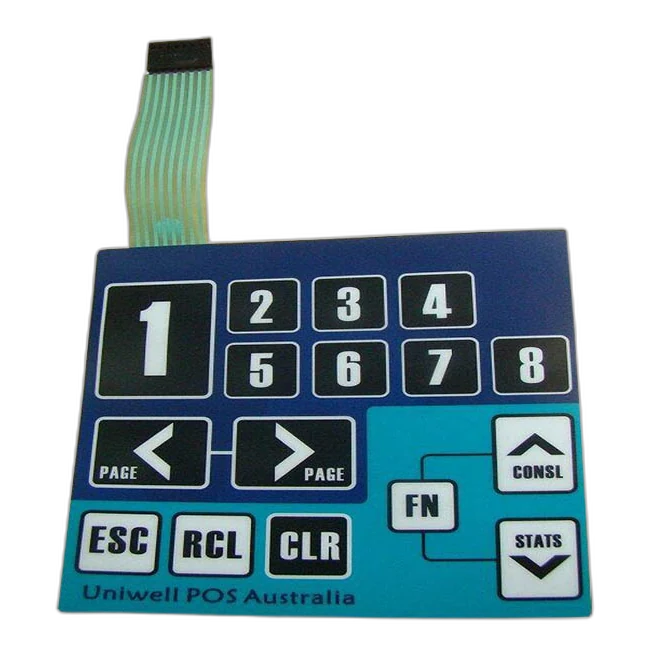
Folientastatur-Glossar
Dieses Glossar erklärt Begriffe zu Tastaturen, Grafikfolien, Schaltungen, Steckverbindern, Klebstoffen, Hinterleuchtung, Abdichtung, Materialien und Prüfung. Es unterstützt OEM-Einkäufer und Ingenieure dabei, klarere Spezifikationen zu erstellen.
Es ist ein strukturiertes Nachschlagewerk, keine Verkaufsseite. Jeder Begriff steht im Zusammenhang mit Zeichnungen, Mustern, Angebotsanfragen, Qualitätsprüfungen oder Produktionsentscheidungen.
Kurz erklärt: Das Glossar macht aus unklaren Begriffen in Angebotsanfragen nutzbare Spezifikationen.
Viele Verzögerungen bei Folientastaturen entstehen durch unklare Begriffe: Anschlussfahne, Abstandshalter, Metallschnappscheibe, ZIF-Steckverbinder, Pinbelegung, Dead-Front-Grafik, Prägung, Lichtleiterfolie, Montagekleber, IP-Schutzart, Betätigungskraft und Durchgangsprüfung. Eine gemeinsame Terminologie hilft Entwicklung, Einkauf, Qualitätssicherung und Lieferanten, über denselben Aufbau zu sprechen.
Begriffe rund um Folientastaturen erklärt
Diese Begriffe werden häufig in Zeichnungen, Angebotsanfragen, Musterbewertungen, Qualitätsprüfungen und Lieferantengesprächen zu Folientastaturen verwendet.
↔ Tabelle seitlich verschieben, um alle Spalten zu lesen.
| Begriff | Bedeutung | Warum er wichtig ist |
|---|---|---|
| Grafikfolie | Bedruckte oberste Schicht einer Folientastatur oder eines Bedienfelds | Legt Symbole, Beschriftungen, Fenster, Oberflächenfinish und Benutzerführung fest |
| Grafikfolienkleber | Klebstoffschicht zwischen Grafikfolie und innerem Schichtaufbau der Tastatur | Beeinflusst Laminierung, Blasenbildung, Kantenqualität und Schichtstabilität |
| Abstandshalterschicht | Schicht, die Schaltkontakte bis zum Tastendruck voneinander trennt | Bestimmt Schaltweg, Kontaktabstand und Dichtungsverlauf |
| Schaltungsschicht | Schicht mit Leiterbahnen und Kontaktflächen | Legt elektrische Verbindungen, Matrixanordnung und Prüfpunkte fest |
| Gedruckte Silberschaltung | Auf flexible Folie gedruckte leitfähige Silbertinte | Üblich für dünne Folientastaturschaltungen und flexible Anschlussfahnen |
| PCB-Folientastatur | Folientastatur mit Leiterplatte als Träger oder mit leiterplattenbasierten Schaltungsbereichen | Geeignet für dichte Schaltungen, LEDs, Steckverbinder oder Bereiche mit starrer Abstützung |
| FPC-Folientastatur | Folientastatur mit flexiblem Leiterplattenaufbau | Geeignet, wenn feinere Leiterbahnführung oder die Eigenschaften einer flexiblen Leiterplatte benötigt werden |
| Metallschnappscheibe | Schnappscheibe aus Edelstahl, die eine fühlbare Klickrückmeldung erzeugt | Bestimmt Betätigungskraft, Schnappgefühl und Kontaktschluss |
| Taktile Folientastatur | Tastatur mit fühlbarer Klickrückmeldung beim Drücken | Ermöglicht dem Bediener eine fühlbare Bestätigung der Betätigung |
| Nichttaktile Folientastatur | Tastatur, die den Stromkreis ohne ausgeprägtes Klickgefühl schließt | Geeignet für flachere Oberflächen oder einfachere Anforderungen an das Tastgefühl |
| Anschlussfahne | Flexible Schaltungsverlängerung zur Verbindung der Tastatur mit der Elektronik | Länge, Austrittsrichtung, Biegeradius und Rastermaß beeinflussen die Montage |
| ZIF-Steckverbinder | Steckverbinder ohne Einsteckkraft für flache flexible Anschlussfahnen | Erfordert das richtige Rastermaß, die passende Kontaktseite und die korrekte Verstärkungsdicke |
| Crimp-Steckverbinder | An Anschlussfahne oder Leitungen befestigter Steckverbinder für eine definierte Steckverbindung | Kann die Installation vereinfachen; Platzbedarf und Ausrichtung müssen geprüft werden |
| Rastermaß | Abstand zwischen Steckverbinderkontakten oder Kontaktflächen einer Schaltung | Muss zum Gegenstecker oder zum Leiterplatten-Footprint passen |
| Pinbelegung | Zuordnung der Tastaturfunktionen zu den Kontakten des Steckverbinders | Verhindert falsche Tastensignale oder eine unpassende Anbindung an die Steuerung |
| Matrixschaltung | Schaltungsanordnung aus Zeilen und Spalten zur Verringerung der Kontaktzahl | Beeinflusst Pinbelegung, Steuerungslogik und Prüfverfahren |
| Verstärkung | Verstärktes Ende der Anschlussfahne zum Einstecken in den Steckverbinder | Unterstützt eine stabile ZIF-Verbindung und Handhabung |
| Biegeradius | Kleinster praktisch nutzbarer Biegeradius einer Anschlussfahne oder flexiblen Schaltung | Schützt Leiterbahnen vor Rissen und sporadischen Fehlern |
| Dead-Front-Grafik | Symbole, die erst bei Hinterleuchtung sichtbar werden | Erfordert die Kontrolle von Deckkraft, LED-Ausrichtung und Lichtabschirmung |
| Lichtleiterfolie | Folie zur Verteilung von LED-Licht über ausgewählte Bereiche | Verbessert die Lichtverteilung und die Sichtbarkeit der Symbole |
| Prägung | Erhöhter oder geformter Bereich der Grafikfolie | Erleichtert das Finden von Tasten, verbessert das Tastgefühl oder setzt optische Akzente |
| Randprägung | Erhöhter Rand um eine Tastenfläche | Macht Tastengrenzen fühlbar, ohne die gesamte Taste anzuheben |
| Montagekleber | Haftklebstoff zur Befestigung der Baugruppe | Muss zu Gehäusematerial, Oberflächenstruktur, Temperatur und Anpressdruck bei der Montage passen |
| Rückseitenkleber | Klebstoff auf der Rückseite der Tastaturbaugruppe | Bestimmt die Befestigung am Gehäuse |
| PET / Polyester | Gängige Grafikfolie mit hoher Biegewechselfestigkeit und Chemikalienbeständigkeit | Wird häufig für langlebige Tastatur- und Grafikfolienoberflächen gewählt |
| Polycarbonat / PC | Grafikfolienmaterial mit bestimmten Vorteilen bei Optik und Formgebung | Erfordert eine Bewertung der Chemikalien- und Abriebbelastung |
| Hartbeschichtete Folie | Folie mit zusätzlichem Oberflächenschutz | Verbessert die Abriebfestigkeit bei häufiger Berührung oder Reinigung |
| Durchgangsprüfung | Elektrische Prüfung, ob die vorgesehenen Stromkreise korrekt schließen | Erkennt Unterbrechungen und Funktionsfehler |
| Kurzschluss- und Unterbrechungsprüfung | Prüfung auf unbeabsichtigte Kurzschlüsse oder unterbrochene Stromkreise | Sichert die elektrische Zuverlässigkeit vor dem Versand ab |
| Betätigungskraft | Kraft, die zum Drücken einer Taste erforderlich ist | Beeinflusst Tastgefühl und Musterfreigabe |
| Lebensdauerprüfung | Prüfung durch wiederholte Betätigung unter festgelegten Bedingungen | Wird zur Bewertung der Tastenhaltbarkeit eingesetzt |
| IP-Schutzart | Schutzklassifizierung gegen das Eindringen von Staub und Wasser | Muss für das zusammengesetzte Produkt betrachtet werden, nicht nur für die Tastatur |
| RoHS / REACH | Regelwerke zur Materialkonformität im Hinblick auf beschränkte Stoffe | Sollten vor der Materialauswahl festgelegt werden |
| Handhabung im Reinraum | Kontrollierte Arbeitsumgebung für empfindliche Oberflächen | Hilfreich für Fenster, glänzende Grafikfolien und sichtbare Oberflächen mit optischen Anforderungen |
Das Glossar bei einer Angebotsanfrage nutzen
Nutzen Sie das Glossar, um Zeichnungen und Lieferantengespräche präziser zu gestalten.
↔ Tabelle seitlich verschieben, um alle Spalten zu lesen.
| Kategorie | Zu prüfende Begriffe | Nutzen |
|---|---|---|
| Aufbau | Grafikfolie, Grafikfolienkleber, Abstandshalter, Schaltungsschicht, Rückseitenkleber | Klärt den Schichtaufbau und die Aufgabe jeder Schicht |
| Elektrik | gedruckte Silberschaltung, PCB, FPC, Matrixschaltung, Pinbelegung, Durchgangsprüfung | Verbindet die Tastaturkonstruktion mit der Kundenelektronik |
| Steckverbinder | Anschlussfahne, ZIF-Steckverbinder, Crimp-Steckverbinder, Rastermaß, Verstärkung, Biegeradius | Verhindert Montage- und Installationsprobleme |
| Tastgefühl | Metallschnappscheibe, taktil, nichttaktil, Betätigungskraft, Prägung | Definiert Bedienrückmeldung und Kriterien für die Musterfreigabe |
| Optik und Beleuchtung | Dead-Front-Grafik, Lichtleiterfolie, hartbeschichtete Folie, Fensterbereiche | Klärt Lesbarkeit, Hinterleuchtung und optische Erwartungen |
| Qualität und Konformität | Kurzschluss- und Unterbrechungsprüfung, Lebensdauerprüfung, IP-Schutzart, RoHS, REACH, Handhabung im Reinraum | Verknüpft Begriffe mit Prüfung, Dokumentation und Risikokontrolle |
Glossarbegriffe sind dann nützlich, wenn sie mit einer Zeichnung oder Anforderung verknüpft werden.
Ein Begriff sollte nicht abstrakt bleiben. Er sollte dem Einkäufer helfen, Erwartungen an Material, Aufbau, Steckverbinder, Qualität oder Montage klarer zu beschreiben.
- Ergänzen Sie „Anschlussfahne“ und „Steckverbinder“ um Abmessungen, Rastermaß, Pinbelegung, Verstärkung, Kontaktseite und Austrittsrichtung.
- Ergänzen Sie „Grafikfolie“ um Material, Finish, Fenster, Farbreferenz, Druck und Klebstoffangaben.
- Ergänzen Sie „taktil“ um Schnappscheibenkraft, Tastengröße, Grafikfoliendicke, Abstandshalterkonstruktion und Auflagefläche.
- Ergänzen Sie „Montagekleber“ um Gehäusematerial, Oberflächenstruktur, Anpressdruck bei der Montage, Reinigungsbelastung und Temperatur.
- Verwenden Sie „IP-Schutzart“ mit Bedacht: Die Abdichtung hängt vom gesamten zusammengesetzten Produkt ab, nicht nur von der Tastatur.
- Verwenden Sie „RoHS/REACH“ als Anforderungen an die Materialkonformität, die vor der Beschaffung zu prüfen sind.
Hinweis zur Angebotsanfrage: Wenn ein Begriff unklar ist, fügen Sie eine Zeichnung, ein Foto, ein Muster, ein Datenblatt oder eine Anmerkung bei, statt sich allein auf die Formulierung zu verlassen.

So können verschiedene Teams das Glossar nutzen
Das Glossar soll die Kommunikation zwischen Entwicklung, Einkauf, Qualitätssicherung und Lieferanten verbessern.
Entwicklungsteams
Beschriften Sie Zeichnungen vor der Musterfreigabe mit den richtigen Begriffen für Schichten, Schaltungen, Steckverbinder, Beleuchtung und Klebstoffe.
Einkaufsteams
Vergleichen Sie Angebote, ohne Produkttyp, Material, Konstruktionsverfahren und Prüfumfang zu verwechseln.
Qualitätsteams
Definieren Sie Kriterien für Sichtprüfung, Durchgangsprüfung, Kurzschluss- und Unterbrechungsprüfung, Betätigung, Haftung und Verpackung.
Lieferantenbewertung
Prüfen Sie, ob Lieferanten Begriffe zu Steckverbindern, Materialien, Abdichtung, Beleuchtung und Dokumentation genauso verstehen wie Ihr Team.
Musterrückmeldungen
Verwenden Sie bei Änderungsangaben präzise Begriffe: Farbe, Fensterklarheit, Schnappscheibenkraft, Fahnenaustritt, Klebstoff oder Abstandshalterproblem.
Wiederholaufträge
Halten Sie freigegebene Begriffe und Revisionshinweise konsistent, damit Folgeproduktionen demselben Aufbau entsprechen.
Weiterführende Konstruktionsressourcen
Detaillierte Fragen von Einkäufern
Sollte eine Glossarseite umfangreich sein?
Ein nützliches Glossar kann mit der Zeit wachsen. Es sollte mit den Begriffen beginnen, die Einkäufer tatsächlich in Zeichnungen, Angebotsanfragen, Steckverbindergesprächen, Musterrückmeldungen und Qualitätsbewertungen verwenden.
Dürfen Glossareinträge auf Produktseiten verlinken?
Ja. Jeder Begriff sollte auf die passendste Produkt-, Ressourcen- oder Kompetenzseite verweisen, wenn dies dem Einkäufer beim weiteren Verständnis hilft.
Ist ein Glossar für Beschaffungsteams nützlich?
Ja. Es hilft dem Einkauf, Angebote und Lieferantenantworten zu vergleichen, ohne Materialien, Aufbauten, Steckverbinderoptionen und Prüfumfang zu verwechseln.
Kann ein Glossar die technische Prüfung ersetzen?
Nein. Es verbessert die Kommunikation, aber Zeichnungen, Muster, Gehäusedetails, Steckverbinderspezifikationen und Umgebungsanforderungen müssen weiterhin projektbezogen geprüft werden.
Welche Begriffe sind bei einer ersten Angebotsanfrage besonders wichtig?
Grafikfolie, Schaltungsschicht, Anschlussfahne, Steckverbinder, Pinbelegung, Montagekleber, Material, Tastgefühl, Fenster und Prüfanforderungen sind bei ersten Angebotsanfragen meist wichtig.
Warum sind Steckverbinderbegriffe so wichtig?
Rastermaß, Kontaktseite, Verstärkung, Pinbelegung und Fahnenaustritt können darüber entscheiden, ob eine funktionierende Tastatur tatsächlich in das Produkt eingebaut werden kann.
Kann JASPER unklare Begriffe in meiner Zeichnung prüfen?
Ja. Senden Sie die Zeichnung, ein Musterfoto, ein Datenblatt oder Projektnotizen, damit JASPER die beabsichtigte Bedeutung vor der Bemusterung prüfen kann.
Sollten Konformitätsbegriffe im Glossar enthalten sein?
Ja, sie sollten jedoch sorgfältig verwendet werden. RoHS, REACH und Materialoptionen mit UL-Einstufung sollten auf Material- und Projektebene geprüft und nicht erst nach der Bemusterung ergänzt werden.
Benötigen Sie Hilfe, technische Begriffe in eine umsetzbare Spezifikation zu übertragen?
Senden Sie Ihre Zeichnung, Ihr Muster oder Ihre Anfragenotizen, damit JASPER Begriffe zu Aufbau, Steckverbindern, Materialien und Prüfung vor der Produktion klären kann.
Technische Prüfung anfragen