Custom HMI Assembly for OEM Front Panels and Operator Interfaces
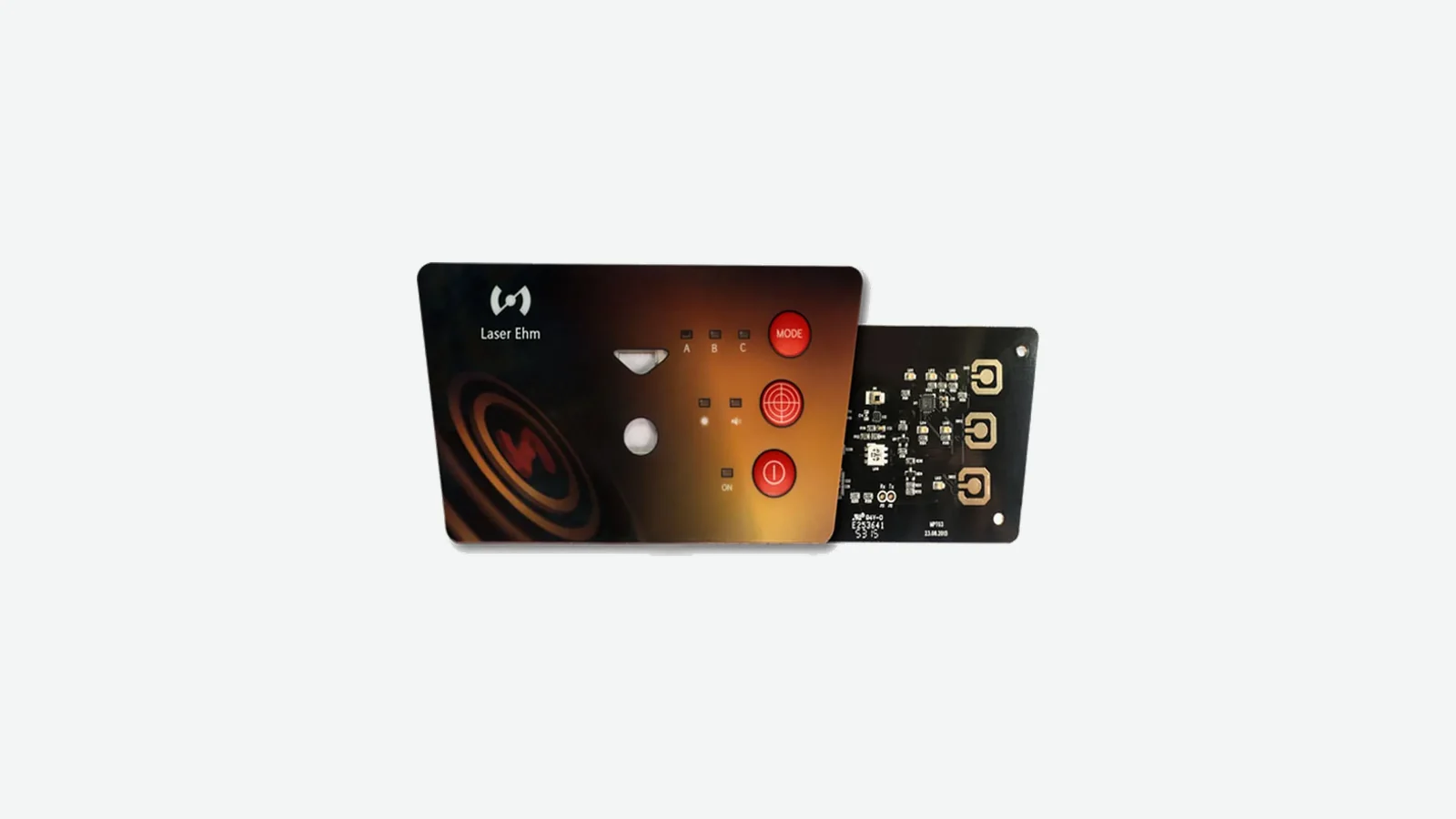
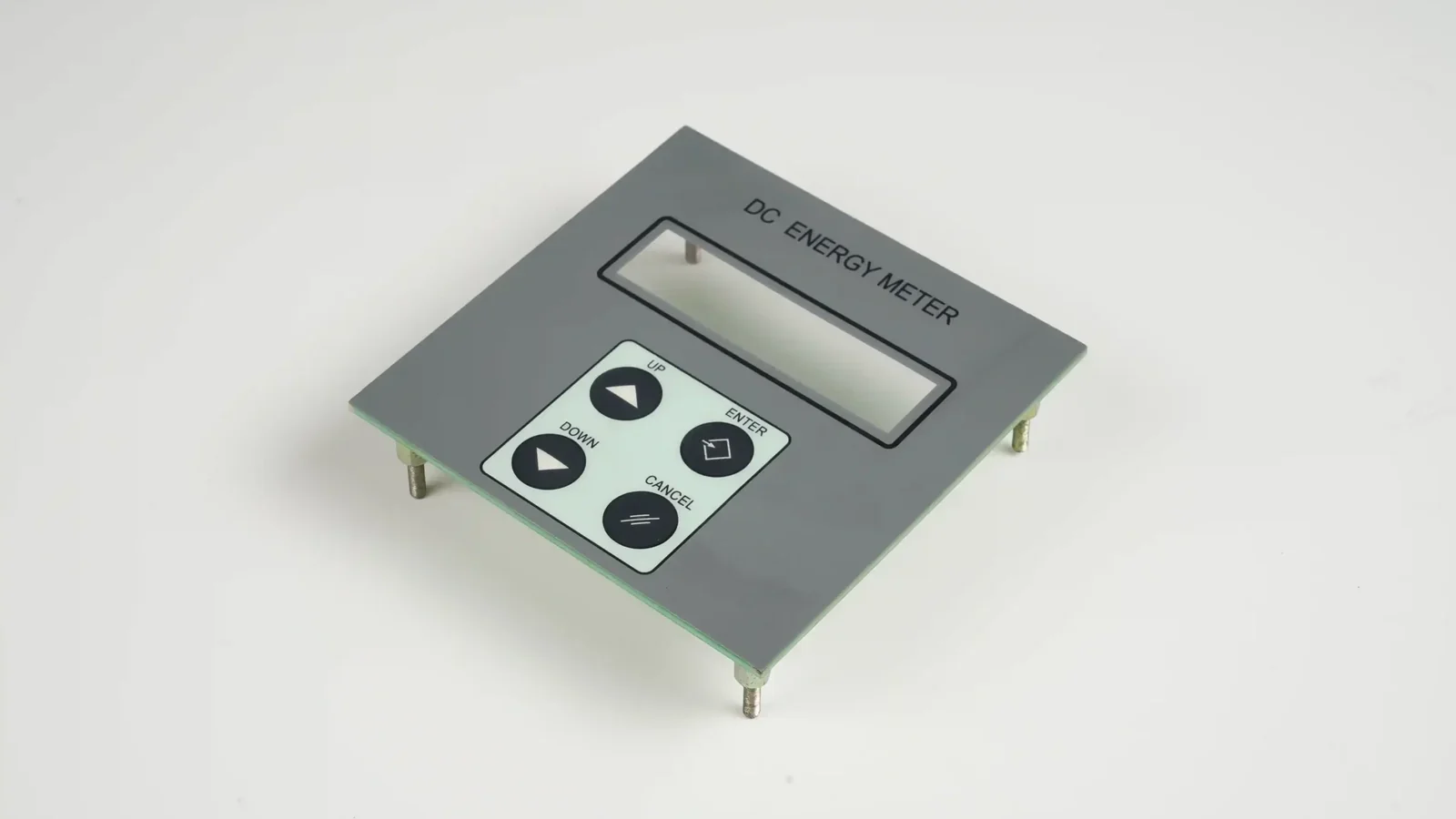
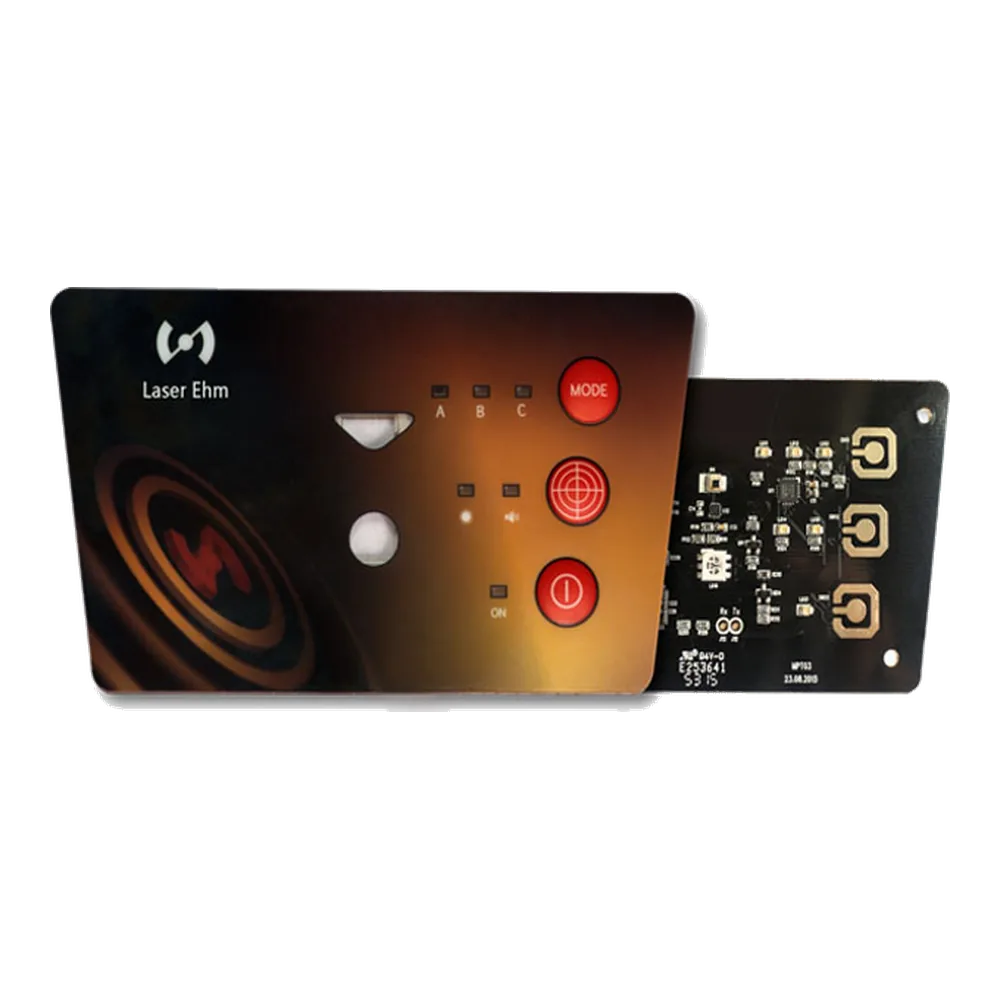
JASPER builds the physical HMI panel assembly an operator sees, touches, presses, reads, cleans, and installs: graphic overlay or rigid front, membrane switch or capacitive touch layer, PCB/FPC, LEDs, display windows, connector tails, rear adhesive, gasket details, and final inspection as one matched operator interface assembly.
This is not PLC programming, SCADA software, HMI terminal firmware, an industrial PC, or an electrical control cabinet. It is the human-machine interface assembly that fits into your enclosure and connects to your electronics.
Six ways to specify the same HMI assembly project
This is one HMI Assembly page with no child product pages. Different input, display, lighting, circuit, and mounting choices become one operator-facing HMI front-panel assembly.
| HMI requirement | What JASPER builds into the HMI assembly | When to choose it |
|---|---|---|
| Tactile HMI key assembly | Sealed keys with tactile or non-tactile switching, LED windows, flexible tails, and connectorized input panels built into one HMI front panel. | Use when the operator needs a physical key feel, simple switch matrix behavior, or a thin sealed HMI panel. |
| Flat touch HMI assembly | No-travel touch surfaces with printed icons, display windows, PCB/FPC support, shielding, and final fit review as one HMI interface. | Use when the HMI front must wipe down as one continuous surface and feedback can come from light, audio, host logic, or haptics. |
| Printed HMI front panel assembly | The visible HMI surface: legends, windows, icons, dead-front areas, branding, adhesive, gasket, and enclosure fit. | Use when the interface depends on clear operator instructions, display alignment, warning marks, or brand graphics. |
| PCB/FPC HMI control assembly | High pin-count circuits, SMT LEDs, ZIF/FFC/header connectors, tail exits, and final functional checks integrated behind the HMI surface. | Use when the HMI panel needs circuit density, indicators, connectors, or a controlled pinout behind the front face. |
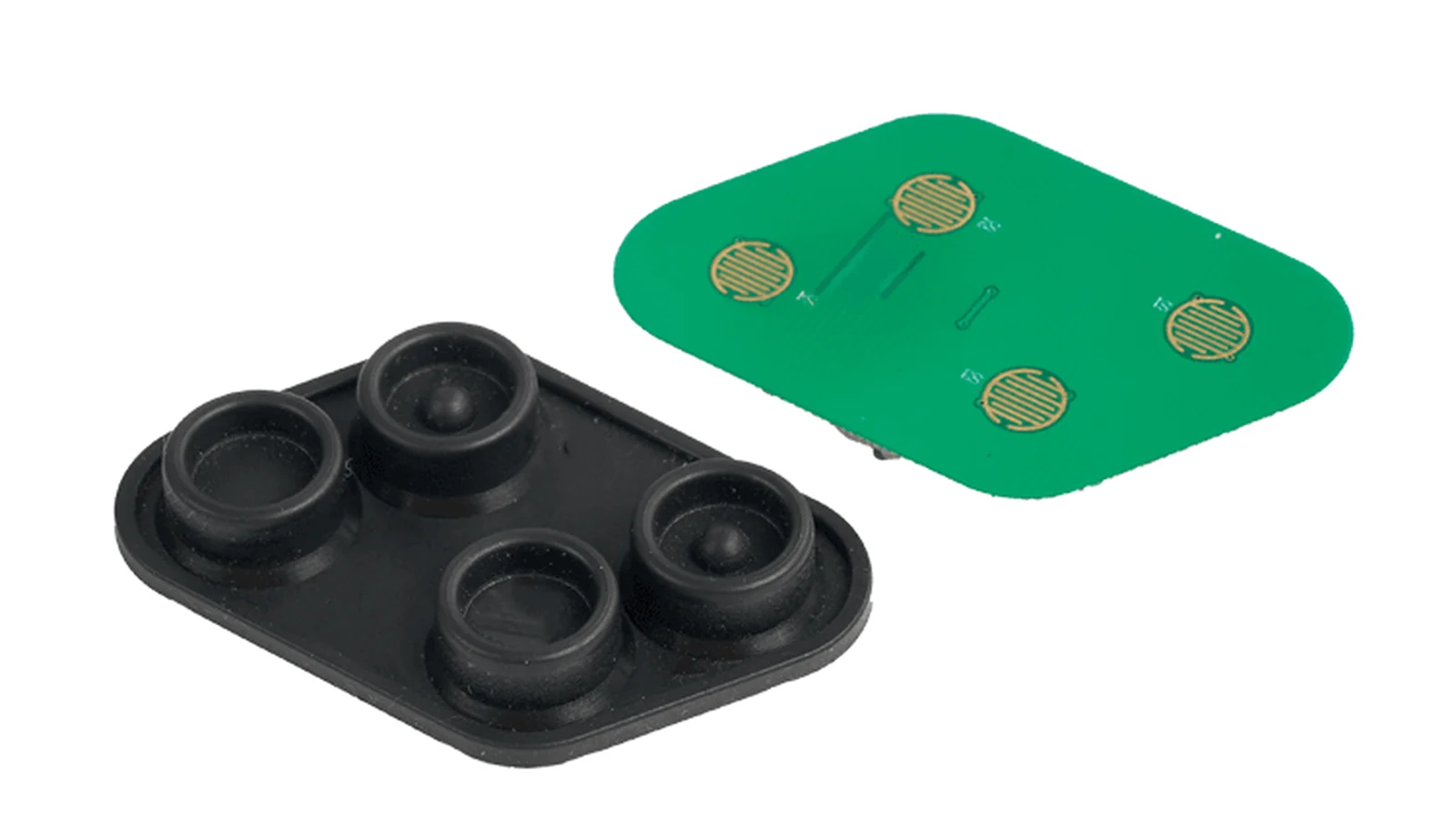
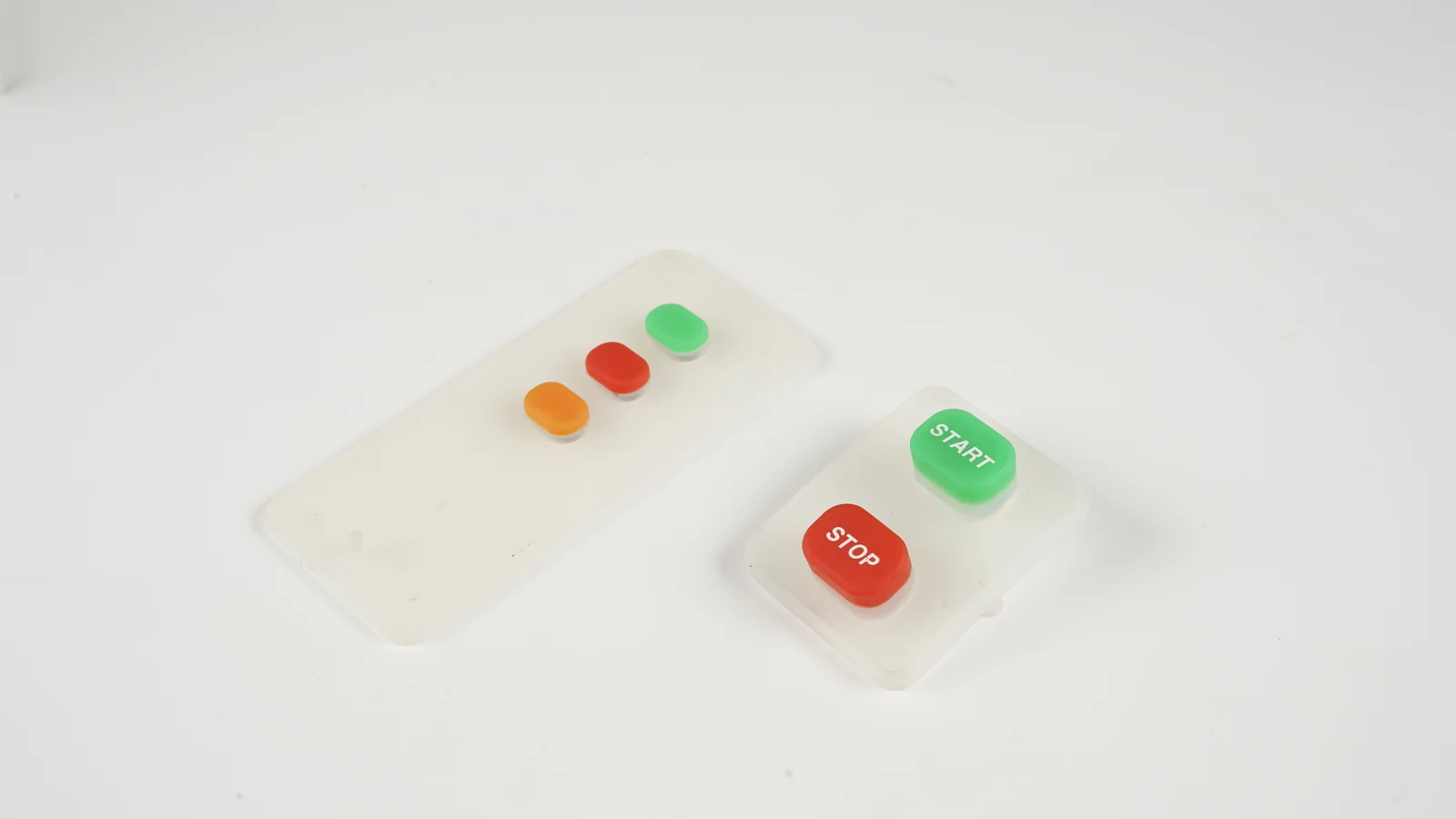
| Raised-key HMI assembly | Raised molded keys, longer travel, soft feel, carbon-pill contacts, PCB carriers, coating, and backlight options inside the HMI panel. | Use when finger location, travel, glove feedback, or molded key geometry matters more than a completely flat front surface. |
| Display, LED and connector HMI integration | Display windows, light guides, LED indicators, dead-front icons, connector tails, rear labels, and inspection points in the finished HMI assembly. | Use when the final part must arrive as an install-ready operator interface instead of loose front-panel pieces. |
An HMI assembly is the front-panel interface — not the PLC, software, or cabinet.
Buyers use HMI to mean many things: a touchscreen terminal, a PLC display, a software screen, or a complete cabinet. For JASPER, HMI assembly means the operator-facing physical interface: front surface, input layer, circuit, connector, mounting method, and inspection steps that make the panel ready for your equipment. Your controls team normally owns the PLC program, HMI runtime, cabinet wiring, SCADA software, safety logic, and complete equipment validation.
What is an HMI assembly?
An HMI assembly, or human-machine interface assembly, is a physical component that lets a person interact with a machine. It may include keys, icons, a display window, touch zones, indicator lights, printed instructions, a connector, and a rear mounting adhesive. It is designed around the equipment enclosure and the operator task, not just around the electronics.
A user interface panel manufacturer must review mechanical, graphic, electrical, and environmental requirements together. If the overlay artwork shifts, the LED window can miss the light source. If the tail exits on the wrong side, the installer may have to fold a circuit sharply. If the adhesive is selected without the enclosure material, the panel can lift at the corner after heat, humidity, or cleaning.
| Buyer term | What it means for OEM buyers | What to confirm before tooling |
|---|---|---|
| Custom HMI assembly | Complete OEM front-panel interface built to your drawing | Front surface, input method, circuit, connector, mounting, inspection |
| HMI panel assembly | A mounted or bonded operator panel with input and display features | Panel size, display window, key/touch layout, tail exit |
| Human-machine interface assembly | Formal term for the operator-facing physical interface | Use environment, operator input, electronics connection |
| Operator interface assembly | The part an operator sees and uses on the machine | Workflow, labels, feedback, glove use, cleaning |
| User interface panel manufacturer | Supplier that builds the physical UI panel | Artwork, material, adhesive, pinout, sample approval |
| Front panel assembly | The complete front face, not only a printed label | Surface, input layer, circuit, gasket, rear mounting |
| Control panel assembly | Only the front-panel control interface in this context | Not cabinet wiring, PLC integration, or UL508A panel listing |
HMI front-panel stack options
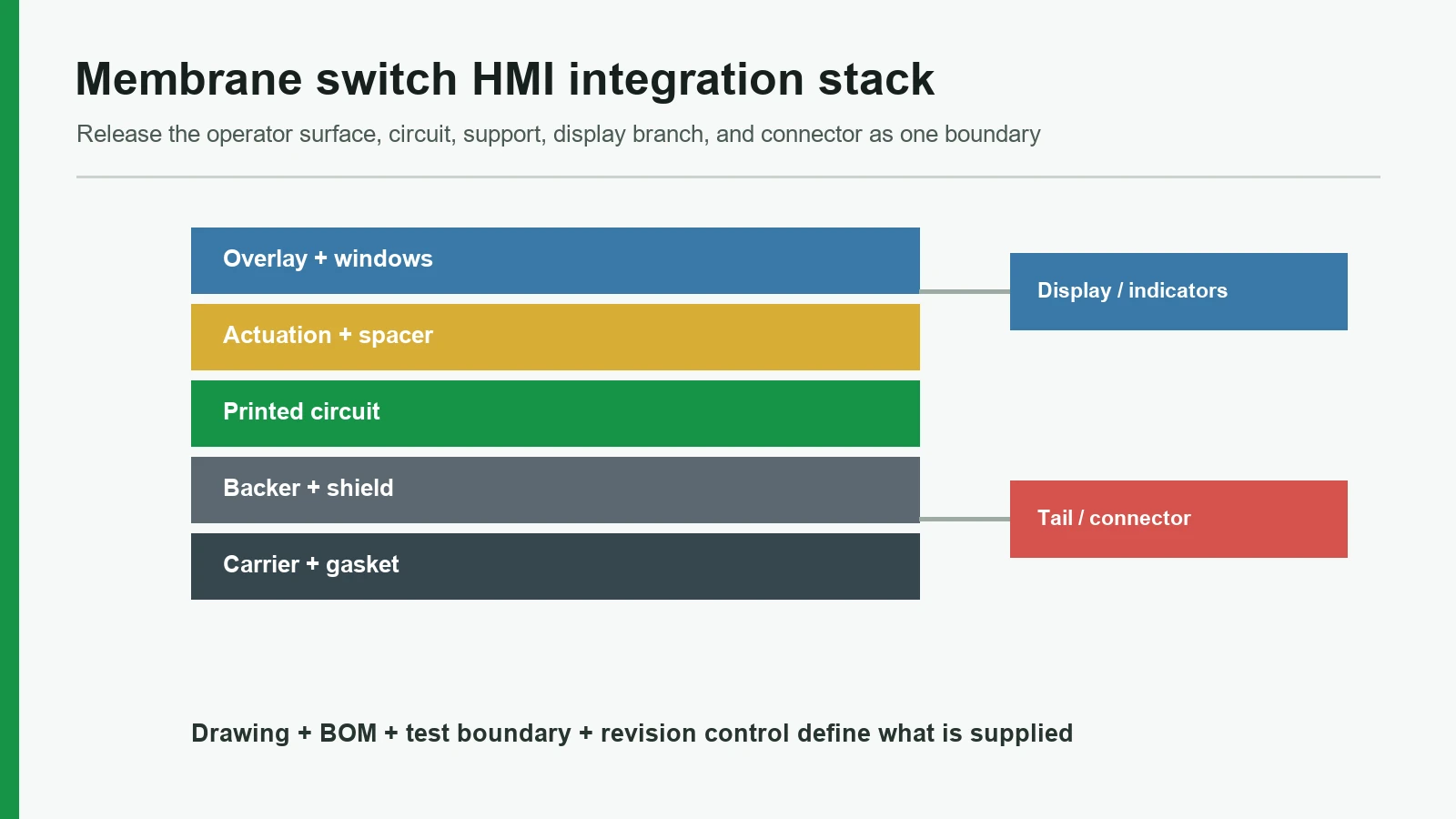
A reliable HMI front panel is a stack. Each layer has a job, and every layer affects the next one.
| Layer or module | Common options | Engineering decisions |
|---|---|---|
| Front surface | PET overlay, PC overlay, glass, acrylic, silicone rubber, metal nameplate | Abrasion, chemical exposure, impact, UV, tactile feel, premium appearance |
| Graphics and legends | Subsurface print, dead-front icons, safety markings, serial or rating labels | Pantone matching, icon hierarchy, language versions, display-window registration |
| Input layer | Membrane switch, tactile dome, non-tactile key, capacitive touch, silicone keypad | Tactile feedback, glove operation, no-travel touch, sealing, expected use |
| Circuit layer | Silver-ink PET circuit, FPC, PCB, rigid-flex, LED carrier | Trace density, pin count, SMT LEDs, connector type, bend area |
| Display and indicators | LCD/OLED/TFT window, light guide film, discrete LEDs, RGB indicators | Window alignment, light leak, dead-front effect, electrical routing |
| Mounting and seal | 3M rear adhesive, gasket, bezel pocket, screw or frame support | Surface energy, IP target, enclosure material, compression, service access |
| Final assembly | Connector, label, inspection, packaging | Continuity test, touch test, visual check, lot traceability, incoming inspection format |
A thin HMI panel may be less than a few millimeters thick and still include tactile keys, LEDs, a display window, a circuit layer, and a tail connector. A flat-touch HMI may look simpler outside, but the surface material, sensor geometry, shielding, window registration, and grounding can make the engineering review more demanding.
Choose the HMI assembly route by operator input method
If you already know the input method, the sourcing path is usually clear. If not, start from the operator task.
| If the HMI project needs… | HMI assembly route | Typical JASPER build |
|---|---|---|
| Sealed buttons with tactile or non-tactile feedback | Tactile-key HMI assembly | Printed HMI front surface, dome or spacer layer, circuit layer, tail, connector, adhesive, and inspection as one assembly |
| A flat no-travel touch surface | Flat-touch HMI assembly | Printed HMI surface, touch-sensing layer, PCB/FPC support, display window, shield or ground strategy, connector, and final functional check |
| Raised molded keys or strong finger location | Raised-key HMI assembly | Molded key area, contact interface, PCB carrier, coating or marking, backlight review, and enclosure fit |
| Printed legends, windows, and brand surface | Printed-front HMI assembly | PET, PC, glass, acrylic, or metal front surface with subsurface printing, display windows, adhesive, and mounting details |
| High connector density or LED integration | Circuit-integrated HMI assembly | Front surface plus PCB/FPC, SMT LEDs, ZIF/FFC/header connector, pinout control, and functional test |
| A complete interface that arrives ready to install | Custom HMI assembly | Front surface, input method, circuit, connector, rear mounting, gasket details, inspection, labeling, and packaging |
What JASPER integrates — and what stays with your system team
The best HMI assembly projects have a clear boundary between the physical interface and the control system. We can reduce the number of parts you manage, but we should not blur responsibilities that belong to your electronics, software, or compliance team.
| JASPER can build into the HMI front panel | Usually supplied, programmed, or validated by your team |
|---|---|
| Graphic overlay, nameplate, glass, acrylic, or silicone front | PLC program, HMI runtime, SCADA screen, or machine software |
| Membrane switch, capacitive sensor, or rubber keypad input | Control logic, safety logic, and system response |
| PCB/FPC circuit layer, tail, connector, pinout to drawing | Host controller, firmware, and electrical architecture |
| LED indicators, light-guide films, display windows, dead-front icons | Display module selection, UI screen design, data content |
| Rear adhesive, gasket, bezel fit, mounting support | Enclosure-level IP validation unless the full assembly is tested together |
| Functional inspection, continuity checks, visual checks, packaging | Cabinet wiring, UL508A panel listing, final machine compliance |
What we need to quote a custom HMI panel assembly
A rough sketch is enough for an early conversation. For a controlled quote and sample build, the following inputs help us make the right engineering calls.
| Input needed | Examples | Why it matters |
|---|---|---|
| Panel drawing | DXF, STEP, PDF, enclosure cutout, sample photo | Defines size, mounting, window, tail exit, and fit |
| Artwork | AI, PDF, Pantone list, icon list, language versions | Controls print layers, dead-front areas, and operator hierarchy |
| Input method | Tactile dome, non-tactile key, capacitive touch, silicone rubber keypad | Determines stack height, feel, circuit, and tooling |
| Display or window data | LCD/OLED/TFT active area, lens size, dead-front requirement | Controls window registration and light shielding |
| Electrical interface | Matrix, pinout, voltage, connector family, tail length | Defines PCB/FPC route and final test |
| Environment | Indoor, outdoor, cleaning chemicals, UV, humidity, temperature | Drives material, coating, adhesive, and gasket choices |
| Mechanical mounting | Adhesive, screws, bezel, gasket, sub-panel, curved surface | Prevents lift, misfit, and assembly stress |
| Compliance needs | RoHS, REACH, UL 94 material need, IP target, customer standard | Filters material choices before sampling |
| Volume and sampling | Prototype, pilot, production forecast | Controls tooling, fixtures, and inspection plan |
| Documentation | Drawing, BOM, inspection criteria, sample report, lot label | Helps purchasing and engineering approve the part |
From drawing to tested operator interface assembly
A custom HMI assembly should not move straight from artwork to mass production. The route below keeps the high-risk decisions visible.
| Step | What we review | Output |
|---|---|---|
| 1. Enclosure and operator task | Panel size, mounting surface, operator workflow, cleaning exposure, display/window needs | Feasibility questions and route recommendation |
| 2. Interface route | Membrane switch, capacitive touch, silicone keypad, graphic overlay, or hybrid assembly | Confirmed stack direction |
| 3. Stack definition | Front surface, print layers, input layer, circuit, connector, adhesive, gasket | Draft drawing and quote basis |
| 4. Prototype assembly | Fit, feel, window alignment, connector reach, installation review | Samples for engineering approval |
| 5. Feedback before tooling lock | Key force, touch response, light leak, artwork visibility, tail route, adhesive fit | Revision list before production |
| 6. Production drawing and inspection | Dimensions, pinout, material, test, packaging, labels | Controlled build specification |
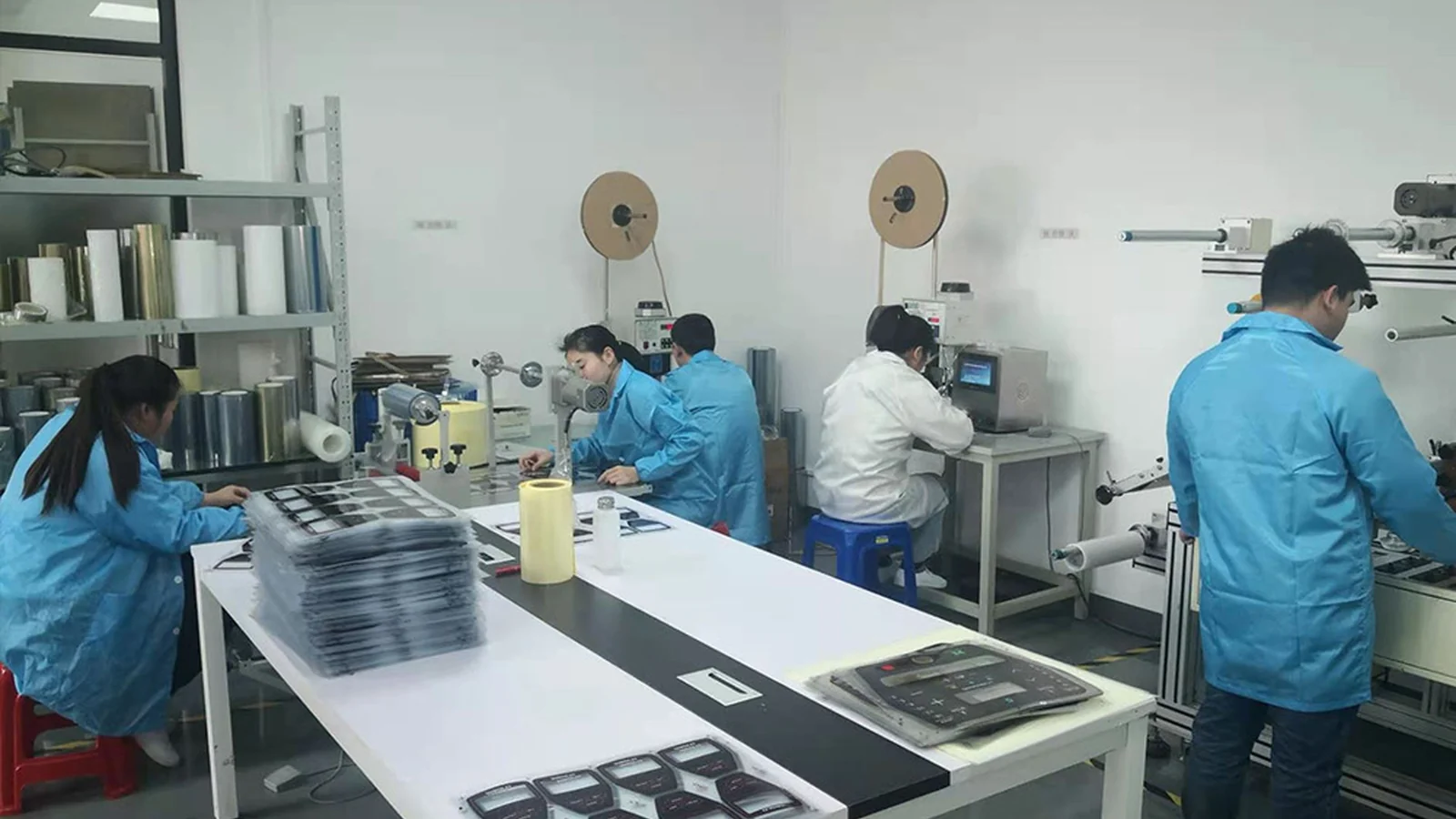
| 7. Production | Manufacturing, inspection, packing, shipment | Install-ready HMI front-panel assembly |
Applications for OEM HMI panel assemblies
HMI assembly projects appear wherever the interface needs to be sealed, readable, durable, and matched to an enclosure.
| Application | Typical interface need | Design concerns |
|---|---|---|
| Industrial equipment operator panels | Keys, indicators, display windows, durable legends | Glove use, oil, dust, tail route, service access |
| Medical and diagnostic instruments | Wipeable front panels and controlled materials | Cleaning chemicals, labels, windows, inspection documentation |
| Laboratory and analytical equipment | Compact displays, status LEDs, high-density connectors | Window alignment, EMI, connector pitch, clear labeling |
| Food and beverage equipment | Washdown-ready operator interfaces | Sealing, adhesive, cleaning exposure, edge protection |
| Marine and outdoor controls | UV, humidity, salt, sealed front surfaces | UV-stable print, gasket, corrosion-resistant choices |
| Building automation and access control | Long-life user panels with indicators and labels | Durable legends, enclosure fit, moderate actuation count |
| Transportation and mobility equipment | Vehicle-mounted operator controls and access panels | Vibration, light, glove use, connector retention |
| Power, energy, and monitoring equipment | Warning labels, indicator windows, control inputs | Safety markings, display windows, compliance documents |
Inspection points for HMI front panel assembly
A finished HMI front panel must look correct and connect correctly. Depending on the stack, inspection may include the checks below.
| Inspection point | What we check | Why it matters |
|---|---|---|
| Artwork and color | Approved file, Pantone, icon placement, text legibility | Prevents operator confusion and brand mismatch |
| Surface quality | Scratches, dust, bubbles, contamination, edge finish | Controls visible quality before bonding |
| Display windows | Window registration, black mask, clear aperture, light blocking | Keeps the display readable and aligned |
| LED and dead-front areas | Light leak, icon visibility, LED position | Prevents halo, uneven light, or hidden status cues |
| Input function | Key force, continuity, touch response, rubber travel | Confirms the operator input works before shipment |
| Electrical interface | Connector model, pinout, tail length, strain area | Prevents assembly-line wiring problems |
| Mounting details | Adhesive liner, gasket, holes, rear labels | Supports installation and incoming inspection |
| Packaging and traceability | Part number, lot label, protective film, packing method | Protects the front surface and supports quality records |
HMI Assembly questions OEM buyers ask
What is a custom HMI assembly?
A custom HMI assembly is a physical human-machine interface front panel built for a specific OEM product. It can include a printed overlay or rigid front, membrane switch or capacitive touch input, PCB/FPC circuit, LEDs, display windows, connector tail, adhesive, gasket, and inspection as one operator-facing assembly.
Is an HMI panel assembly the same as an HMI touch screen?
Not always. An HMI touch screen usually means a display terminal or electronic screen module. For JASPER, an HMI panel assembly means the physical front-panel interface. It may include capacitive touch and a display window, but JASPER is not claiming to supply the PLC, HMI runtime software, SCADA system, or industrial PC.
What is included in a front panel assembly?
A front panel assembly can include the visible front surface, printed legends, dead-front icons, display windows, switch or touch input layer, PCB/FPC circuit, LEDs, connector, adhesive, gasket, and rear mounting features. The exact stack depends on the drawing and operating environment.
Can a membrane switch assembly be part of an HMI front panel?
Yes. Many HMI front panels use a membrane switch assembly as the input layer. That route is useful when the equipment needs sealed keys, tactile domes, non-tactile keys, LED indicators, a display window, and a flexible tail connector behind one printed surface.
Can a capacitive touch interface assembly replace membrane keys?
Sometimes. A capacitive touch interface assembly works well when the product needs a flat sealed surface with no key travel. A membrane switch is still better when operators need a clear tactile click, heavy glove feedback, or a simpler electrical interface. The right choice depends on the operator, environment, overlay thickness, display window, and host electronics.
Can silicone rubber keypads be integrated into an HMI assembly?
Yes. A silicone rubber keypad can be used when the interface needs raised molded keys, longer travel, softer feel, or strong finger location. It usually adds more height than a membrane keypad, so enclosure depth, PCB support, coating, legends, and backlighting should be reviewed before tooling.
Does JASPER provide PLC programming or HMI software?
No. JASPER focuses on the physical HMI front-panel assembly. We can manufacture the overlay, switch or touch layer, PCB/FPC, LEDs, connector, adhesive, gasket, and tested assembly. PLC programming, SCADA software, HMI runtime, cabinet wiring, and system-level validation normally stay with the OEM or system integrator.
What information is needed to quote a custom HMI assembly?
Send the panel drawing, artwork, input method, display or window details, electrical interface, connector requirement, mounting method, operating environment, compliance needs, and estimated volume. If the design is early, send a sketch or sample photo and we will identify the missing decisions before quoting.
Need a custom HMI assembly for your OEM front panel?
Send the drawing, artwork, connector requirement, and operating environment. We will review the HMI stack, confirm the operator-interface assembly route, and flag the decisions that should be settled before tooling.
Request an HMI Assembly Quote